KX100
Section 2
6
Getting Started
9 .
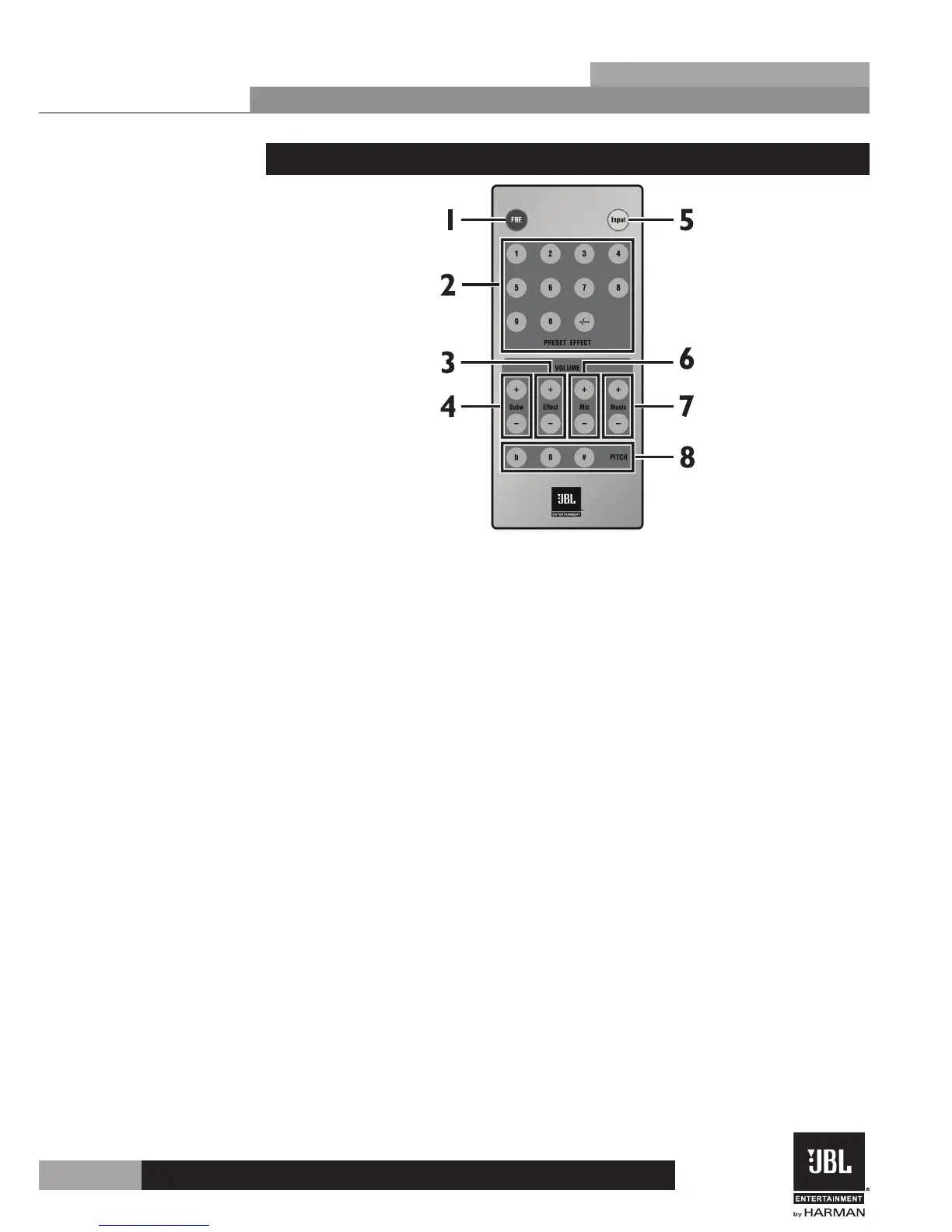
2.4 Remote Control
1 . FBE
This button will turn the FBE (Feedback Elimination) on and off.
2 . PRESET EFFECT
These buttons allow you to select and load a preset.
3 . Effect
This will adjust the effect volume up and down.
4 . Subw
This pair of buttons will adjust the subwoofer volume up and down.
5 . Input
This button will cycle through all inputs allowing you to select the input source.
6 . MIC
This pair of buttons will adjust the microphone volume up and down.
7 . MUSIC
This pair of buttons will adjust the music volume up and down.
8 . PITCH
This set of buttons will adjust the pitch of the music up and down.
♭ (Flat) – Use this button to lower the pitch of the music.
0 (Normal) – Use this button to set the pitch of the music back to normal.
♯ (Sharp) – Use this button to raise the pitch of the music.


 To Next Page