KX100
Section 2
7
Getting Started
2.5 Programming an External Remote
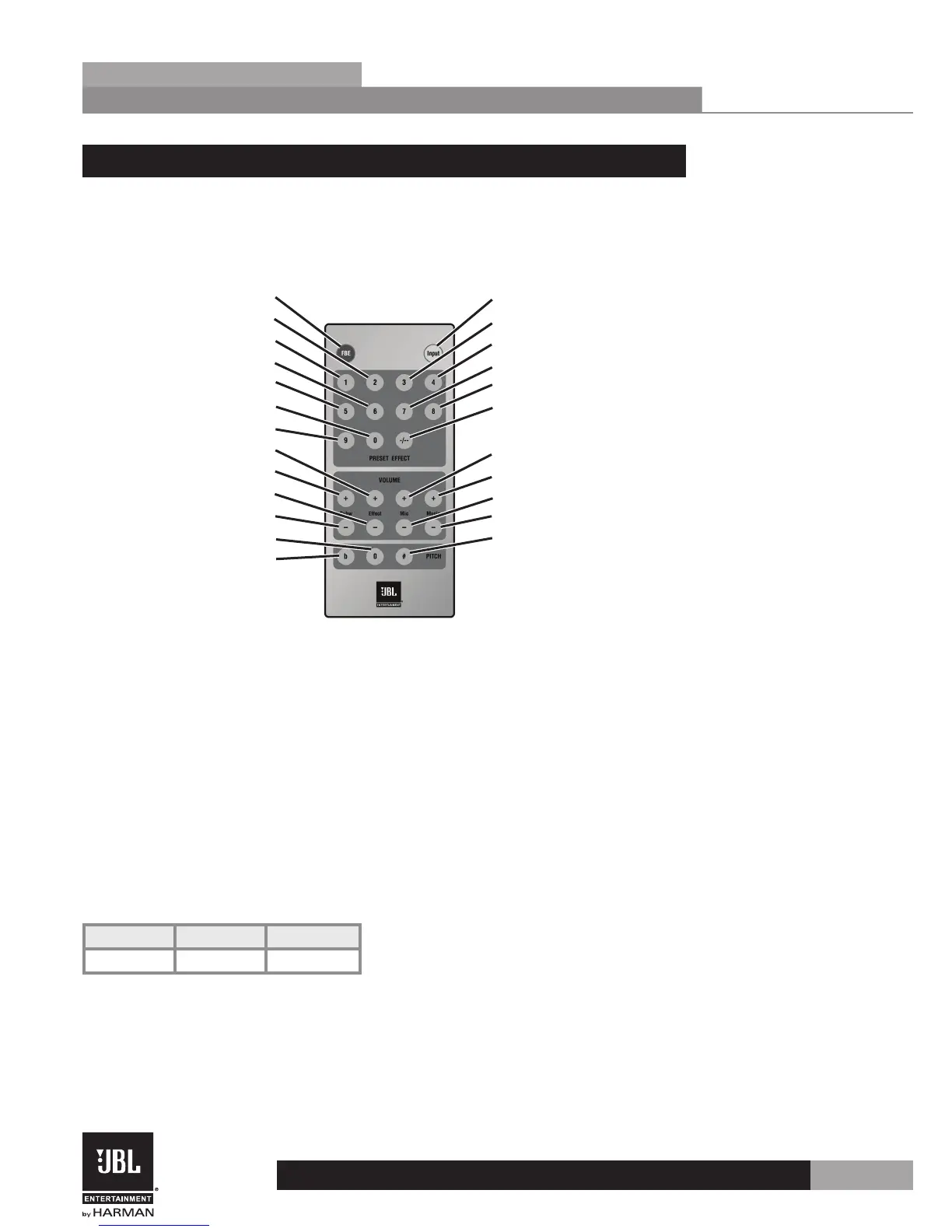
Below are the function codes of the included IR Remote Control to use for reference when
programming a third party (external) remote control. If using an external remote control,
which is not programmable, the Software GUI can be used to change the function codes of
each button to match your external remote.
AC
8C
9C
1C
44
84
8A
0A
AA
2A
66
46
6C
EC
5C
04
C4
4A
CA
06
86
56
User Code 9F
When the USB port on the KX100 is connected to a PC, the Remote and External Remote
interfaces will be disabled. The External Remote interface module will have to remove the 38
kHz carrier frequency and allow the coded signal to be sent to the External Remote interface
jack.
The code of the remote controller is based on the below reading method.
Example:
Button D4 Binary Code
FBE 0x1C 1100 0001
• 0001 regarding as hex 1. It’s read from LSB to MSB.
• 1100 regarding as hex C. It’s read from LSB to MSB.


 To Next Page