KX100
Section 2
4
Getting Started
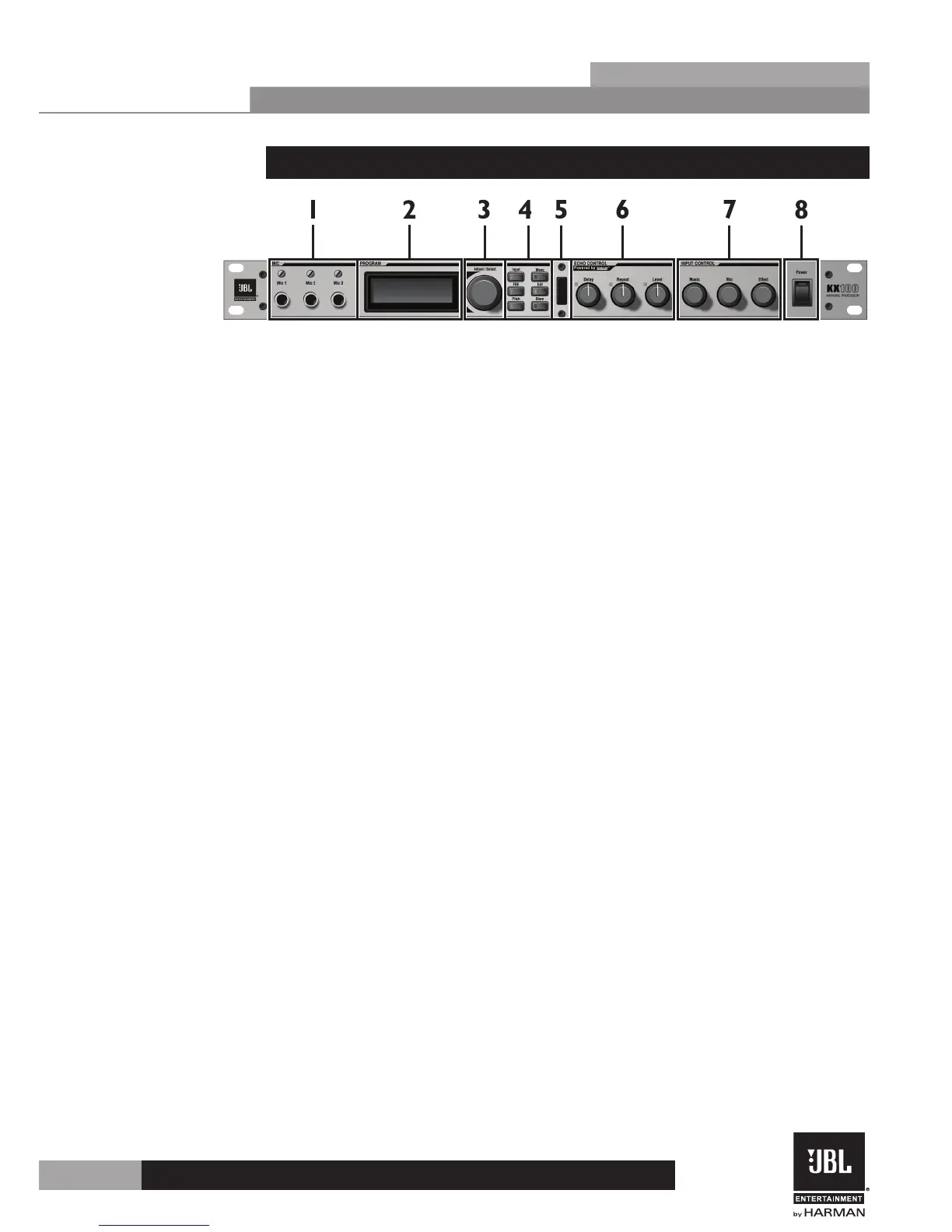
2.2 Front Panel
1 . 1/4” Microphone Inputs
Use these microphone inputs when connecting microphones via a 1/4” connection.
Separate gain trim controls are provided above each input.
Note: The Mic 1 and Mic 2 inputs on the front panel are paralleled with the Mic 1
and Mic 2 inputs on the rear panel. Therefore, you should not use both Mic 1 inputs
or Mic 2 inputs simultaneously. Since the Mic 3 input is not paralleled to any other
inputs, it is safe to use it with any combination of the Mic 1 and Mic 2 inputs (front
or rear).
2 . Display
This LCD display shows which menu you have navigated to and which parameters are
available for editing.
3 . Adjust/Select Knob
This dual function encoder allows you to load presets, navigate within menus, and
edit processing parameters.
4 . Navigation Buttons
These buttons allow you to navigate through the different menus within the KX100.
Here’s a brief description of these buttons:
• INPUT – Enters the Audio/Video Input Menu.
• FBE – Enables/disables FBE (Feedback Elimination).
• PITCH – Enters the Pitch Menu for altering the pitch of the music source.
• MENU – Enters the Main Menu.
• EXIT – A short press will navigate up one level within the current menu. If pressed and held
for 2 seconds, this button will completely exit the current menu and return you to the home
screen.
• STORE – This button is used to initiate the storing of a preset.
5 . Infrared Receiver
This receiver receives commands from the included IR Remote Control.
6 . Echo Controls
These knobs allow quick access for adjusting the three most important parameters
within the Echo effect. These LEDs will light when the parameter is modified, then
set back to the stored parameter value, allowing you to use them as stored parameter
value indicators.
7 . Input Control Mixer
These knobs allow quick access for adjusting the mix between the music level, overall
mic level, and echo/reverb effect level.
8 . Power Switch
Use this switch to turn the power of the KX100 on and off.


 To Next Page