KX100
Section 2
8
Getting Started
2.6 Menus & Navigation
This section will walk you through the different menus within the KX100 and how to navigate
the device.
The Display
The Display allows you to access the different menus, so you can edit the various parameters.
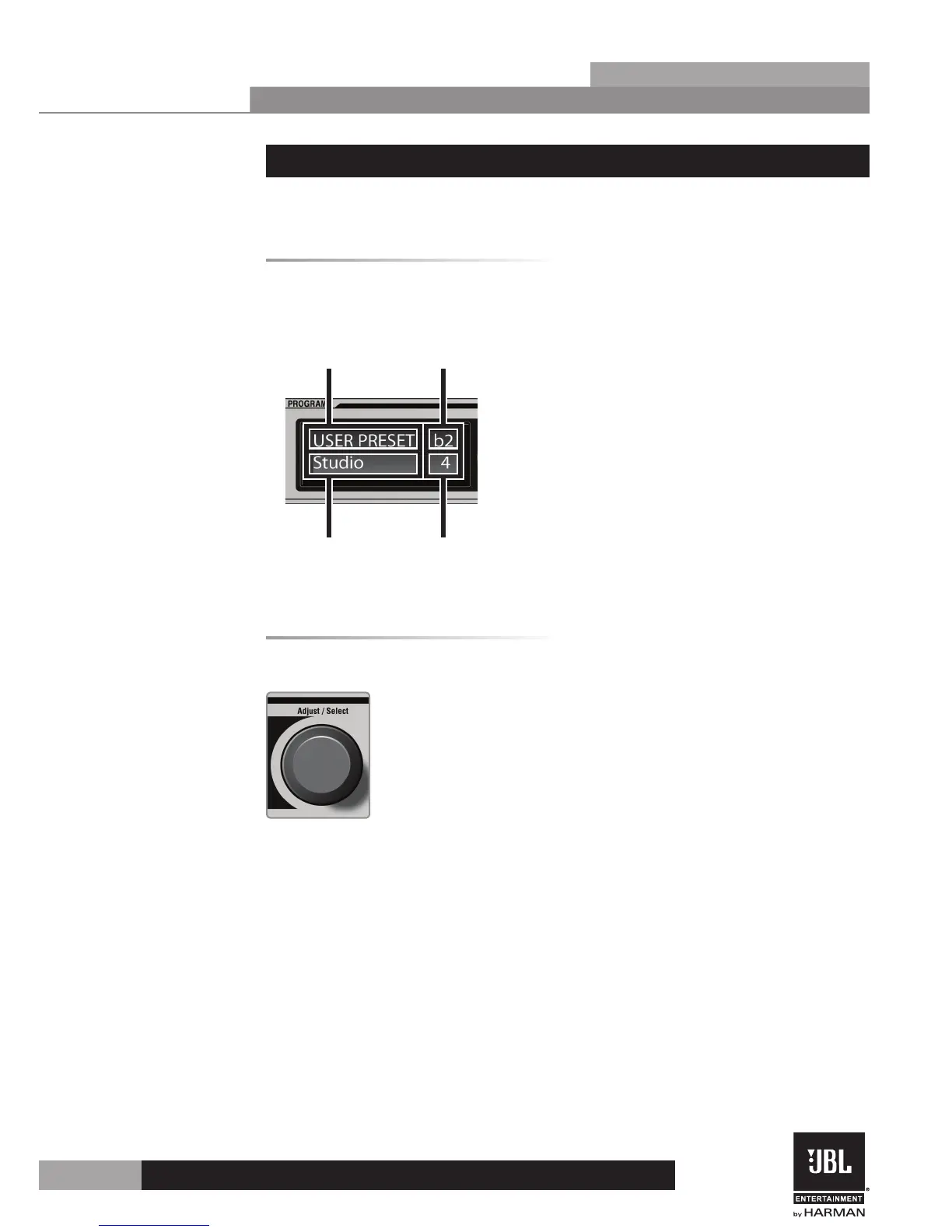
The home screen (viewed after the KX100 initially boots) displays the currently loaded preset
name and number, preset type (User or Factory), and currently set music pitch setting.
Preset Type
(User or Factory)
Preset
Name
Preset
Number
Music Pitch
Setting
The Adjust/Select Knob
The Adjust/Select knob allows you to adjust parameter values (turn) and select menus
(press).
• Loading Presets
1. From the home screen, turning the Adjust/Select knob will cycle through the
30 User Presets (1-30), and then through the 30 Factory Presets (31-60).
2. Once you have selected the preset you would like to load, pressing the Adjust/
Select knob will load the preset.
• Editing Parameters
1. When navigating through menus, pressing the Adjust/Select knob will allow
you to select a parameter within the currently active page.
2. By then turning this Adjust/Select knob, the selected parameter can be edited.


 To Next Page