MULTIMEDIA 221
Call Controls
The touchscreen allows you to control the
following call features:
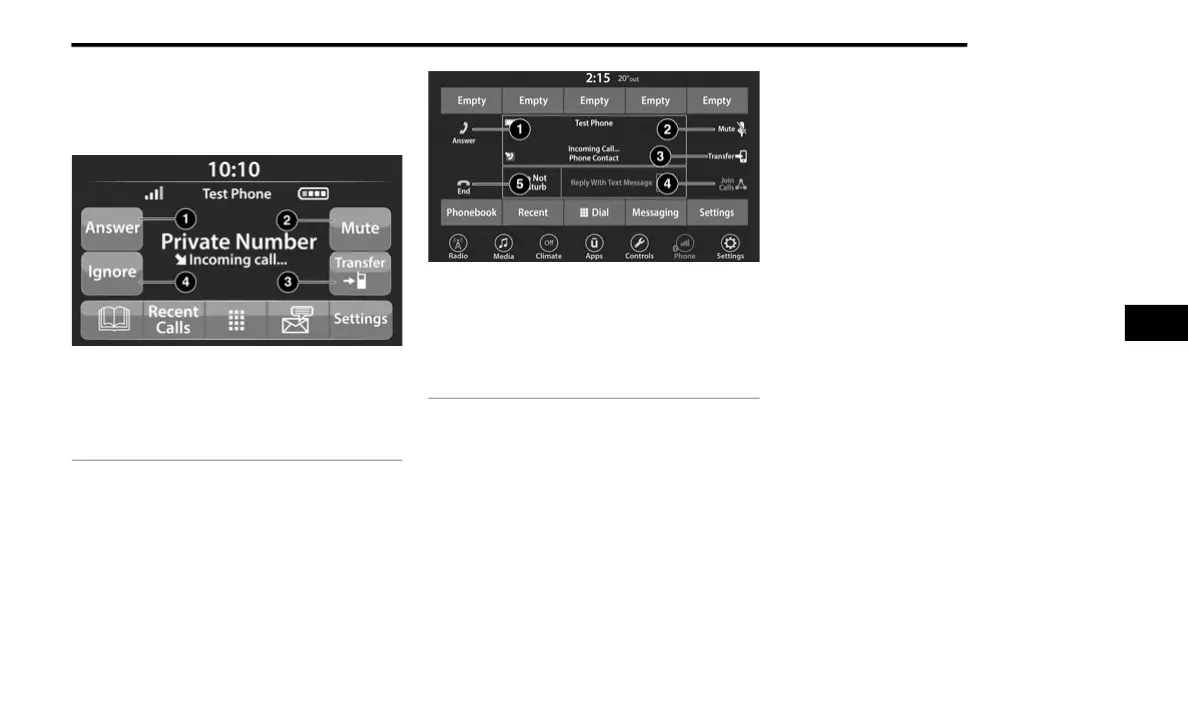
Uconnect 3 With 5-inch Display
Uconnect 4 With 7-inch Display
Other phone call features include:
End Call
Hold/Unhold/Resume
Swap two active calls
Key Pad Number Entry
1. Press the Phone button.
2. Press the Dial/Keypad button on the
touchscreen.
3. The Touch-Tone screen will be displayed.
4. Use the numbered buttons on the
touchscreens to enter the number and
press Dial/Call.
Recent Calls — If Equipped
You may browse a list of the most recent of each
of the following call types:
All Calls
Incoming Calls or Calls Received
Outgoing Calls or Calls Made
Missed Calls
These can be accessed by pressing the Recent
Calls button on the phone main screen.
You can also push the VR button on your steering
wheel and perform the above operation.
For example, say “Show my incoming calls”.
1 — Answer
2 — Mute/Unmute
3 — Transfer
4 — Ignore
1 — Answer
2 — Mute/Unmute
3 — Transfer
4 — Join Calls
5 — End
5
21_KL_OM_EN_USC_t.book Page 221














 To Next Page