234 MULTIMEDIA
Features And Packages
After the trial period, you must purchase a
subscription to continue your services by calling
a SiriusXM Guardian™ Customer Care agent.
GETTING STARTED WITH CONNECTED
V
EHICLE SERVICES
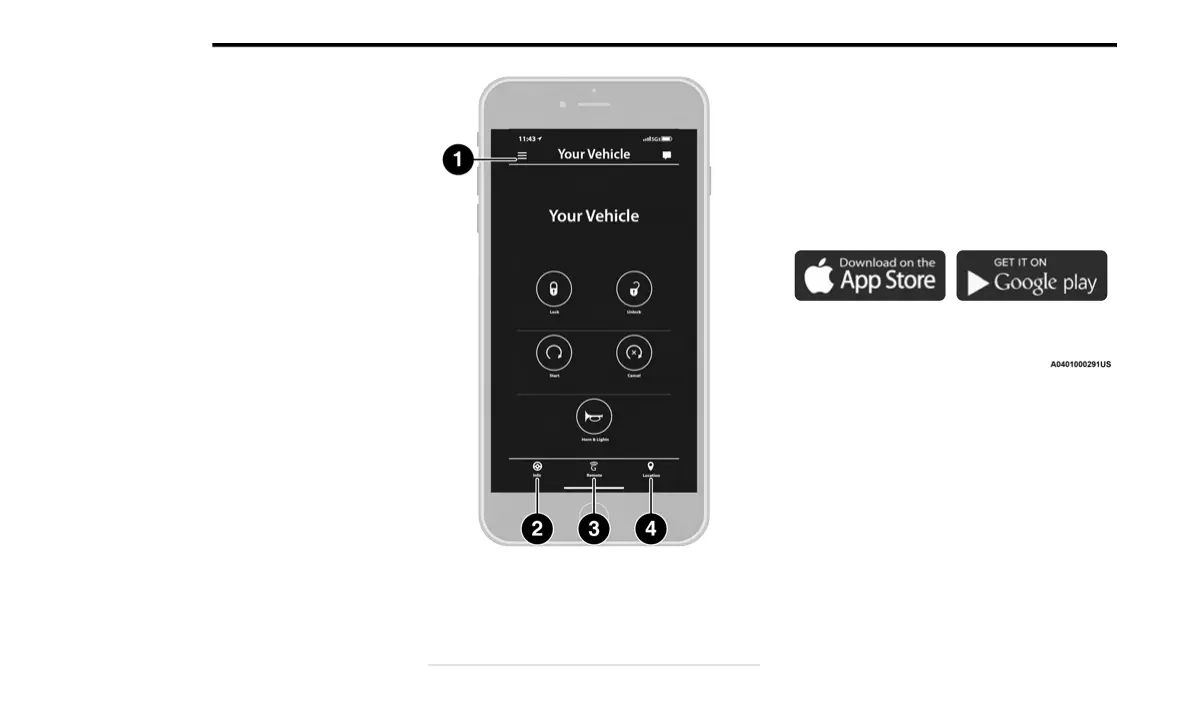
Download The Uconnect App
Once you have activated your services, you’re
only a few steps away from using connected
services.
Uconnect Mobile App
Download the Uconnect app to your mobile
device.
Use your Owner Account login and password
to open the app and then set up a PIN.
For customers in the United States, visit
https://www.mopar.com/en-us.html, and
click the Sign In/Register button in the upper
right hand corner to register your account
online.
a. Click the Register button
b. Select the correct country and email
address then click “Register”.
c. You will then receive an email notification
to confirm/verify your newly created
account.
1 — Settings
2 — Vehicle Info
3 — Remote Commands
4 — Location And Send & Go
21_KL_OM_EN_USC_t.book Page 234










 To Next Page