Tuner
User
Interface
-.-t1-I-+--+-f----l
12
--'H~____I-----l--l-_____i
13
yyCP
~
I
~!--------~_~-------+-------
01
:02
PM
87.5 MHz
90.1
MHz
7
98.1
MHz
102.9 MHz
106.1 MHz
107.9 MHz
~=============~
~~--+~
9
I
I
f;:\.
6 >
> /
~./
I '
~
5
i,IIp1
I i P2
I I
P3
~
I
P5
I P6
1.
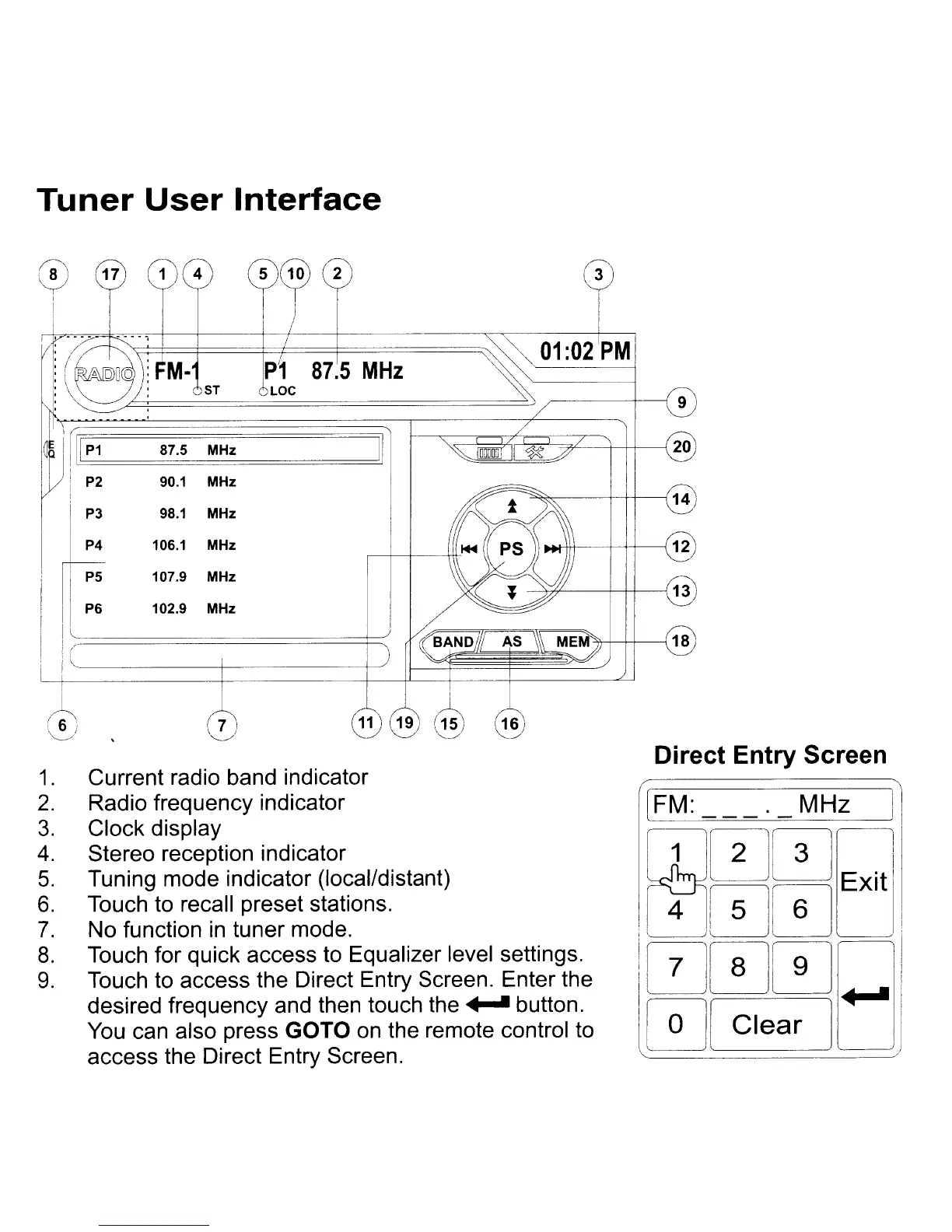
Current radio band indicator
2.
Radio frequency indicator
3.
Clock display
4.
Stereo reception indicator
5.
Tuning mode indicator (local/distant)
6.
Touch
to
recall preset stations.
7.
No function
in
tuner mode.
8.
Touch for quick access to Equalizer level settings.
9.
Touch
to
access the Direct Entry Screen. Enter the
desired frequency and then touch the
....
button.
You
can also press GOTO
on
the remote control to
access the Direct Entry Screen.
Direct Entry Screen
[FM:
. _
MHz]
112lGln
~-':JLJIEXit
I
! 4
lSl61l
..
!GlI8li9l
I
It
J~LJ",1
[~]
Clear]
IJ



 To Next Page