CD/DVD
Audio
Operation
I
(j) @
The
VM9213 will play
music
or
other audio
files from the following
disc media:
• CD-DA
• CD-R/RW
• DVD
• DVD+R/RW
• DVD-R/RW
CD-R and CD-RW will
not play unless the
recording session is
finalized.
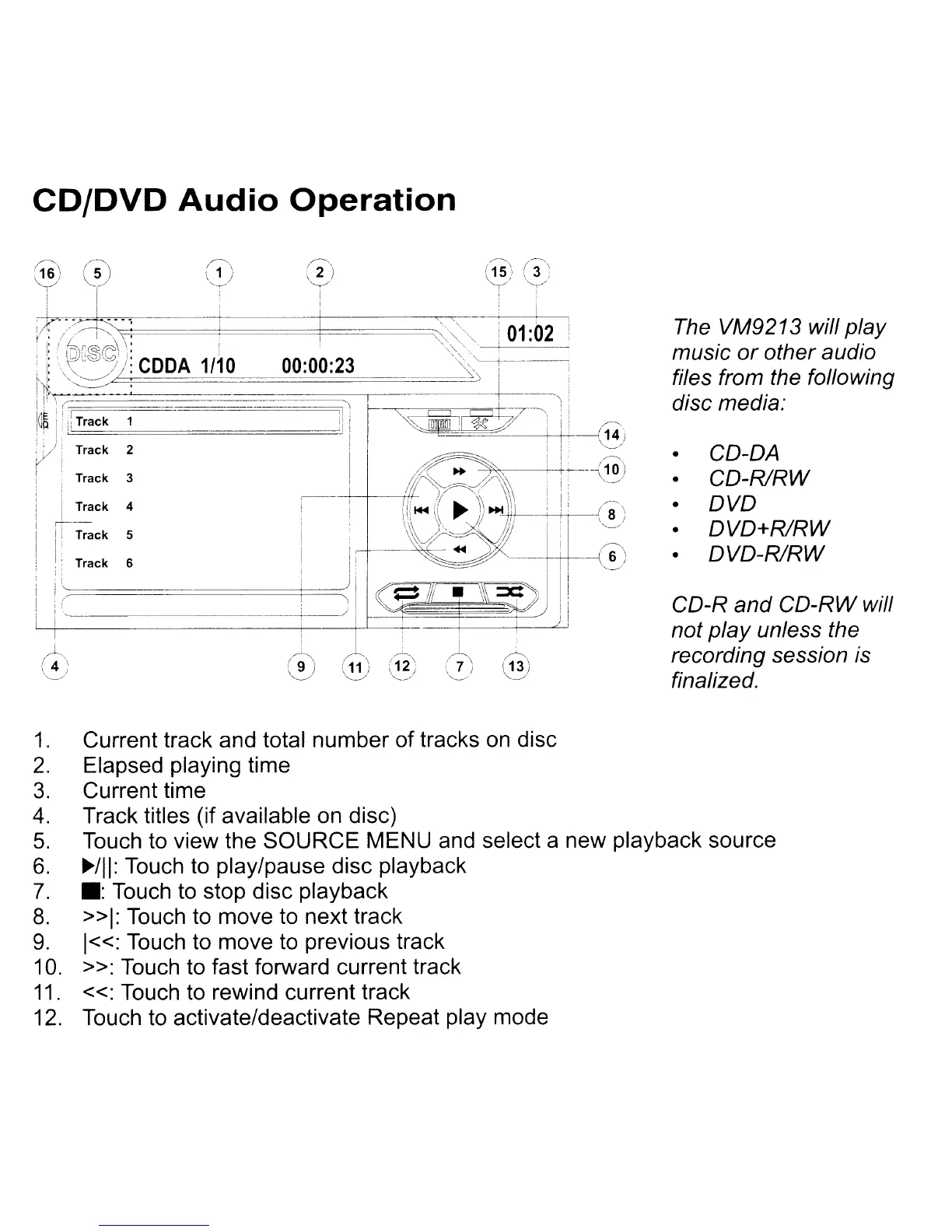
1.
Current track and total number of tracks
on
disc
2.
Elapsed playing time
3.
Current time
4.
Track titles (if available on disc)
5.
Touch to view the SOURCE MENU and select a new playback source
6.
~/II:
Touch to play/pause disc playback
7.
.:
Touch
to
stop disc playback
8.
»1:
Touch
to
move to next track
9.
1«:
Touch to move
to
previous track
10.
»:
Touch to fast forward current track
11.
«:
Touch to rewind current track
12.
Touch to activate/deactivate Repeat play mode



 To Next Page