Optional
Equipment
• NAV102: Before accessing any navigation features, you must purchase and install the navigation
module
(NAV1
02). All installation and operating instructions will be included with the navigation
module.
• BTM10: Before you can connect to a Bluetooth enabled device, you must purchase and install the
Jensen BTM10.
• Rear Camera: Before accessing any camera features, you must purchase and install a rear
video camera.
Disconnecting
the
Battery
To
prevent a short circuit,
be
sure to turn off the ignition and remove the negative (-) battery cable
prior to installation.
NOTE:
If
the VM9213
is
to be
installed
in
a
car
equipped
with
an
on-board
drive
or
navigation
computer,
do
not
disconnect
the
battery
cable.
If
the
cable
is
disconnected, the
computer
memory
may
be lost.
Under
these
conditions,
use extra
caution
during
installation
to
avoid
causing
a
short
circuit.
Pre-installation
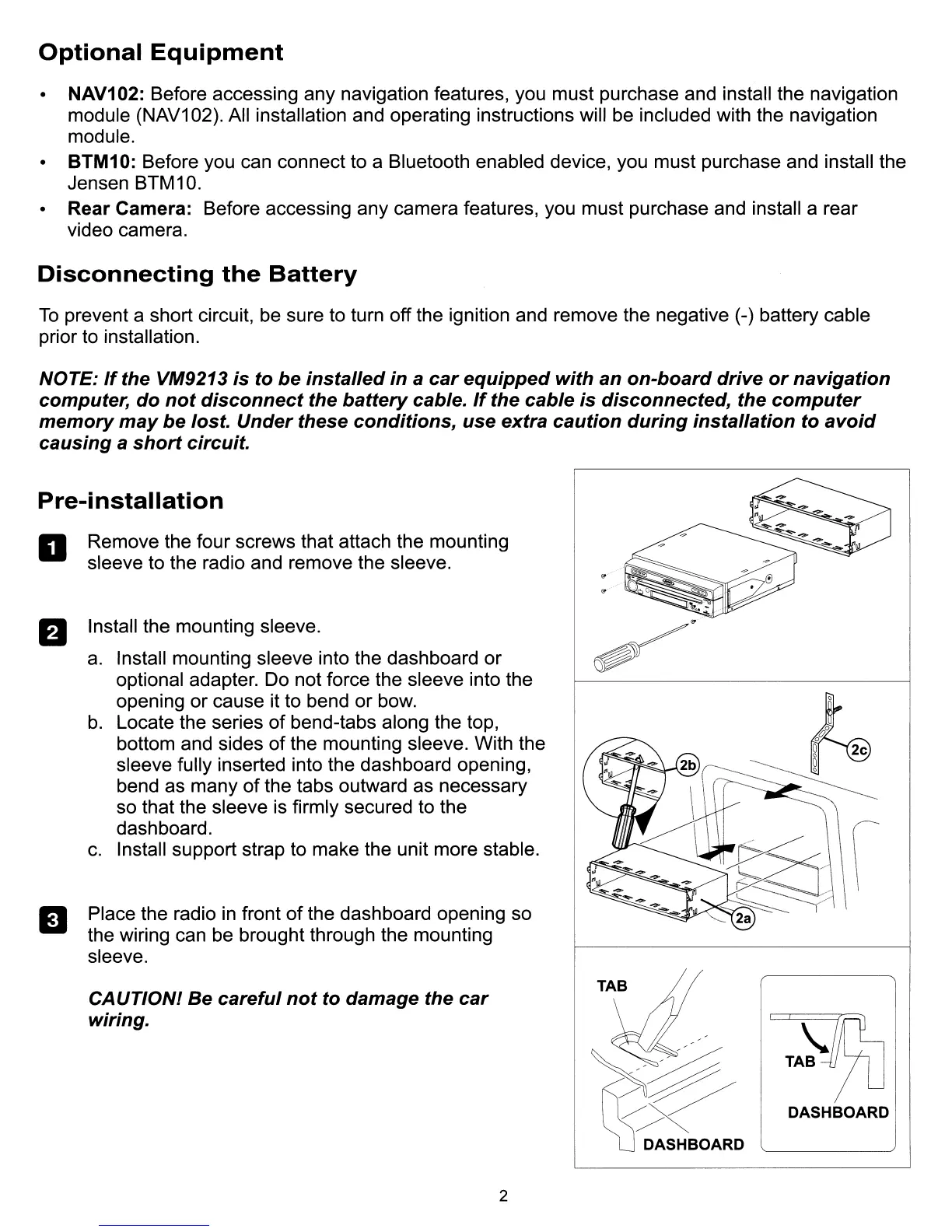
a Remove the four screws that attach the mounting
sleeve to the radio and remove the sleeve.
fJ Install the mounting sleeve.
a.
Install mounting sleeve into the dashboard
or
optional adapter. Do not force the sleeve into the
opening or cause it to bend or bow.
b.
Locate the series of bend-tabs along the top,
bottom and sides of the mounting sleeve. With the
sleeve fully inserted into the dashboard opening,
bend as many of the tabs outward as necessary
so that the sleeve is firmly secured to the
dashboard.
c.
Install support strap to make the unit more stable.
Place the radio
in
front
of
the dashboard opening so
the wiring can be brought through the mounting
sleeve.
II
CAUTlONl
Be
careful
not
to damage the
car
wiring.
~QS/~
/X
DASHBOARD
DASHBOARD
2



 To Next Page