<If~~
VM9313
MP3IWMA
OPERATION
Level 2 Leve I4
15 3
0:02AM
3.
Insert the USB device into the USB connector. The unit
will read the audio/video files on the USB device
automatically.
To
remove the USB device, press the SRC button (6) to
switch to another mode and then remove the USB device
from the USB connector.
111
fj
Cherry Poppin Dad
II
2
fj
Chris
Isaak·
Baby
3·
fj
Crazy
Town·
Butt
4 f'J
Phish·
Birds
.......,.-----++-----j'!f-
5 f'J
Ph
ish • Bounci
6 f'J
Phlsh·
Freeblr
4
Loading
an
SD Card
This radio is packaged with an SO to USB adaptor, which
allows the playback
of
SO cards through the USB Connector
on the front
of
the radio.
MP3
Player
User
Interface
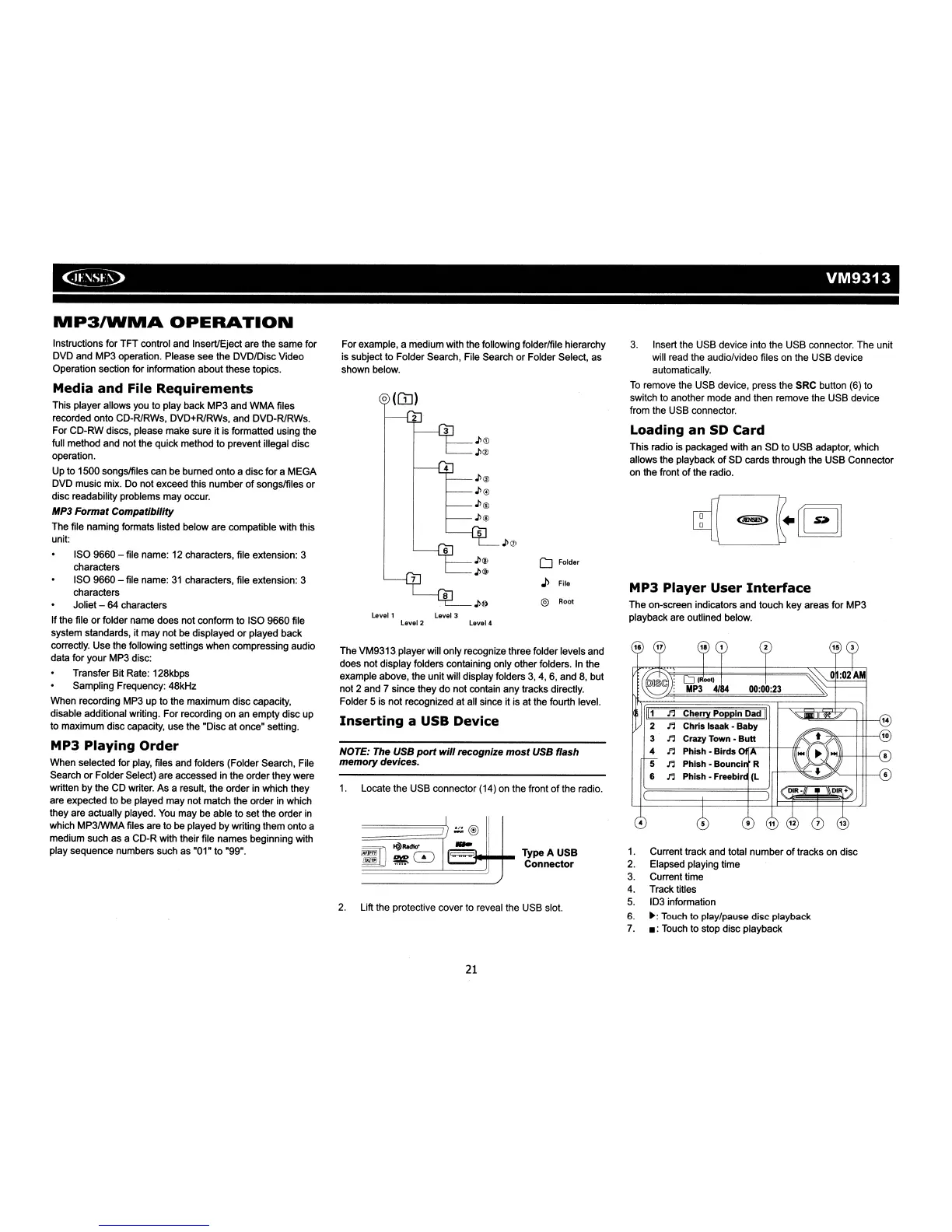
The on-screen indicators and touch key areas for MP3
playback are outlined below.
1.
Current track and total number
of
tracks on disc
2.
Elapsed playing time
3.
Current time
4. Track titles
5.
103 information
6.
~:
Touch to play/pause disc playback
7.
.:
Touch to stop disc playback
@)
Root
D Folder
J>
File
Type A
USB
Connector
Levell
level
3
4
2
o (OJ)
3
For example, a medium with the following folderlfile hierarchy
is
subject to Folder Search, File Search
or
Folder Select, as
shown below.
NOTE: The USB
port
will
recognize
most
USB flash
memory devices.
1.
Locate the USB connector (14) on the front
of
the radio.
The VM9313 player will only recognize three folder levels and
does not display folders containing only other folders. In the
example above, the unitwill display folders
3,
4, 6, and
8,
but
not 2 and
7 since they
do
not contain any tracks directly.
Folder 5 is not recognized
at
all since it is
at
the fourth level.
Inserting
a USB Device
2.
Lift the protective cover to reveal the USB slot.
Instructions for TFT control and Insert/Eject are the same for
OVO and MP3 operation. Please see the
oV%isc
Video
Operation section for information about these topics.
Media and File
Requirements
This player allows you to play back MP3 and
WMA
files
recorded onto Co-RlRWs,
oVo+RlRWs,
and
oVo-RlRWs.
For
Co-RW
discs, please make sure it is formatted using the
full method and not the quick method to prevent illegal disc
operation.
Up to 1500 songslfiles can be burned onto a disc for a MEGA
OVO music mix. Do not exceed this number
of
songslfiles
or
disc readability problems may occur.
MP3
Format Compatibility
The file naming formats listed below are compatible with this
unit:
ISO 9660 - file name: 12 characters, file extension: 3
characters
ISO 9660 - file name:
31
characters, file extension: 3
characters
Joliet -
64
characters
If the file
or
folder name does not conform to ISO 9660 file
system standards, it may not be displayed
or
played back
correctly. Use the following settings when compressing audio
data for your MP3 disc:
Transfer Bit Rate: 128kbps
Sampling Frequency: 48kHz
When recording MP3 up to the maximum disc capacity,
disable additional writing. For recording on an empty disc up
to maximum disc capacity, use the "Disc at once" setting.
MP3 Playing
Order
When selected for play, files and folders (Folder Search, File
Search
or
Folder Select) are accessed in the order they were
written
by
the CD writer. As a result, the order in which they
are expected to be played may not match the order in which
they are actually played. You may be able to set the order
in
which MP3IWMA files are to be played by writing them onto a
medium such as a
Co-R
with their file names beginning with
play sequence numbers such as "01"
to
"99".
21














 To Next Page