VM9313
<TI~sB>
SETUP
MENU
DIRECTION
BUTTONS
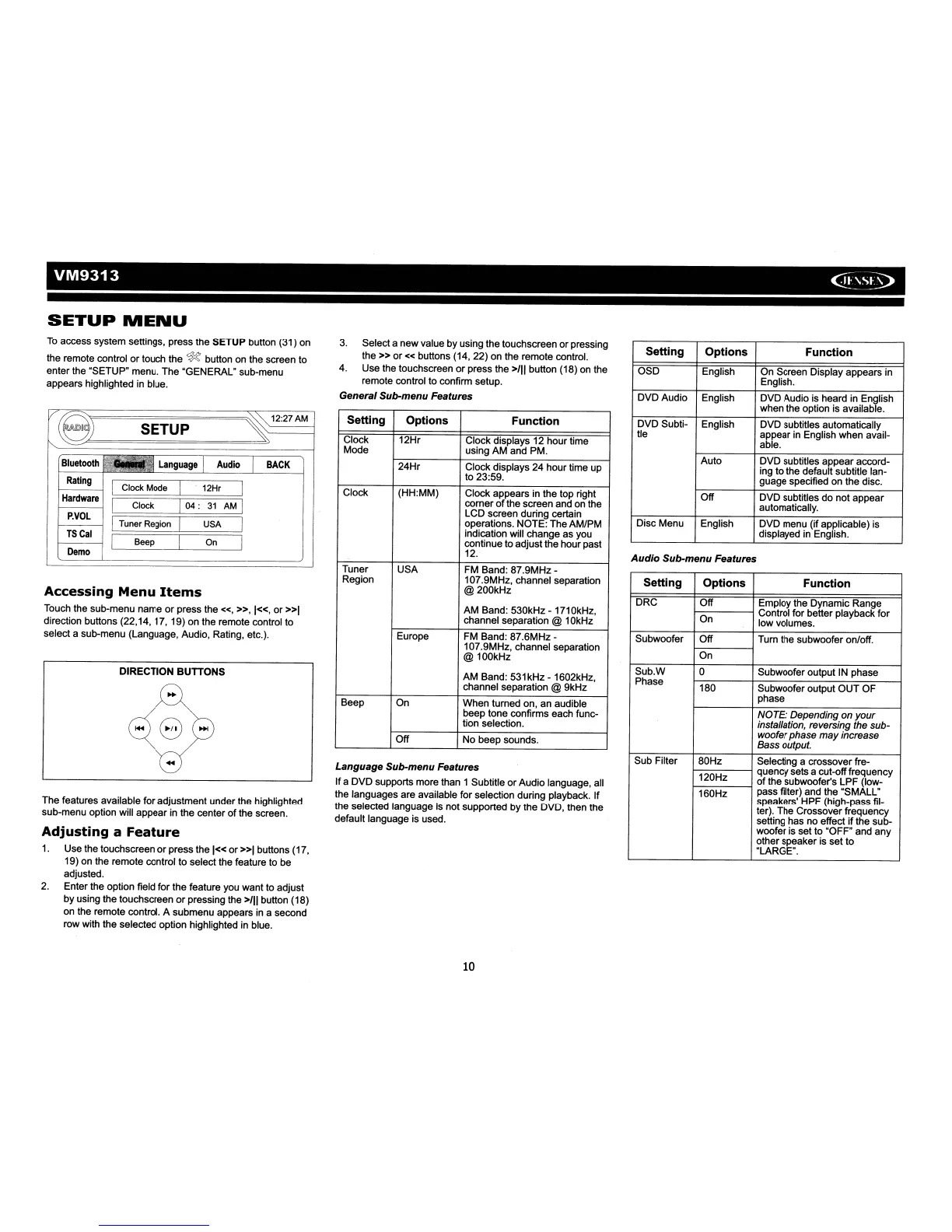
To
access system settings, press the
SETUP
button (31)
on
the remote control
or
touch the
~
button on the screen to
enter
the "SETUP" menu.
The
"GENERAL" sub-menu
appears highlighted in blue.
Setting
Options
Function
OSD
English
On
Screen Display appears in
English.
DVDAudio
English
DVD
Audio is heard in English
when the option is available.
DVD
Subti-
English
DVD
subtitles automatically
tie
appear in English
when
avail-
able.
Auto
DVD
subtitles
appear
accord-
ing
to
the default subtitle lan-
guage
specified on
the
disc.
Off
DVD
subtitles
do
not
appear
automatically.
Disc
Menu English
DVD
menu (if applicable) is
displayed in English.
Audio
Sub-menu Features
Setting Options Function
DRC
Off
Employ the Dynamic Range
On
Control
for
better playback
for
low volumes.
Subwoofer
Off
Turn the subwoofer on/off.
On
SubW
0
Subwoofer output IN phase
Phase
180
Subwoofer output
OUT
OF
phase
NOTE: Depending on
your
installation, reversing the sub-
woofer phase
may
increase
Bass output.
Sub Filter
80Hz
Selecting a crossover fre-
120Hz
quencysets a cut-offfrequency
of
the subwoofer's
LPF
(Iow-
160Hz
pass filter) and the "SMALL"
speakers'
HPF
(high-pass fil-
ter). The Crossover frequency
setting has no effect
if
the sub-
woofer is set to "OFF"
and
any
other speaker is set
to
"LARGE".
3. Selecta
new
value by using
the
touchscreen
or
pressing
the»
or«
buttons (14,
22)
on the remote control.
4.
Use
the touchscreen
or
press the
>/11
button (18) on the
remote control to confirm setup.
General Sub-menu Features
Setting Options Function
Clock
12Hr
Clock
displays 12
hour
time
Mode using
AM
and PM.
24Hr
Clock displays
24
hour
time up
to 23:59.
Clock (HH:MM) Clock
appears
in the top right
corner
of
the screen and on the
LCD
screen during certain
operations.
NOTE:
The
AMIPM
indication will
change
as you
continue to
adjust
the
hour
past
12.
Tuner
USA
FM Band:
87.9MHz-
Region 107.9MHz, channel separation
@200kHz
AM
Band:
530kHz
- 1710kHz,
channel separation @ 10kHz
Europe FM Band:
87.6MHz-
107.9MHz, channel separation
@
100kHz
AM
Band:
531kHz
- 1602kHz,
channel separation @ 9kHz
Beep On
When turned on,
an
audible
beep
tone
confirms each func-
tion selection.
Off
No
beep sounds.
Language Sub-menu Features
If
a
DVD
supports more than 1 Subtitle
or
Audio
language, all
the languages
are
available
for
selection during playback.
If
the selected language is not supported
by
the DVD, then
the
default language is used.
BACK
~12:27AM
SETUP
Bluetooth
'"
Rating
Clock Mode
I
12Hr
I
Hardware
Clock
I
04:
31
AM
I
P.YOL
I I
Tuner Region USA
TSCal
I I
Beep On
Demo
Accessing Menu
Items
Touch the sub-menu
name
or
press the
«,
»,1«,
or
»1
direction buttons
(22,14,17,19)
on the remote control to
select a sub-menu (Language, Audio, Rating, etc.).
The
features available
for
adjustment
under the highlighted
sub-menu option will
appear
in the center
of
the screen.
Adjusting a
Feature
1. Usethe touchscreen
or
press the
1«
or
»1
buttons (17,
19)
on
the remote control to select the feature to be
adjusted.
2. Enter the option field
for
the
feature you
want
to
adjust
by
using the touchscreen
or
pressing the
>/11
button (18)
on the remote control. A
submenu
appears in a second
row with the selected option highlighted in blue.
10














 To Next Page