VM9313
<1f:S~
11
10
14
---------tt----t-------j
15
······1···
WIlE
TILT
7
Multimedia Receiver
96
CLOSE
PIC
(PP
.
I
(C
OPEN ¢ BAND
.....
12
,----
~
160
>WI
<[ENSE[)
~
f~I/lumR
WAn5
$.
13
8
lltSP IVM9313
I
\
J}:':::' ®
5
~
<!>
H?}Radio'
."..
\)~
II
~
....,
J·EIluw·m
mw
IW
~
II
I~I
SRC
~..;
I!J1I!J1
m'fJIIIlfIJ!iI'lJ1FjJ
fIJ!iI
I
=TA
!P
~
...
CONTROLS
AND
INDICATORS
Button
Operation
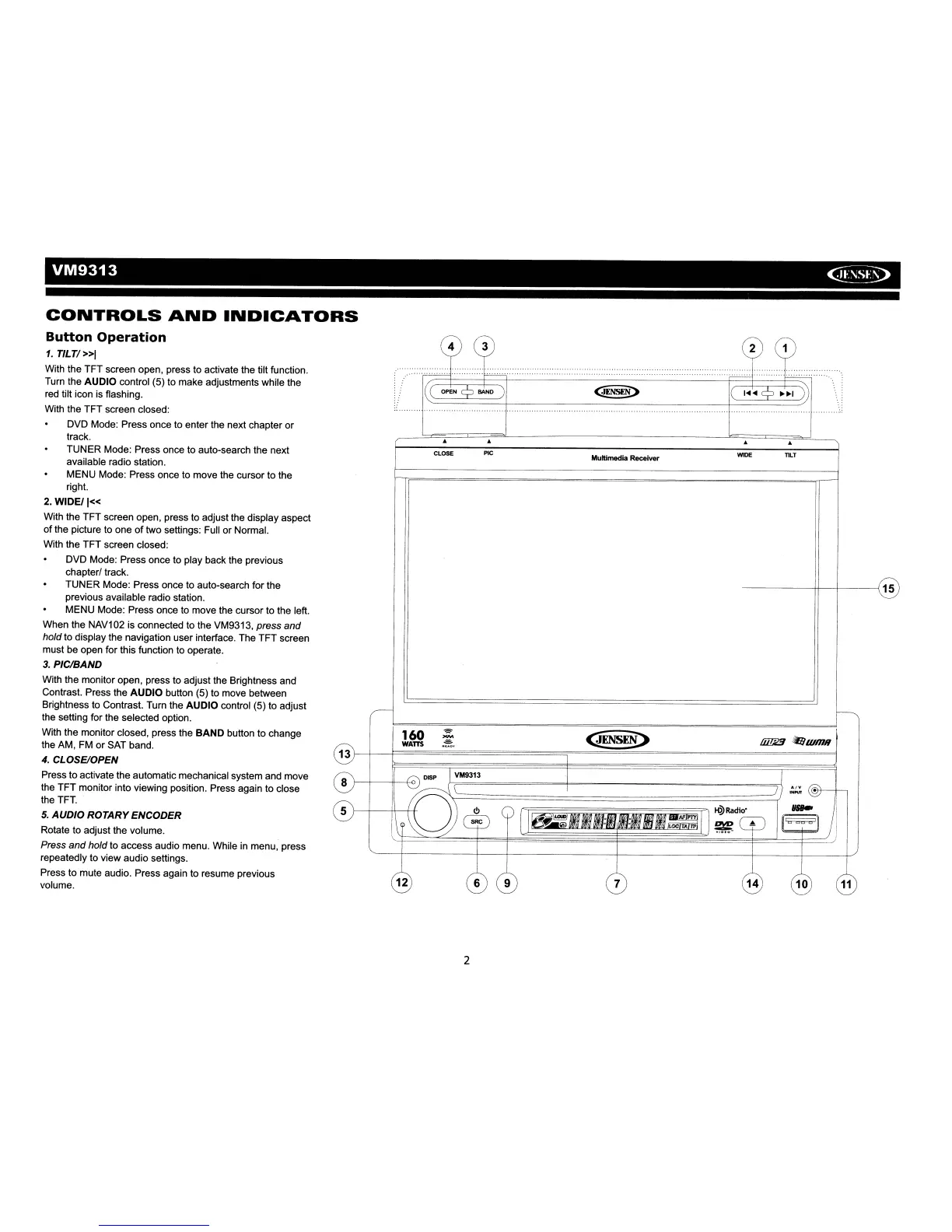
1.
TlLT/»1
With the TFT screen open, press to activate the tilt function.
Turn the AUDIO control (5) to make adjustments while the
red tilt icon is flashing.
With the TFT screen closed:
DVD Mode: Press once to enter the next chapter or
track.
TUNER Mode: Press once to auto-search the next
available radio station.
MENU Mode: Press once to move the cursor to the
right.
2.
WIDE/I«
With the TFT screen open, press to adjust the display aspect
of
the picture to one
of
two settings: Full or Normal.
With the TFT screen closed:
DVD Mode: Press once to play back the previous
chapterl track.
TUNER Mode: Press once to auto-search for the
previous available radio station.
MENU Mode: Press once to move the cursor to the left.
When the NAV102 is connected to the VM9313, press and
hold to display the navigation user interface. The TFT screen
must be open for this function to operate.
3.
PIC/BAND
With the monitor open, press
to
adjust the Brightness and
Contrast. Press the AUDIO button (5) to move between
Brightness to Contrast. Turn the AUDIO control (5) to adjust
the setting for the selected option.
With the monitor closed, press the BAND button to change
the AM, FM or SAT band.
4.
CLOSE/OPEN
Press to activate the automatic mechanical system and move
the TFT monitor into viewing position. Press again to close
the
TFT
..
5.
AUDIO
ROTARY ENCODER
Rotate to adjust the volume.
Press
and
hold to access audio menu. While in menu, press
repeatedly to view audio settings.
Press to mute audio. Press again
to
resume previous
volume.
2














 To Next Page