~
VM9313
TUNER
OPERATION
About
HD
Radio™
Technology
HD
Radio technology allows CD-quality digital broadcasting
of your local AM and
FM
radio stations. HD Radio broadcasts
can include multiple channels
on
the same frequency, which
is called multicasting. With multicasting, you can receive up
to eight additional multicast channels: HD1-HD8. With your
VM9313 radio, you will receive HD Radio digital broadcasts
automatically when tuned
to
a station that offers HD Radio
technology.
Tuner
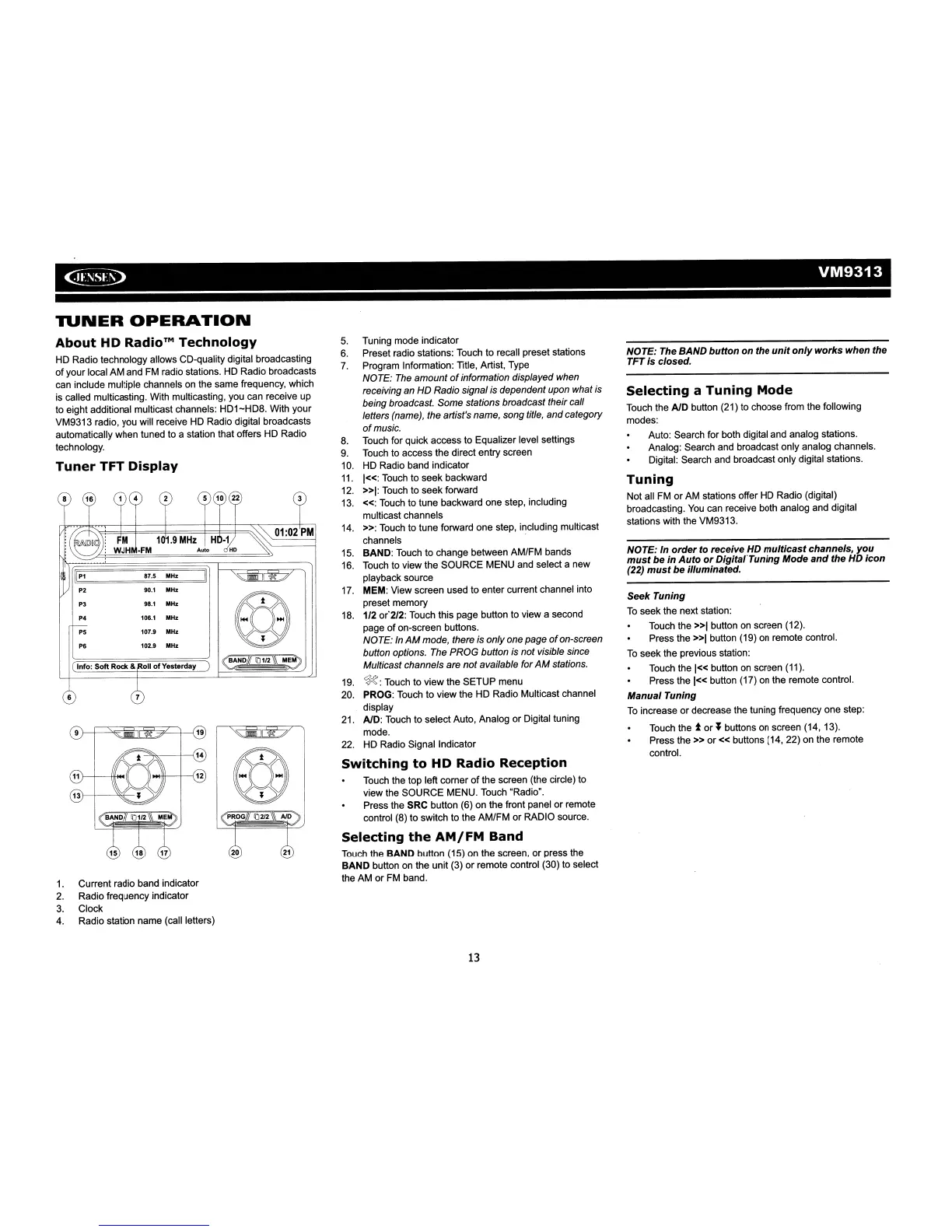
TFT Display
Ilpl
87.5
MHz
P2
90.1
MHz
P3
98.1
MHz
P4 106.1
MHz
P5 107.9
MHz
P6 102.9
MHz
Info:
Soft
Rock &
011
of
Yesterday
6
9
11}--f--iJIi<~(
1.
Current radio band indicator
2.
Radio frequency indicator
3.
Clock
4.
Radio station name (call letters)
5.
Tuning mode indicator
6.
Preset radio stations: Touch to recall preset stations
7.
Program Information: Title, Artist, Type
NOTE: The
amount
of
information displayed when
receiving an
HD
Radio signal is dependent upon what is
being broadcast. Some stations broadcast their call
letters (name), the artist's name, song tit/e, andcategory
of
music.
8.
Touch for quick access to Equalizer level settings
9.
Touch
to
access the direct entry screen
10.
HD Radio band indicator
11.
1«:
Touch to seek backward
12.
»1:
Touch to seek forward
13.
«:
Touch to tune backward one step, including
multicast channels
14.
»:
Touch
to
tune forward one step, including multicast
channels .
15.
BAND: Touch to change between AM/FM bands
16.
Touch
to
view the SOURCE MENU and select a new
playback source
17.
MEM: View screen used to enter current channel into
preset memory
18.
1/2 or"2/2: Touch this page button
to
view a second
page of on-screen buttons.
NOTE: In
AM
mode, there is onlyone page
of
on-screen
button options. The PROG button is not visible since
Multicast channels are
not
available for
AM
stations.
19.
~:
Touch to view the SETUP menu
20. PROG: Touch to view the HD Radio Multicast channel
display
21.
AID: Touch to select Auto, Analog or Digital tuning
mode.
22. HD Radio Signal Indicator
Switching
to
HD
Radio Reception
Touch the top left corner
of
the screen (the circle)
to
view the SOURCE MENU. Touch "Radio".
Press the SRC button (6) on the front panel or remote
control (8) to switch to the AM/FM or RADIO source.
Selecting
the
AM/FM
Band
Touch
the BAND button (15) on the screen, or press the
BAND button on the unit (3) or remote control (30)
to
select
the
AM
or
FM
band.
13
NOTE:
The
BAND
button
on the
unit
only
works
when the
TFT is closed.
Selecting
a
Tuning
Mode
Touch the AID button (21)
to
choose from the following
modes:
Auto: Search for both digital and analog stations.
Analog: Search and broadcast only analog channels.
Digital: Search and broadcast only digital stations.
Tuning
Not all
FM
or
AM
stations offer HD Radio (digital)
broadcasting.
You
can receive both analog and digital
stations with the VM9313.
NOTE: In
order
to receive
HD
multicast
channels, you
must
be in
Auto
or
DigitafTuning
Mode
and
the
HD
icon
(22)
must
be illuminated.
Seek Tuning
To
seek the next station:
Touch the
»1
button
on
screen (12).
Press the
»1
button (19)
on
remote control.
To
seek the previous station:
Touch the
1«
button
on
screen (11).
Press the
1«
button (17) on the remote control.
Manual Tuning
To
increase or decrease the tuning frequency one step:
Touch the
tor'
buttons
on
screen (14,13).
Press
the»
or«
buttons (14, 22) on the remote
control.














 To Next Page