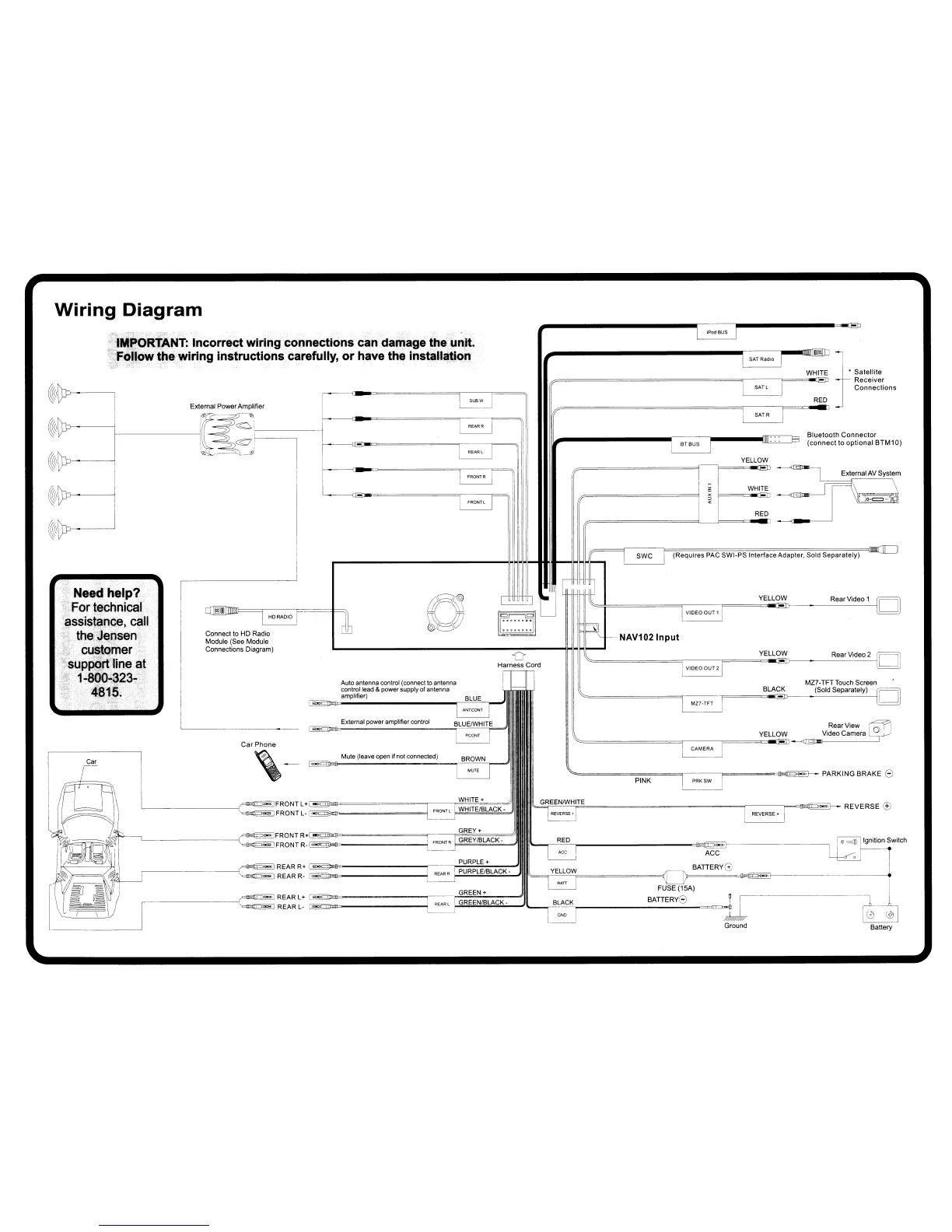
Wiring
Diagram
---
•
Satellite
Receiver
Connections
II;;
RED
WHITE
Bluetooth
Connector
(connect
to
optional
BTM10)
RED
WHITE
YELLOW
IMPORTANT:
Incorrect
wiring
connections
can
damage the
-unit.
Fo1l9W
the wiring instructions carefully, or
have
the
install"tion
Rear Video 2 D
Rear View
Video
Camera
YELLOW
YELLOW
(Requires
PAC
SWI-PS Interface Adapter. Sold Separately)
PINK
NAV1021nput
YELLOW Rear Video 1
~=====r-~====o~~----=-=----~D
MZ7-TFTTouch Screen
~==========r
---"====B,,,LA-::EC;,:Kp-
__
..::(So=ld=-s=-e~p:::a:::ra:::te:::IY'.C)-
D
~==========r---F=====_~~-
PARKING
BRAKE
8
D
Harness Cord
Mute (leave
open
if
not
connected)
External
power
amplifier
control
Auto
antenna
control
(connect
to
antenna
control lead &
power
supply
of
antenna
amplifier)
•
c:ID
Ignition Switch
=
A=CC
~}-----~o
BATTERYG
,
=======<f1-rn
F=
~
i4
1
1::t*lD1
GREEN
+ FUSE (15A)
REAR L+
[iii;g-~-------"'----~G~R~E~E~N~/B~LA;C~K~-::~~!L.....,~BLACK
B_A_T_T_E_R_Y8..;;-_~=
V I
~
REARL- r
-~
~
I
~
~
0 @
Ground Battery
Car Phone
,-
Connect
to
HD
Radio
Module (See Module
Connections
Diagram)
_____
---(::::;~REAR
R+
@?
~
,-
REAR
R-
~
..
~_-------...,
L
C:;~~FRONT
R+[!!i;gj_=========r--~~~""",,.,-=
FRONT
R-
§i'g!l=ll~-------~
L
-{-~=FRONTL+[!!i;gjj>e=========r--F~~=~
FRONT
L-
~gjj~===-===-
Car
Need help?
For
technical
assistance,
call
the Jensen
-'
"
customer
suppgrt
line
at
1-800-323-
481~.














 To Next Page