~
VM9313
CONTROLS
AND
INDICATORS
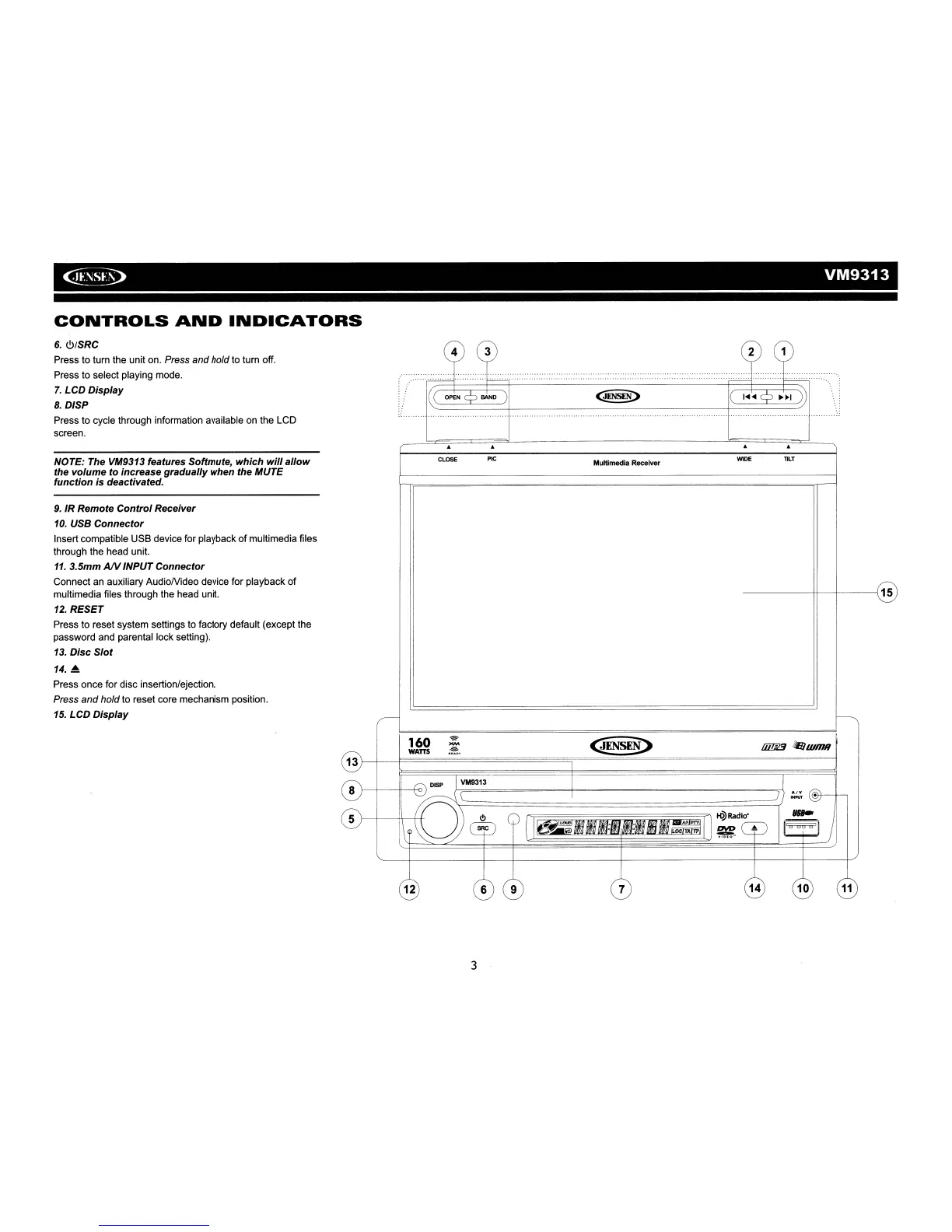
6.
<!>ISRC
Press to turn the unit on. Press
and
hold to turn off.
Press to select playing mode.
7.
LCD Display
8.
DISP
Press to cycle through information available on the LCD
screen.
.
...
......................................................
j.CP
(..::=(O=PE=N=
Q=BA=N=D=4
Q-=J=ENst:N=~:::::9>
+(==I
...
=I
...
=C?=~=i~=I~~
NOTE: The VM9313 features Softmute, which
will
allow
the volume to increase gradually when the MUTE
function is deactivated.
CLOSE
PIC
Multimedia Receiver
WIDE
TILT
8
I-I---+--+<>
9.
IR Remote
Control
Receiver
10.
USB Connector
Insert compatible USB device for playback
of
multimedia files
through the head unit.
11.
3.5mm
AIV
INPUT Connector
Connect an auxiliary AudioNideo device for playback of
multimedia files through the head unit.
12.
RESET
Press to reset system settings to factory default (except the
password and parental lock setting).
13.
Disc
Slot
14.
A
Press once for disc insertion/ejection.
Press
and
hold
to reset core mechanism position.
15.
LCD Display
------+1-+-------115
~
1~3
I
'-
J)
:.:;:.(
~
<!It-+--,
))
~=================~
"...
5 1-1----++-\
.-+\+
\
SRC<!>
('Tr=~~~~~~~~~~11
~Radio'
I~
J
~
~
(
1~~~BlII:IUf1:m~=~.:
II
~...
~
@
3
6
9 7
14
10
11














 To Next Page