Controls
and
Indicators
14
5
3
6
7
8
l--+--it--~
12
11
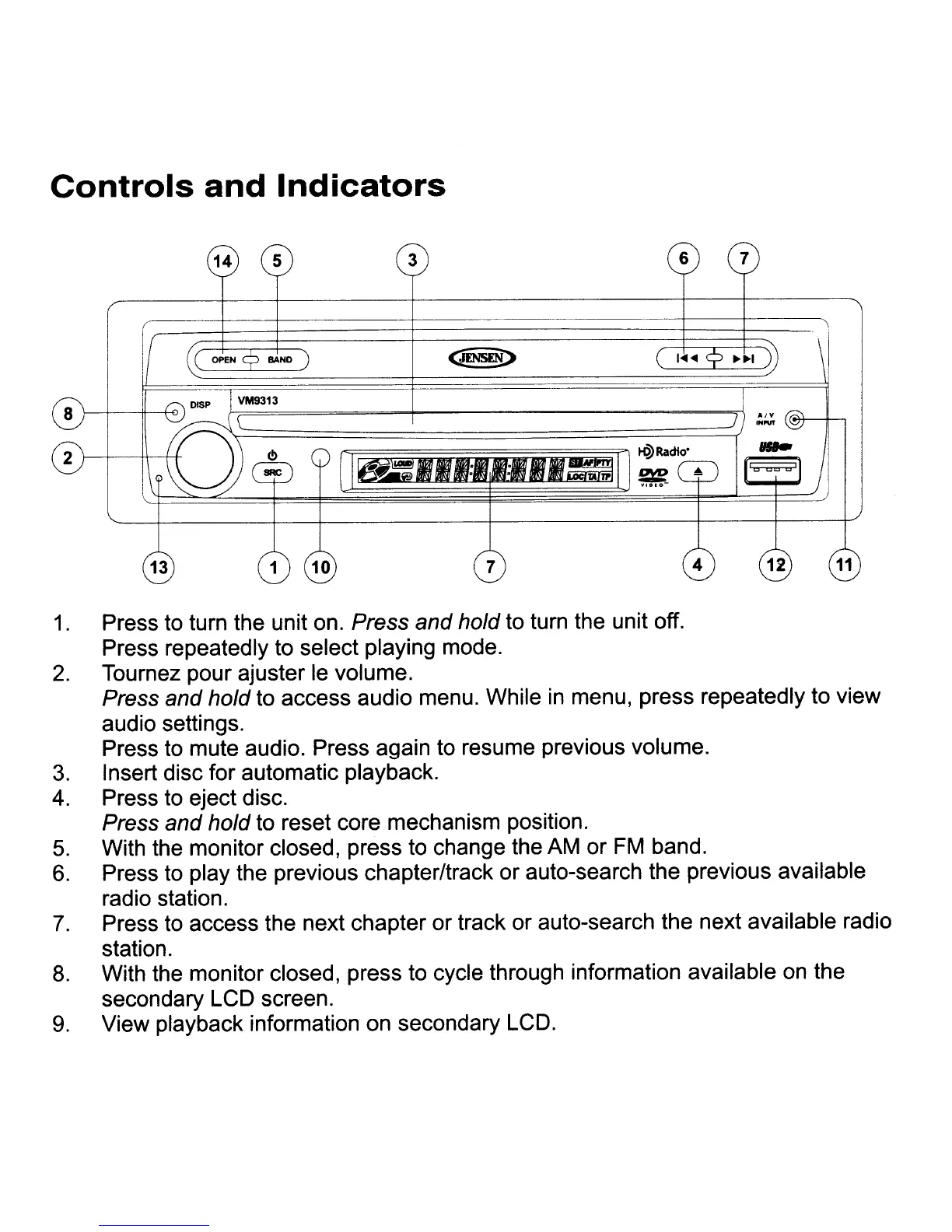
1.
Press
to
turn the unit
on.
Press and hold
to
turn the unit off.
Press repeatedly
to
select playing mode.
2.
Tournez pour ajuster
Ie
volume.
Press and hold
to
access audio menu. While
in
menu, press repeatedly to view
audio settings.
Press
to
mute audio. Press again
to
resume previous volume.
3.
Insert disc for automatic playback.
4.
Press
to
eject disc.
Press and hold to reset core mechanism position.
5.
With the monitor closed, press
to
change the
AM
or
FM
band.
6.
Press
to
play the previous chapter/track or auto-search the previous available
radio station.
7.
Press
to
access the next chapter or track or auto-search the next available radio
station.
8.
With the monitor closed, press to cycle through information available
on
the
secondary
LCD
screen.
9.
View playback information on secondary
LCD.














 To Next Page