~
VM9313
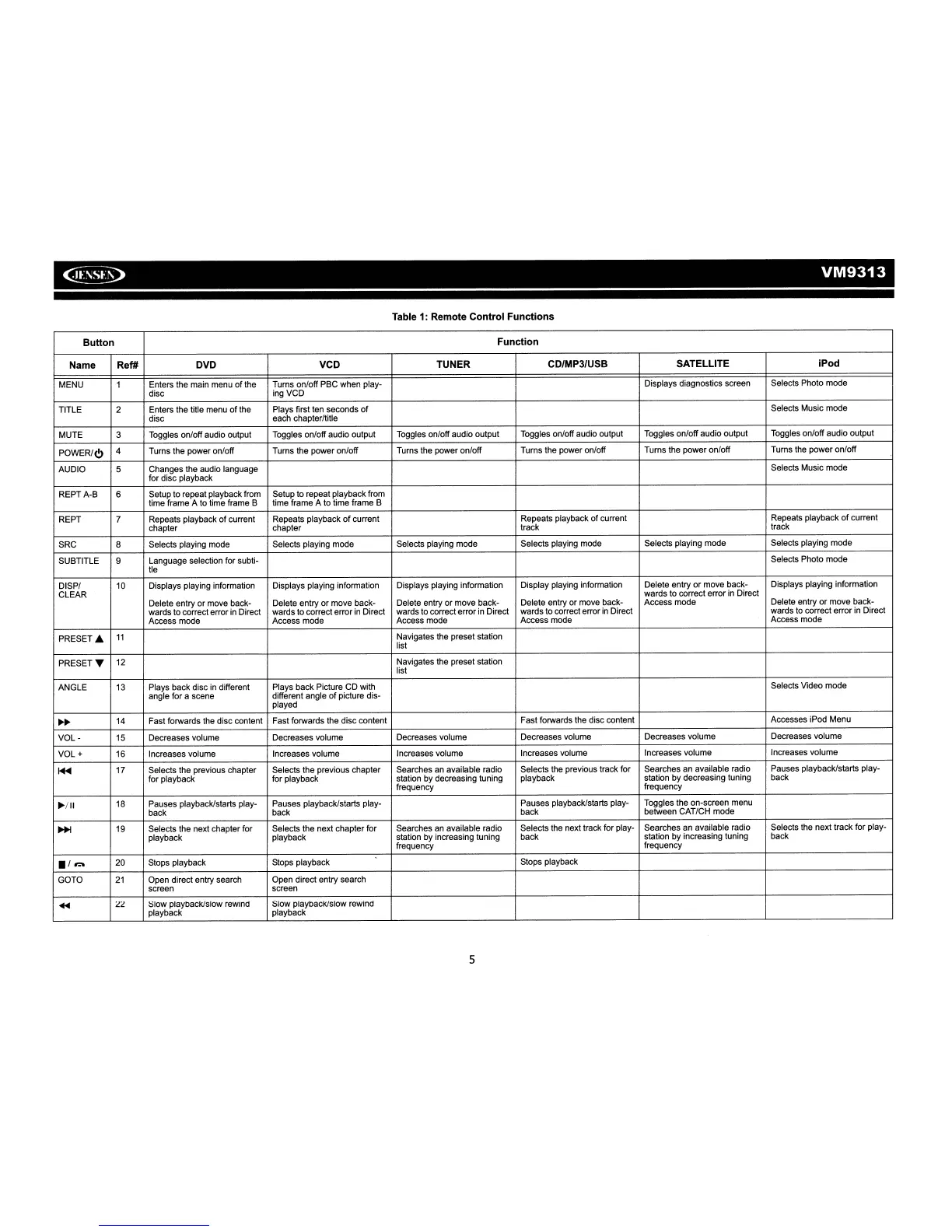
Table
1:
Remote Control Functions
Button
Function
Name Ref# DVD VCD TUNER
CD/MP3/USB SATELLITE iPod
MENU
1 Enters the main menu
of
the
Tums on/off PBC when play-
Displays diagnostics screen Selects Photo mode
disc
ingVCD
TITLE
2
Enters the title menu
of
the Plays first ten seconds
of
Selects Music mode
disc
each chapter/title
MUTE
3 Toggles on/off audio output Toggles on/off audio output Toggles on/off audio output
Toggles on/off audio output Toggles on/off audio output
Toggles on/off audio output
POWER/<!>
4 Turns the power on/off Turns the power on/off Turns the power on/off Turns the power on/off
Turns the power on/off Turns the power on/off
AUDIO
5 Changes the audio language
Selects Music mode
for disc playback
REPT A-B
6
Setup to repeat playback from Setup to repeat playback from
time frame A to time frame B time frame A to time frame B
REPT
7 Repeats playback
of
current Repeats playback
of
current
Repeats playback
of
current Repeats playback
of
current
chapter chapter track
track
SRC
8 Selects playing mode Selects playing mode
Selects playing mode Selects playing mode Selects playing mode
Selects playing mode
SUBTITLE
9
Language selection for subti-
Selects Photo mode
tie
DISP/
10
Displays playing information Displays playing information Displays playing information
Display playing information Delete entry
or
move back-
Displays playing information
CLEAR
wards to correct error
in
Direct
Delete entry or move back-
Delete entry or move back-
Delete entry or move back- Delete entry or move back- Access mode
Delete entry or move back-
wards to correct error
in
Direct wards to correct error
in
Direct wards to correct error
in
Direct wards to correct error
in
Direct
wards to correct error
in
Direct
Access mode Access mode
Access mode Access mode
Access mode
PRESET.
11
Navigates the preset station
list
PRESETT
12
Navigates the preset station
list
ANGLE
13
Plays back disc
in
different Plays back Picture CD with
Selects Video mode
angle for a scene
different angle
of
picture dis-
played
~~
14
Fast forwards the disc content
Fast forwards the disc content
Fast forwards the disc content
Accesses iPod Menu
VOL-
15
Decreases volume Decreases volume Decreases volume
Decreases volume Decreases volume
Decreases volume
VOL
+
16
Increases volume Increases volume Increases volume
Increases volume Increases volume
Increases volume
~
17
Selects the previous chapter Selects the previous chapter Searches an available radio Selects the previous track for
Searches
an
available radio
Pauses playback/starts play-
for playback for playback station by decreasing tuning
playback
station by decreasing tuning back
frequency
frequency
~/II
18
Pauses playback/starts play- Pauses playback/starts play- Pauses playback/starts play-
Toggles the on-screen menu
back back
back between CAT/CH mode
~
19
Selects the next chapter for
Selects the next chapter for Searches
an
available radio Selects the next track for play-
Searches an available radio Selects the next track for play-
playback playback station by increasing tuning back
station by increasing tuning
back
frequency
frequency
./~
20
Stops playback Stops playback
Stops playback
GOTO
21
Open direct entry search Open direct entry search
screen screen
...
22
Slow playback/slow rewind Slow playback/slow rewind
playback playback
5














 To Next Page