2. Unpacking and cable connection
2.1 Unpacking
When you receive the product:
First, check whether the packaging equipment has obvious damage. Selection of protective
packaging materials during transport can cope with most of the unexpected hit;
Then, remove the device, remove the plastic protective film DVR, check whether there is any
visible damage to the outside;
Finally, open the case, check the front panel data cable, power cable, power supply and
motherboard fan connector is loose.
Front panel and rear panel
Various interfaces on the front panel and the rear panel of the various key functions are
described in detail in the specification;
Please check carefully whether the product model on the front panel with foil products you
ordered the same model;
Label affixed to the rear panel, has a very important significance for our service work, please
protect. In the company's after-sales service when you contact us, you will need to provide
the model and serial number to order the label.
Check
In addition to checking for any obvious signs of damage, but please pay attention to check
the front panel data cable, power cable and the motherboard connection is loose.
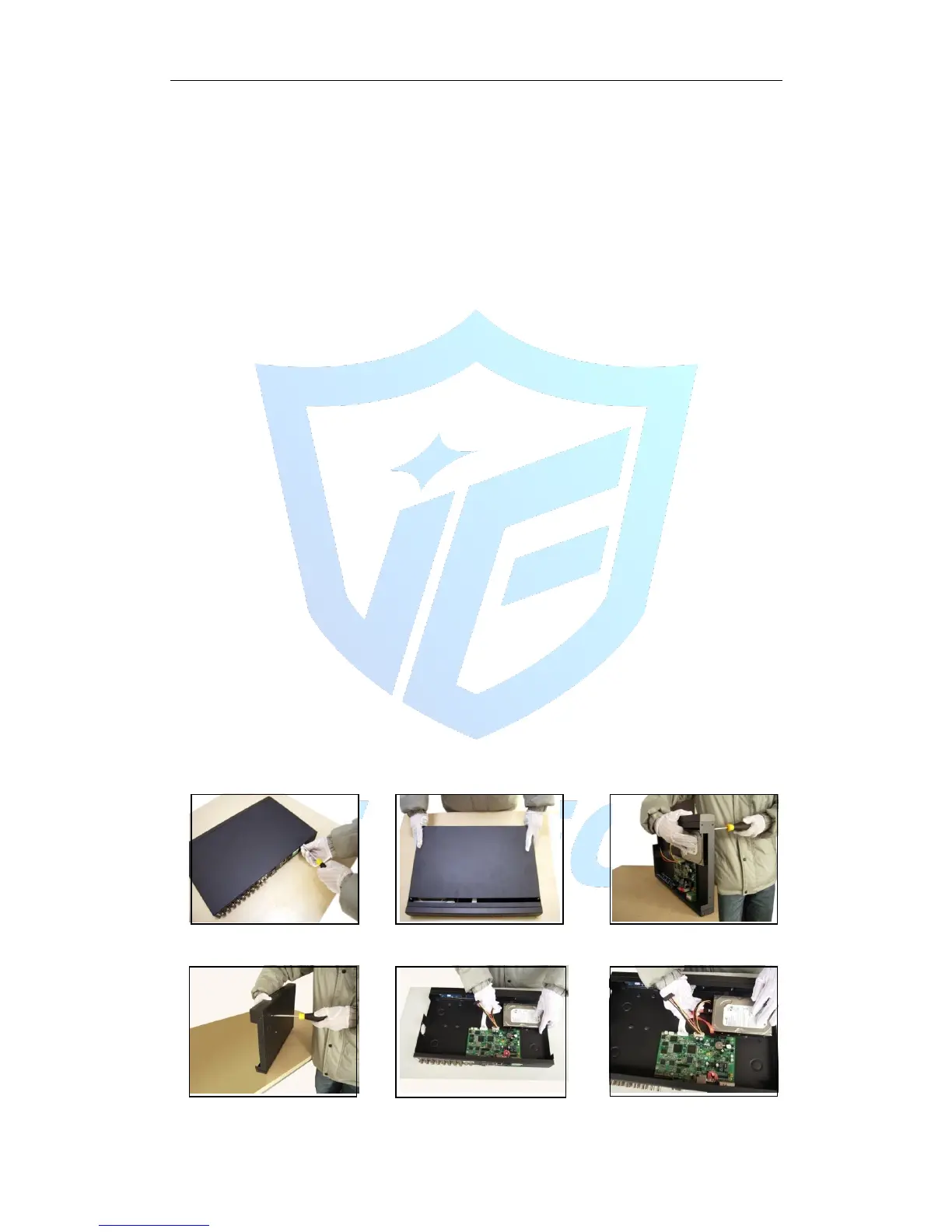
2.2 Hard disk installation
When you use, first install the hard drive, the machine can install two hard drives inside (capacity
no limit).
①disassemble the screw ②disassemble the cover ③fix the screw of hard disk
④fix the screw of hard disk ⑤connect the data wire ⑥connect the power wire



 To Next Page