9
2. How to select the stitch
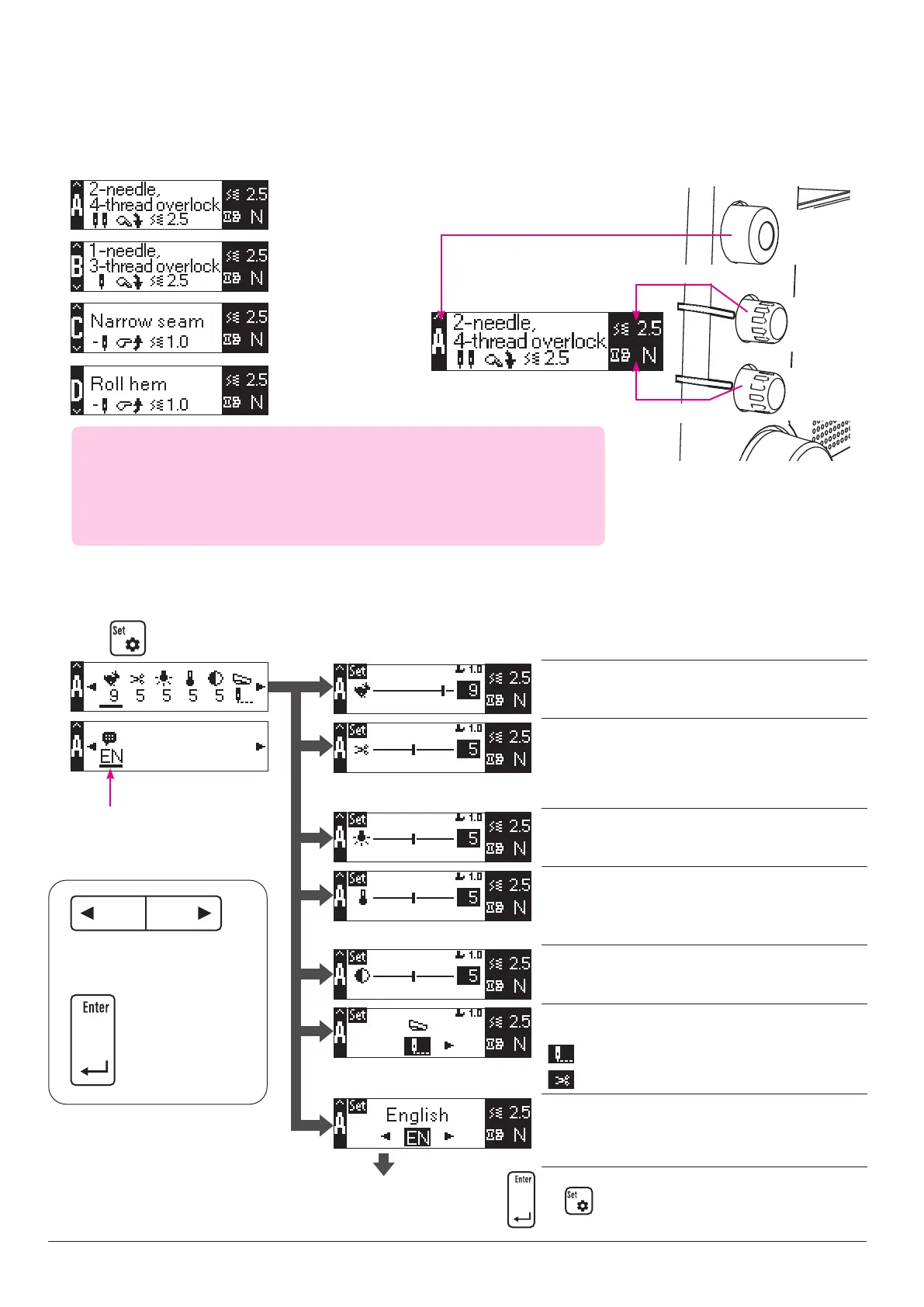
Change over the stitch to be sewn by turning the stitch changeover knob.
Data editing screen
Data selection screen
3. Items that can be set and setting method
The maximum sewing speed can be changed.
1: Slow → 10: Fast
The automatic chain-o thread cutting length can be set.
1: 1cm → 10: 10cm
* The chain-o thread cutting length is a rough guide. It
varies depending on sewing conditions such as the type
of thread and stitch length.
The illumination of the hand LED can be changed.
0: Dark → 10: Bright
The color temperature of the hand LED can be
changed.
0: Low (cold color system) → 10: High (warm color
system)
The contrast of the LCD can be changed.
1: High → 10: Low
It is possible to change the machine operation to be
carried out by depressing the foot switch.
: Half stitch/low-speed inching stitch
: Chain-o thread cutting
The display language of the LCD can be changed.
Japanese, English, Spanish, German, French, Italian,
Dutch, Danish, Norwegian, Finnish, Swedish, Czech, Rus-
sian and Chinese
* Use the right needle.
* If you want to sew the
"1-needle 2-thread"
stitch, select "B".
◆
Thread tension
This product has adopted the feeder type automatic thread tension controller.
Since this automatic thread tension controller supplies the required amount of
thread according to the stitch, material thickness, stitch length and knife width
you have selected, it is not necessary to adjust the thread tension.
* Select "A" when you want to
sew a 1-needle, 3-thread pat
-
tern using the left needle.
Stitch
changeover
knob
Stitch length
adjustment
dial
Dierential
feed adjust-
ment dial
Stitch length adjustment
Dierential feed adjustment
Stitch changeover
Selection bar
The selection bar blinks below
the item you have selected.
Press these buttons to select
or edit the item.
Press this button to
conrm the selection
or editing you have
carried out.
Press
After you have completed editing, press and to return the screen to the sewing screen.


 To Next Page