7
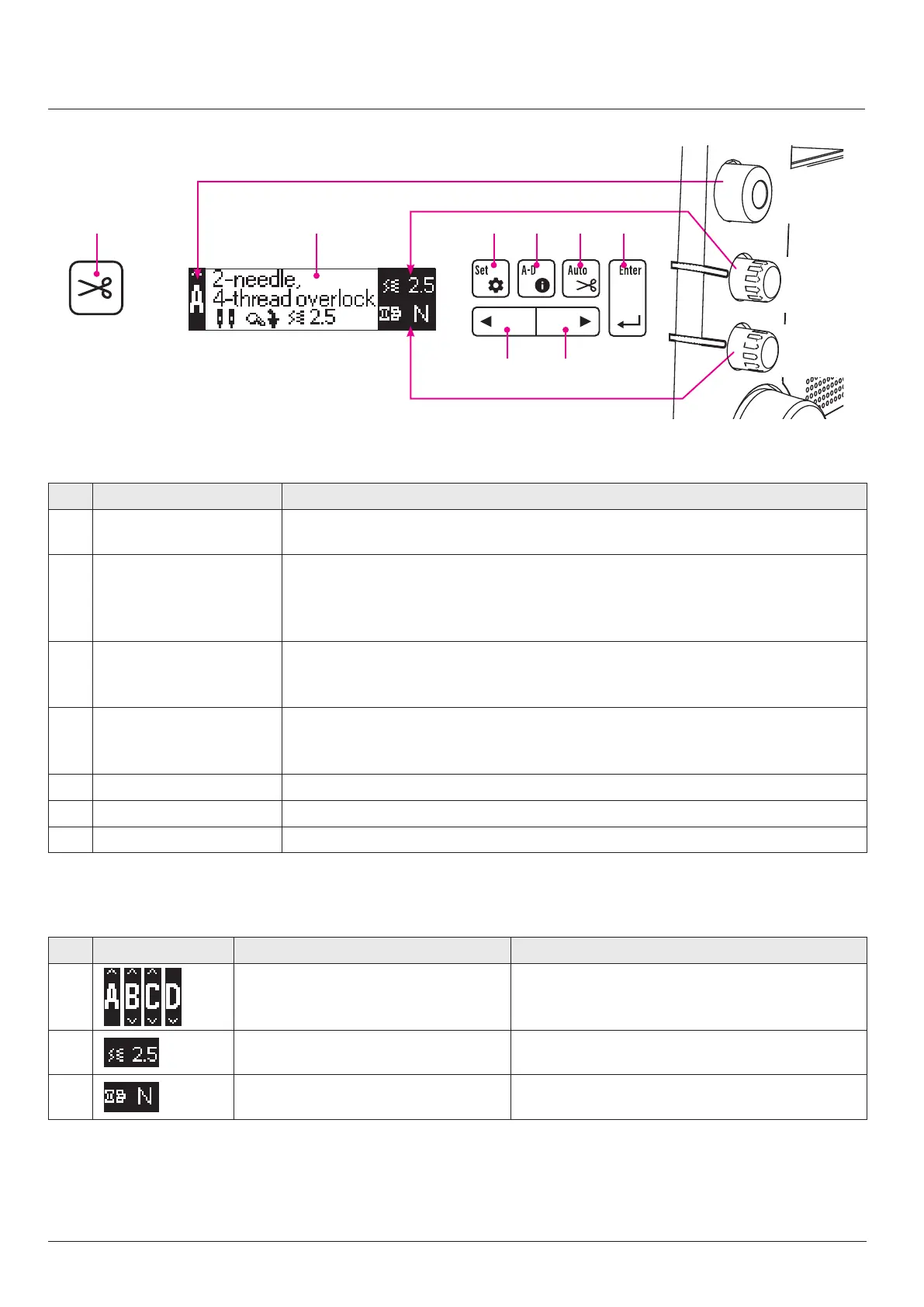
Operation buttons on the LCD screen
Button name Function
Chain-o thread cutting
button
Use this button to manually cut the chain-o thread.
* Chain-o thread is stitch-formed thread with no material.
Edit button Displays the data edit screen.
With this button, the "maximum sewing speed", "automatic chain-o thread cutting length",
"hand LED illumination", "hand LED color temperature", "LCD contrast", "Machine operation
when operating the foot switch" and "display language" can be edited.
Stitch display button Displays the stitch display screen.
Four dierent types of stitches are available: "A: 2-needle 4-thread", "B: 1-needle
3-thread", "C: Narrow overlocking" and "D: Rolled hemming".
Automatic chain-o thread
cutting changeover button
Changes over ON/OFF of the automatic chain-o thread cutting.
When this button is placed in ON, the material end is detected at the end of sewing and
chain-o thread is automatically cut to the set length.
Enter button
Conrms the content you have edited.
Left button
Moves the selection bar on the LCD screen to the left.
Right button
Moves the selection bar on the LCD screen to the right.
* The buttons are disabled while the sewing machine is in operation.
LCD screen display Display contents
/ / /
Displays the stitch. Change over the stitch with the stitch changeover
knob.
Displays the stitch length. Adjust the stitch length by turning the stitch adjust-
ment dial .
Displays the dierential feed ratio. Adjust the dierential feed amount by turning the
dierential feed adjustment dial.
LCD screen
Stitch changeover
Stitch length adjustment
Dierential feed adjustment
Stitch
changeover
knob
Stitch length
adjustment
dial
Dierential
feed adjust-
ment dial


 To Next Page