8
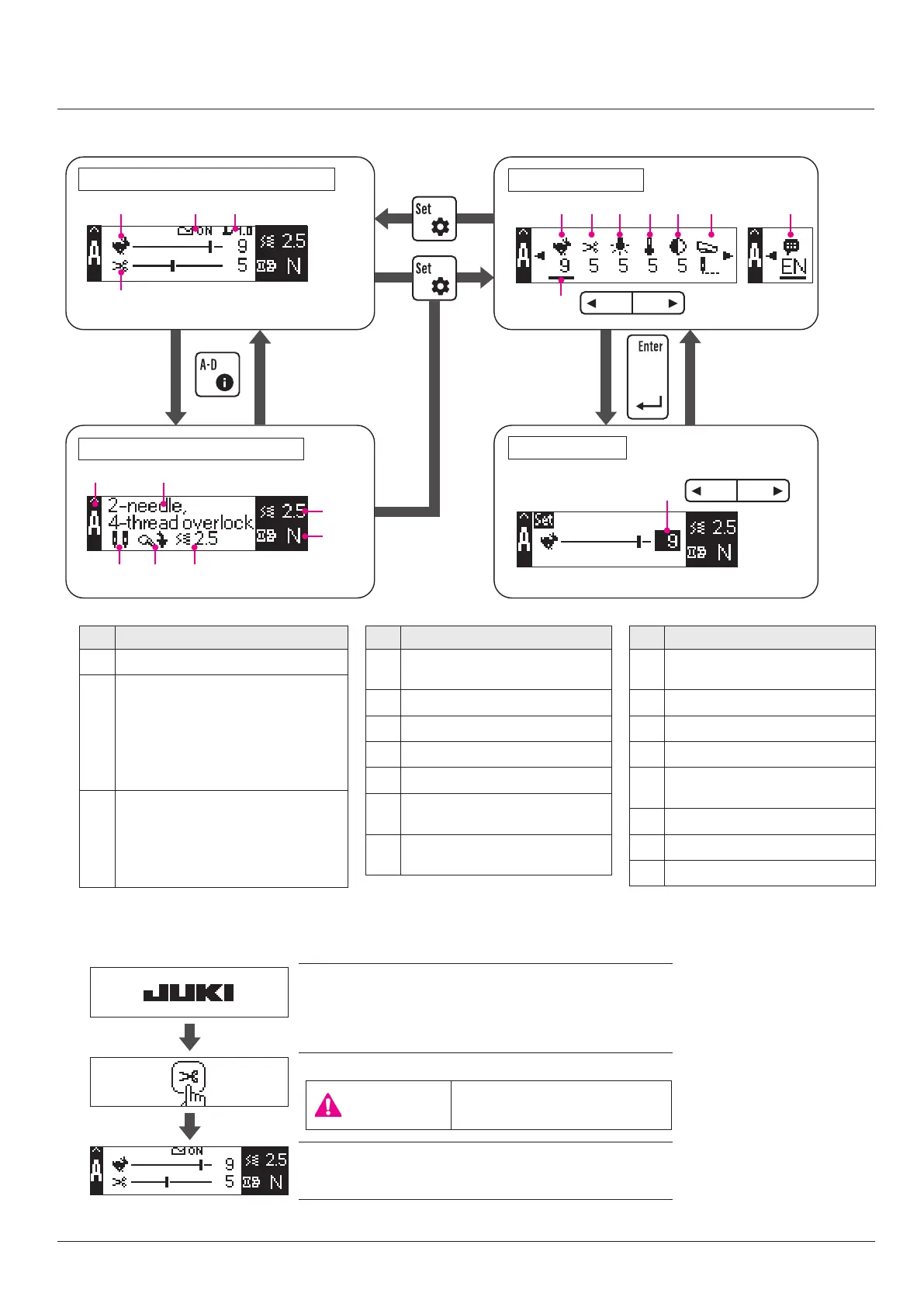
Display contents
Maximum sewing speed
Material detection sensor
ON (With a material)
OFF (Without a material)
(This parameter is displayed only
when the automatic chain-o thread
cutting function is enabled.)
Height of the presser foot by the
micro-lifter
(This parameter is displayed only
when the presser foot is in its upper
position.)
Editing and setting
Welcome screen
Press the chain-o thread cutting button.
Sewing screen (parameter display) is displayed.
After a lapse of four seconds
■
LCD screen display
Selection screen
Editing screen
Display contents
Automatic chain-o thread cut-
ting length
Stitch symbol
Stitch name
Stitch length
Dierential feed ratio
Number and positions of the
needles to be set
Position of the overlocking width
changeover knob
Display contents
Recommended value of stitch
width
Hand LED illumination
Hand LED color temperature
LCD contrast
Machine operation carried out
by depressing the foot switch
Display language
Selection bar
Set value
1. At the startup of the sewing machine
Example) Maximum
sewing speed
(or after a lapse
of ve seconds)
Sewing screen (Stitch display)
Sewing screen (parameter display)
CAUTION
Be aware that the chain-o
thread cutter will move.


 To Next Page