ENGLISH
101
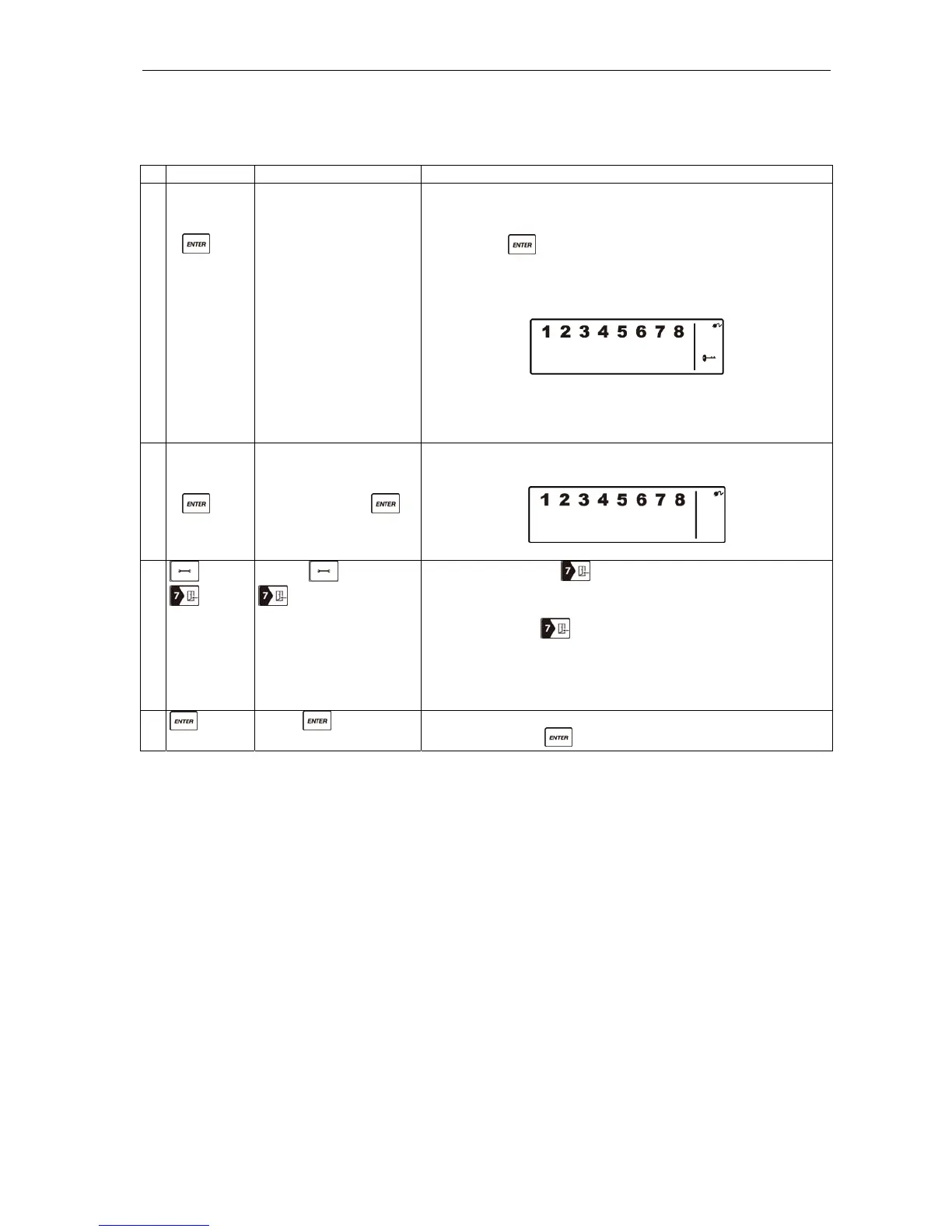
B. Setting the entry delay
With the Smart Panel’s factory setting, the user has 30 seconds to enter the property and disarm the
system. However, it is possible to set the entry delay to between 10 and 60 seconds as instructed below.
Buttons Description Note
1 (1234/4-
digit PIN
code)
+
You must be in standby
mode before you can
set the entry delay.
* How to check you are in standby mode:
Key in the factory-set PIN code 1 2 3 4 or your new 4-
digit PIN code.
Press
The following appears on the Smart Panel when in
standby mode.
(One beep indicates that you have entered a valid PIN code.
Three beeps indicate that you have entered an incorrect
code.)
2 (1234/4-
digit PIN
code)
+
Key in the factory-set
PIN code 1 2 3 4 or
your new 4-digit PIN
code followed by .
The following appears on the Smart Panel:
3
+
Press and then
(as many times as
required) to set the new
entry delay.
The first time is pressed, the number of seconds
for the current entry delay flashes on the Smart Panel
(the factory setting is 30 seconds).
Every time is pressed, the entry delay is increased
by 10 seconds within the setting interval 10–60
seconds.
The length of the entry delay flashes on the display until
the setting is completed.
4
Press to complete
the setting.
Confirm the setting and reset the Smart Panel to standby
mode by pressing .


 To Next Page