ENGLISH
103
E. Arming the system
On the remote control: Press
to arm the system.
On the Smart Panel: Check first that the Smart Panel is in standby mode and then arm the system as
instructed below.
Buttons Description Note
1 (1234/4-
digit PIN
code)
+
You must be in standby
mode before you can
switch to armed mode.
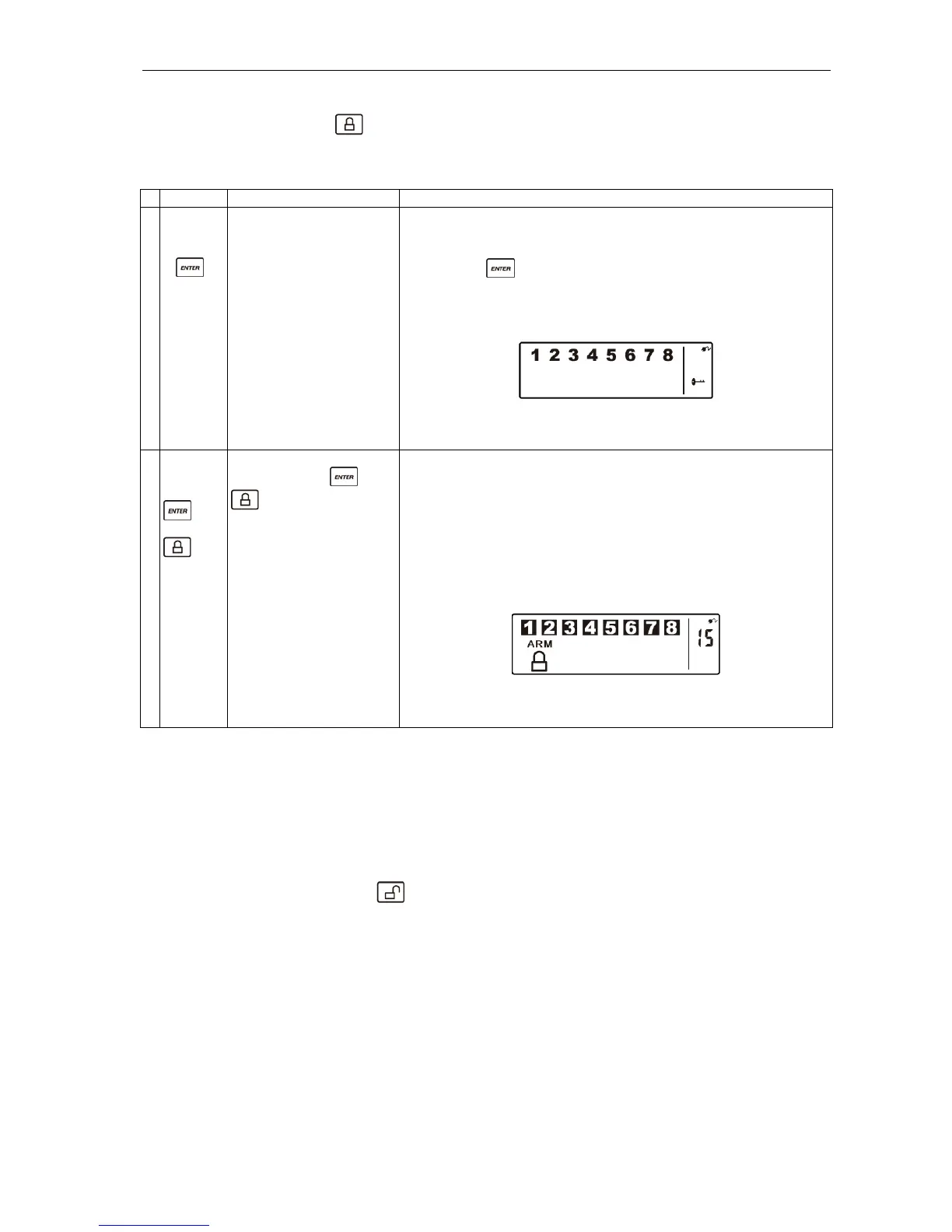
* How to check you are in standby mode:
Key in the factory-set PIN code 1 2 3 4 or your new 4-digit
PIN code.
Press .
The following appears on the Smart Panel when in standby
mode.
(One beep indicates that you have entered a valid PIN code.
Three beeps indicate that you have entered an incorrect code.)
2 (1234/4-
digit PIN
code)
+
Key in the 4-digit PIN
code, press and
to go to armed
mode.
Exit delay: up to 15 seconds.
n exit delay of 15 seconds is counted down visually and
audibly (beeps) before the system is armed. (Press the
silent button – crossed-out speaker – to deactivate the
beeps during the countdown. Press the silent button again
to activate the beeps.)
If the zone is activated, a number is displayed as illustrated
below:
This means that the system switches to armed mode after
15 seconds.
In armed mode, the Smart Panel flashes RED at 5-second intervals to deter potential intruders. If an
intruder is detected, the panel will flash RED rapidly and continuously. If there is an intrusion (and the
zone has been triggered in armed mode), the alarm siren starts to sound, the Smart Panel flashes RED at
1.5-second intervals and the triggered zone is indicated. After being triggered for the first time, the alarm
sounds immediately (without delay) if another sensor is triggered.
F. Disarming the system
On the Smart Panel: Key in your 4-digit PIN code to disarm the system.
On the remote control: Press
to disarm the system.


 To Next Page