ENGLISH
88
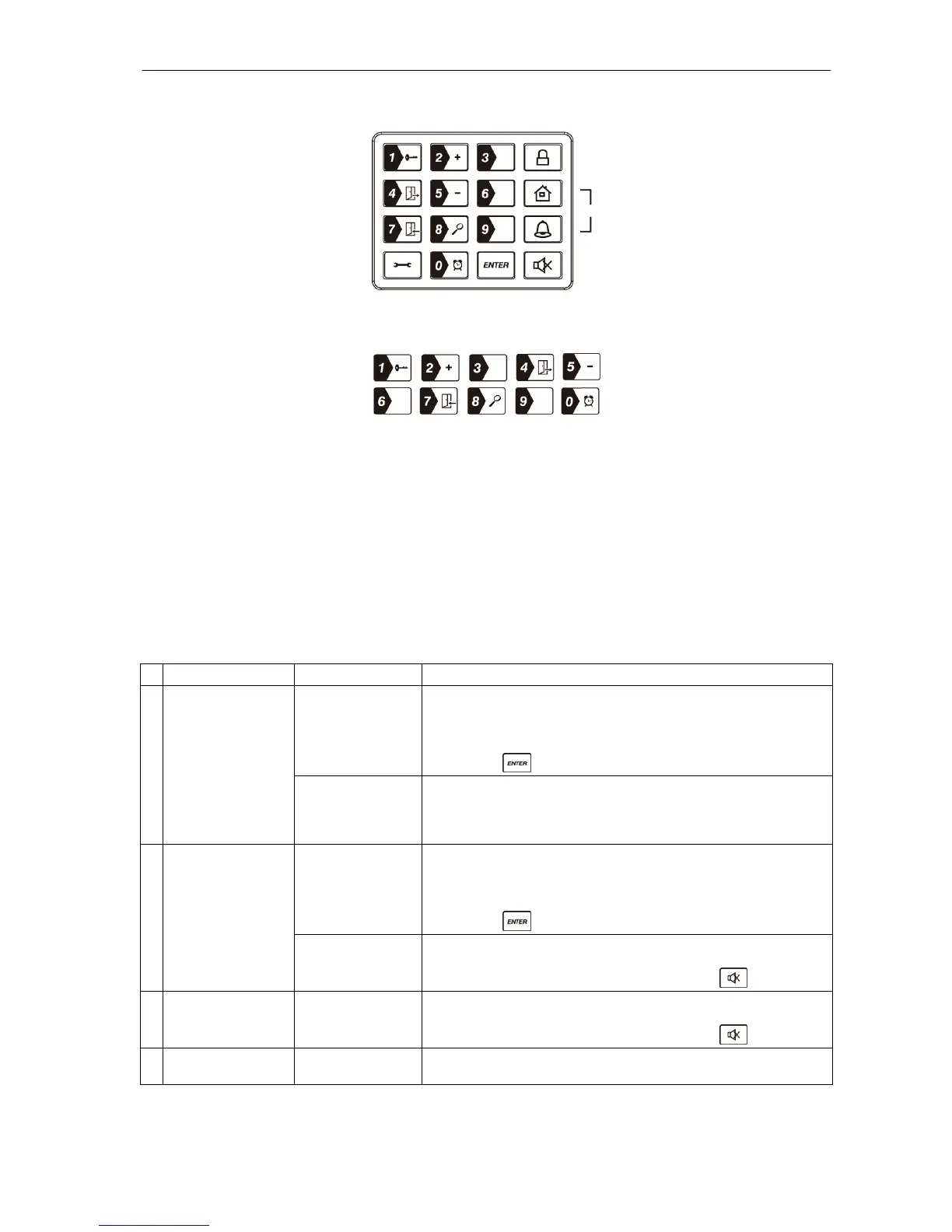
Keypad
Numerical buttons
Other information
Input for 9 VDC For mains adapter
Siren sound level 120 dB
Battery compartment For 9V alkaline back-up battery
4 pole pin block, 4 jumpers For setting the house code
8 pole pin block, 1 jumper For zone setting
Reset button (RESET) If you have forgotten your 4-digit PIN
code, first press the RESET button in the
battery compartment. Then key in the
factory-set PIN code 1 2 3 4 followed by
to reset the factory default settings.
Introduction to the Smart Panel’s audio warning and background lighting
Operating mode Situation Audio warning and background lighting
1 ARM Zone has been
triggered in armed
mode.
The duration of the alarm (siren) can be set to between 1 and
6 minutes. The factory setting is 1 minute.
Smart Panel – flashes red at 1.5 second intervals with the
triggered zone indicated (turn off with the 4-digit PIN code
followed by
).
larm set in
armed mode.
No siren.
Smart Panel – flashes red at 5-second intervals to deter
potential intruders (as opposed to when intrusion has taken
place – the panel then flashes red quickly and continuously).
2 HOME Zone has been
triggered in armed
mode.
The duration of the alarm (siren) can be set to between 1 and
6 minutes. The factory setting is 1 minute.
Smart Panel – flashes red at 1.5 second intervals with the
triggered zone indicated (turn off with the 4-digit PIN code
followed by
).
Zone has been
triggered in alert
mode.
Chime signal (ding-dong) is produced.
Smart Panel – flashes green at 1.5 second intervals with the
triggered zone indicated (turn off by pressing
).
3 ALERT Zone has been
triggered in alert
mode.
Chime signal (ding-dong) is produced.
Smart Panel – flashes green at 1.5 second intervals with the
triggered zone indicated (turn off by pressing
).
4 STANDBY Silent Smart Panel – yellow background lighting lights for 10
seconds after switching to standby mode.
Panikfunktion


 To Next Page