ENGLISH
109
C. Zone settings
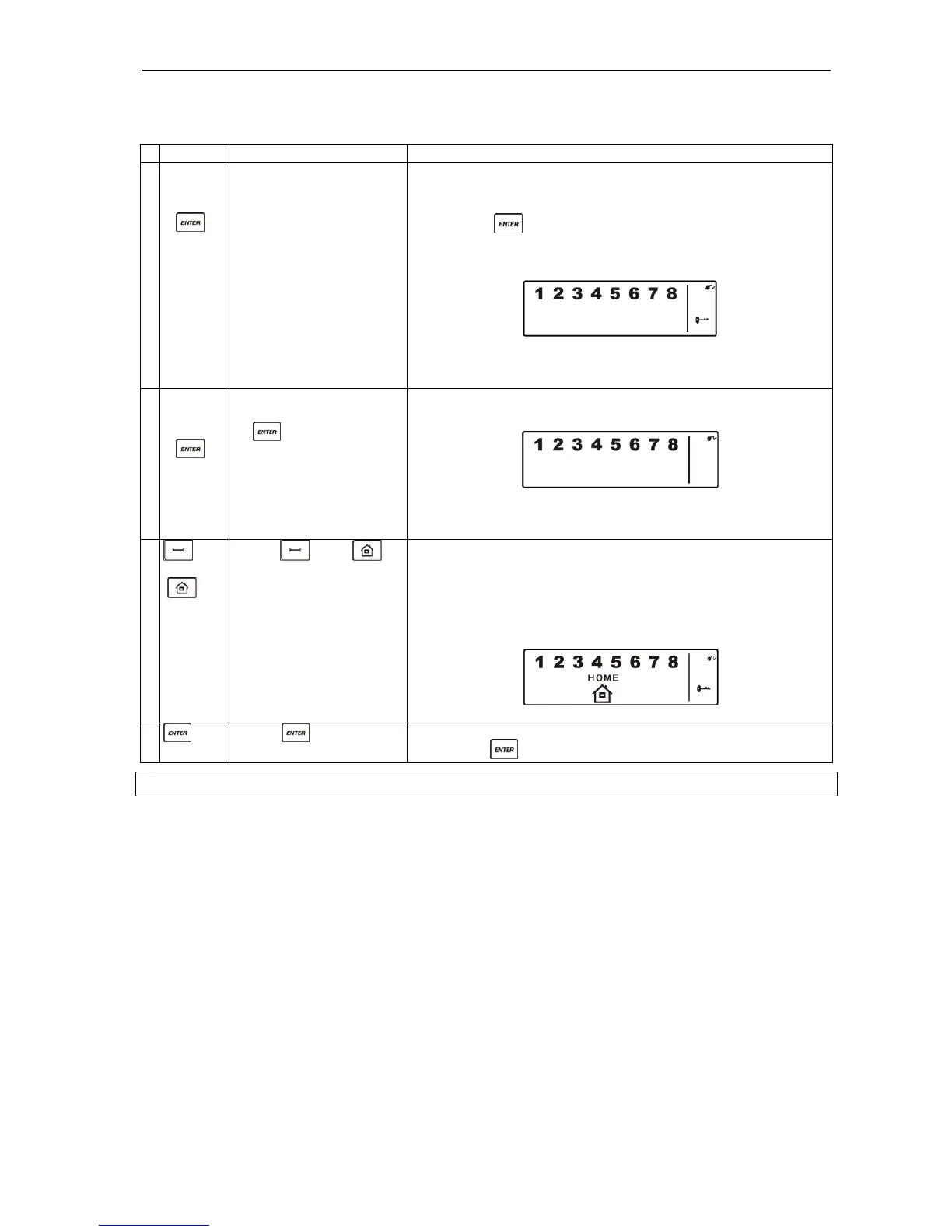
To program different zones in home mode, follow the instructions below.
Buttons Description Note
1 (1234/4-
digit PIN
code)
+
You must be in standby
mode before you can
activate home mode.
* How to check you are in standby mode:
Key in the factory-set PIN code 1 2 3 4 or your new 4-digit
PIN code.
Press .
The following appears in the display:
(One beep indicates that you have entered a valid PIN code.
Three beeps indicate that you have entered an incorrect code.)
2 4-digit
PIN
code)
+
Key in the 4-digit PIN
code for setting, followed
by .
The following appears on the Smart Panel:
(One beep indicates that you have entered a valid PIN code.
Three beeps indicate that you have entered an incorrect code.)
3
+
Press and to
activate home mode.
Set the zones 1, 2, 3, 4, 5, 6, 7 and 8 in the required modes.
☼ indicates alert mode for a zone.
☼ indicates armed mode for a zone.
☼ indicates that the zone is OFF (the digit is not displayed).
The following appears on the Smart Panel:
4
Press to complete
the setting.
Confirm the setting and reset the Smart Panel to standby mode
by pressing .
TROUBLESHOOTING
FAQs
Question 1: How do I set the system optimally? Where should I place the Smart Panel and the sensors?
Answer 1: We recommend that you consider in advance where the Smart Panel and the sensors should
be located. The best place for the Smart Panel is normally by the main entrance, in a hall or another
central location in the house. However, the options are limited by the fact that the Smart Panel must be
connected to a wall socket.
Remember that the alarm’s factory default settings give you a set time for entering (30 seconds)
and exiting (20 seconds) through the outer door before the alarm is triggered. You can change the
factory settings to allow more time for entering and exiting. It is also possible to disarm the system
with the remote control.
Question 2: How many sensors can Smart Panel handle?
Answer 2: The system can handle an unlimited number of sensors. You can supplement the various
zones in the house with additional sensors, according to your needs.
Question 3: What range can I expect the wireless sensors to have?
Answer 3: The range depends on the design of the building. With a clear view, the sensors’ signal range
is up to 250 metres from the Smart Panel. Decide first where to place the sensors and then move them if
necessary to improve RF performance.


 To Next Page