ENGLISH
89
INSTALLATION
INSTALLING THE WIRE-FREE HOME ALARM
WARNING! The Red Shield Smart Panel has an integral tamper-proof switch to stop intruders disabling
the system. Before you install the Smart Panel on a wall, check that the system is in standby mode so
that the alarm is not triggered.
Location of the Smart Panel and tamper-proof switch
First decide where to place the Smart Panel:
max. one metre from the nearest power outlet
in an easily accessible location
at a safe distance from doors or windows through which intruders can gain access
at a safe distance from extreme temperature sources (radiators, ovens, stoves, etc.) and large
metal objects that can disrupt the wireless signal transfer.
Wall installation of the Smart Panel and tamper-proof switch
First cut out the installation template for the Smart Panel and the area that is marked for locating
the tamper-proof magnet (see installation template).
Tape the template onto the wall where you want to install the Smart Panel.
Mark out drill holes for plugs and screws, as well as the tamper-proof magnet’s installation position
on the wall.
Drill the holes, insert the plugs and screw in the screws for the Smart Panel.
Check that the installation surface for the tamper-proof magnet is clean.
Pull off one of the protective films from the double-sided self-adhesive fastening tab and secure the
fastening tab to the magnet.
Pull off the other protective film and press the magnet onto the attachment surface in the marked
position until it is securely in place.
Install the Smart Panel on the wall.
When the Smart Panel has been installed, the system can be started. The tamper-proof protection
is activated when the Smart Panel has been put into operating mode HOME, ALERT or ARM.
Starting up the Smart Panel
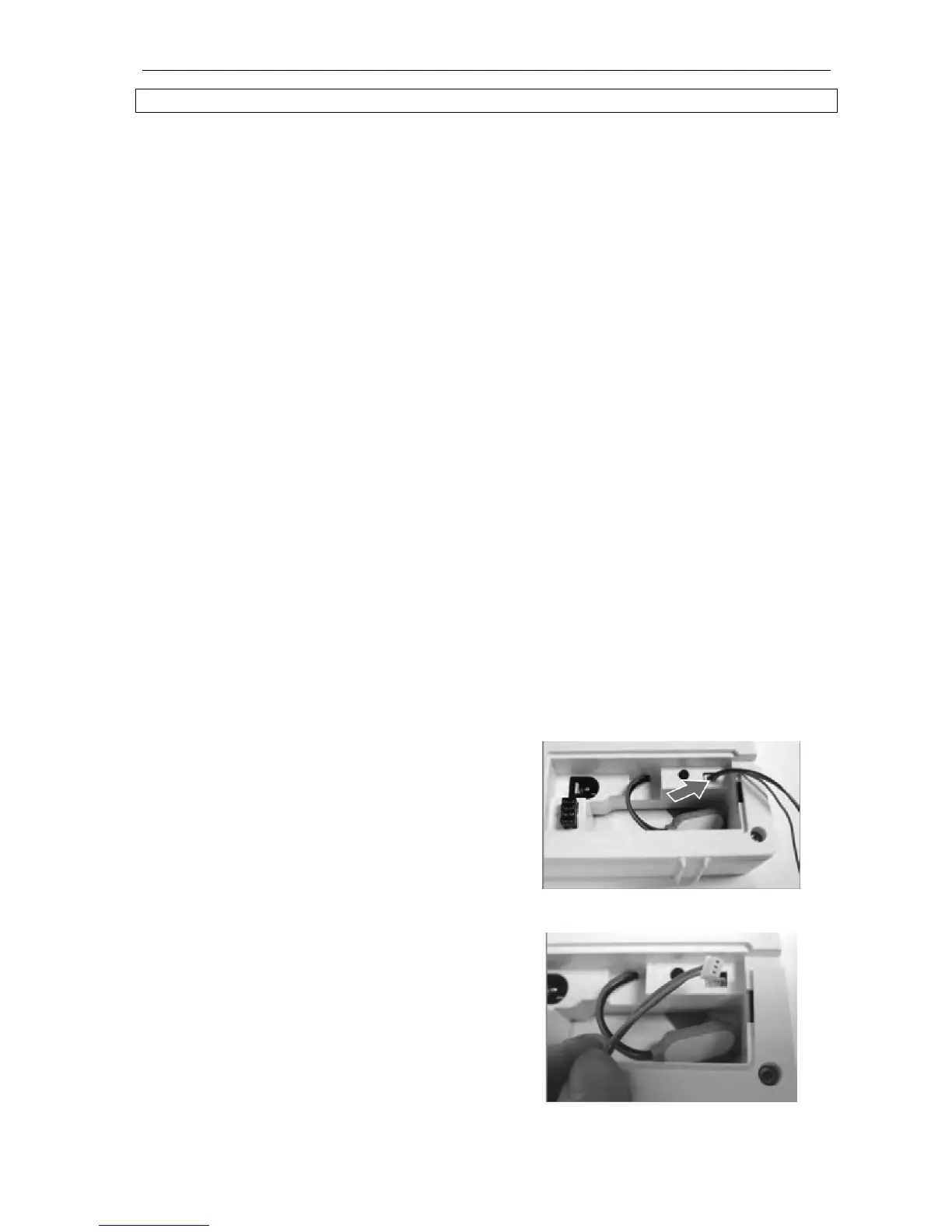
NOTE! The Smart Panel has a demo button that shows how the LCD control panel works while it is still in
the packaging. The cable to this button must be removed before starting up the Smart Panel.
Undo the screw holding the battery compartment cover. Remove the cover.
The cable to the demo button is inside the
battery compartment's upper right-hand
corner.
Loosen the cable.


 To Next Page