ENGLISH
99
Using the panic alarm without activating the siren
If you are forced to disarm the system, key in the password for threat situations to silence the siren. The
Smart Panel then sends a silent alarm signal to installed alarm units (diallers and external siren) to call for
emergency assistance.
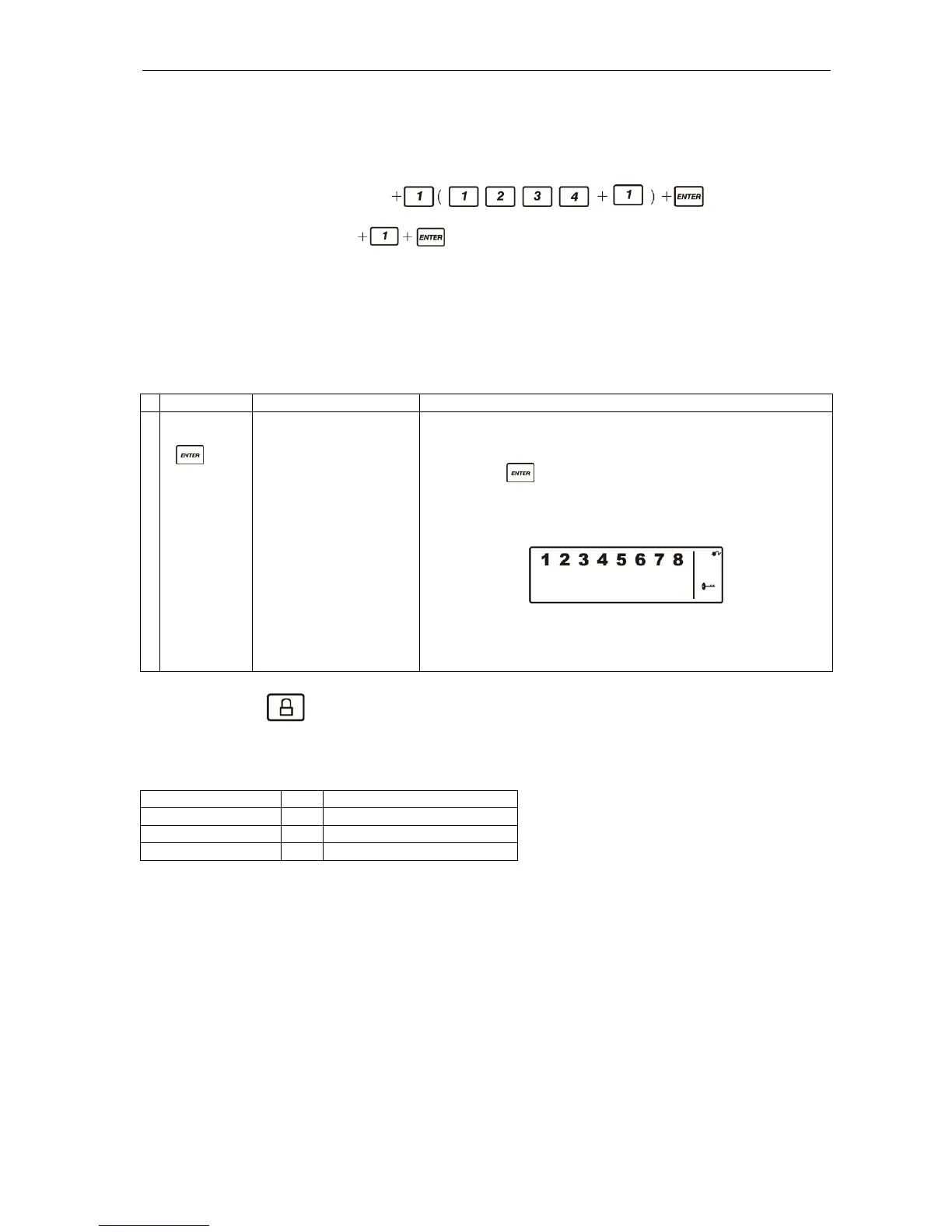
Password for threatening situations:
key in the factory-set 4-digit PIN code
or
key in your own 4-digit PIN code
OPERATING DIFFERENT MODES
The system has four different operating modes (standby, armed, alert and home) for different individual
needs. These operating modes can be set as instructed below.
Standby mode
In standby mode, the Smart Panel is ready for your choice of operating mode.
Buttons Description Note
1 (1234/4-digit
PIN code)
+
You must be in standby
mode before you can
switch to armed mode.
*How to check you are in standby mode:
Key in the factory-set PIN code 1 2 3 4 or your new 4-
digit PIN code.
Press .
The following appears on the Smart Panel when in
standby mode.
(One beep indicates that you have entered a valid PIN code.
Three beeps indicate that you have entered an incorrect
code.)
Armed mode
In armed mode, the Smart Panel’s siren sounds and the panel flashes RED at 1.5 second intervals when
the system is triggered.
The factory setting for armed mode is shown in the table below.
Sensor Zone Status (operating mode)
Door/window sensor 1 ARM
Door/window sensor 2 ARM
Motion sensor 8 ARM


 To Next Page