1-10 (No.MB563)
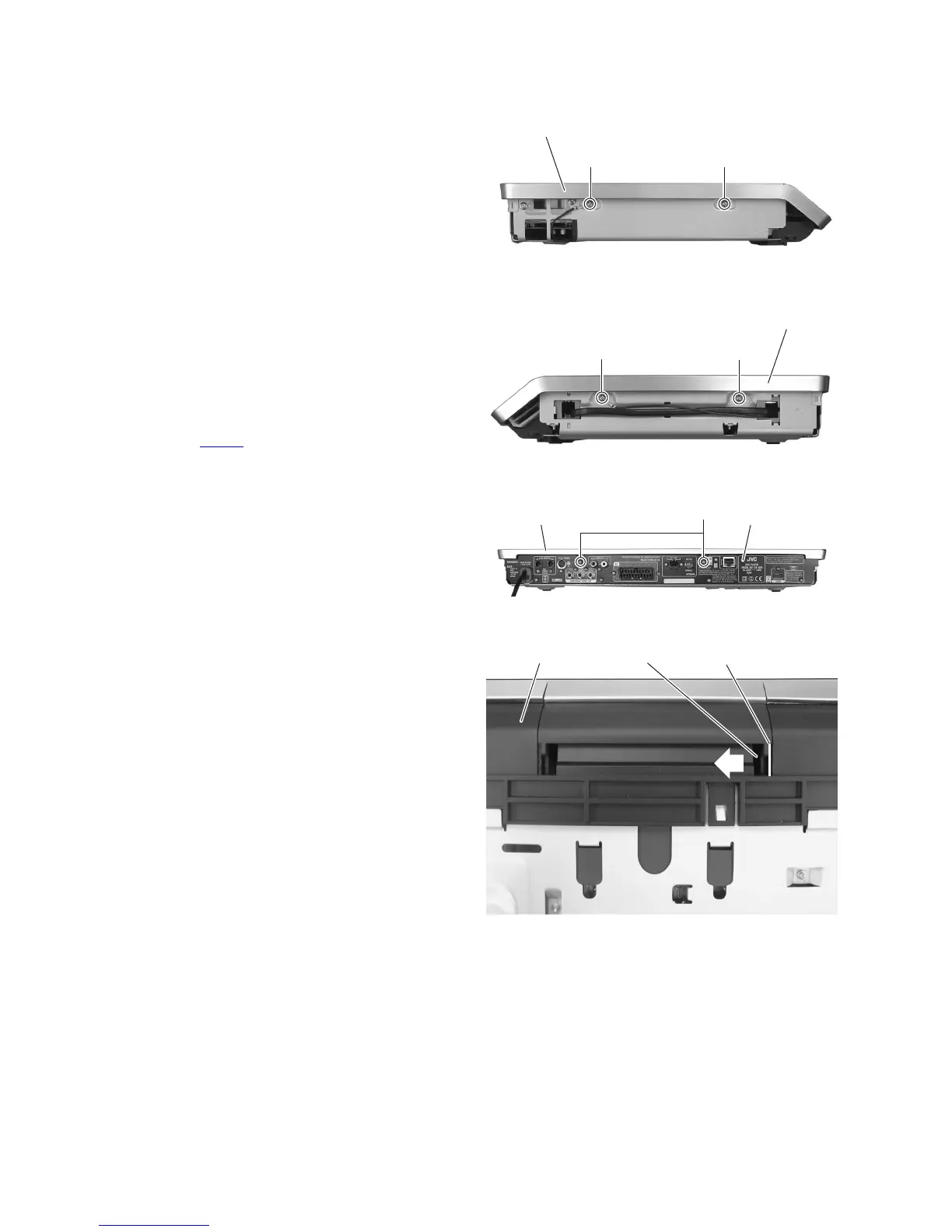
3.1.2 Removing the top cover
(See Figs. 2 to 9)
• Remove the side panel L and side panel R.
(1) From the left and right side of the main body, remove the
two screws B and two screws B' (See Figs.2 and 3)
Reference:
When attaching the screws B', attach the earth wires
with them. (See Figs. 2 and 3)
(2) From the back side of the main body, remove the two
screws C attaching the rear panel. (See Fig.4)
(3) Insert the minus driver a space a of the door arm to the
front base. (See Fig.5)
(4) Moving the minus driver in the direction of the arrow. (See
Fig.5)
(5) Take out the door from the front base in the direction of the
arrow. (See Fig.6)
(6) Remove the two screws D attaching the top cover. (See
Fig.7)
(7) From the top side of the main body, open the top panel in
the direction of the arrow. (See Fig.8)
(8) From front side of the main body, disconnect the card wire
from the connector CN451
on the main board. (See Fig.9)
(9) Remove the top cover.
Fig.2
Fig.3
Fig.4
Fig.5
Top cover
B' B
Top cover
B'
B
Rear panel
C
Top cover
Front base Door arm
a



 To Next Page