(No.MB563)1-15
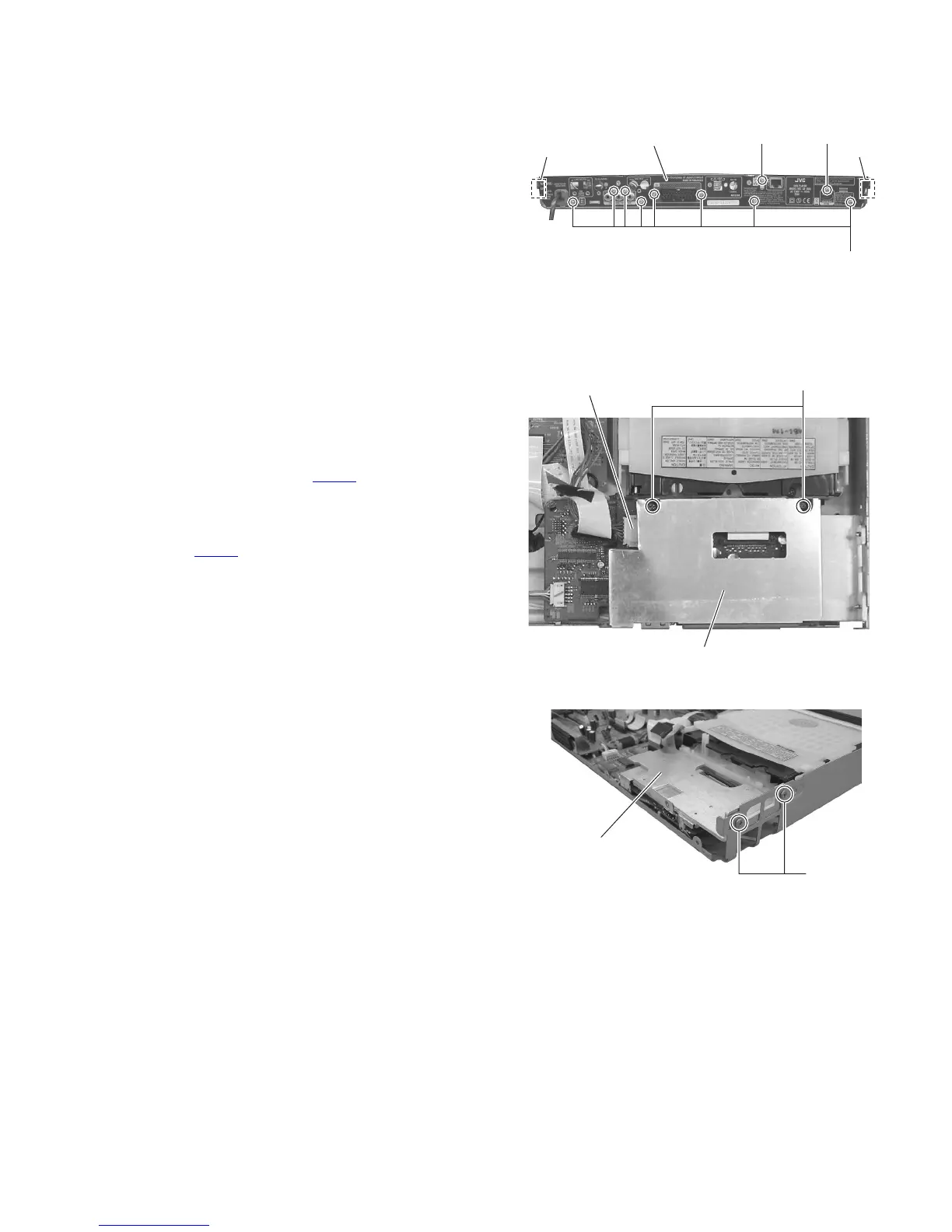
3.1.6 Removing the rear panel
(See Fig.15)
• Remove the side panel L, side panel R, top cover, front base,
audio board and tuner.
(1) From the back side of the main body, remove the eight
screws K, screw M and N attaching the rear panel.
(2) Release the two joints c of the rear panel.
(3) Take out the rear panel from the main body.
Fig.15
3.1.7 Removing the LAN board assembly
(See Figs.16 and 17)
• Remove the side panel L, side panel R, top cover, front base,
audio board, tuner and rear panel.
(1) From the top side of the main body, remove the two screws
P attaching the LAN board assembly. (See Fig.16)
(2) Disconnect the wire from the connector on the LAN board
assembly. (See Fig.16)
(3) Lift up the LAN board assembly and then disconnect the
card wire from the connector CN351
on the DVD board.
(See Fig.17)
(4) Take out the LAN board assembly from the main body.
CAUTION:
The connector CN351
is easy to broken when release the lock
of connector.
Fig.16
Fig.17
Rear panel
MN
cc
K
Connecter
LAN board assembly
P
DVD assembry
Q



 To Next Page