1-18 (No.MB563)
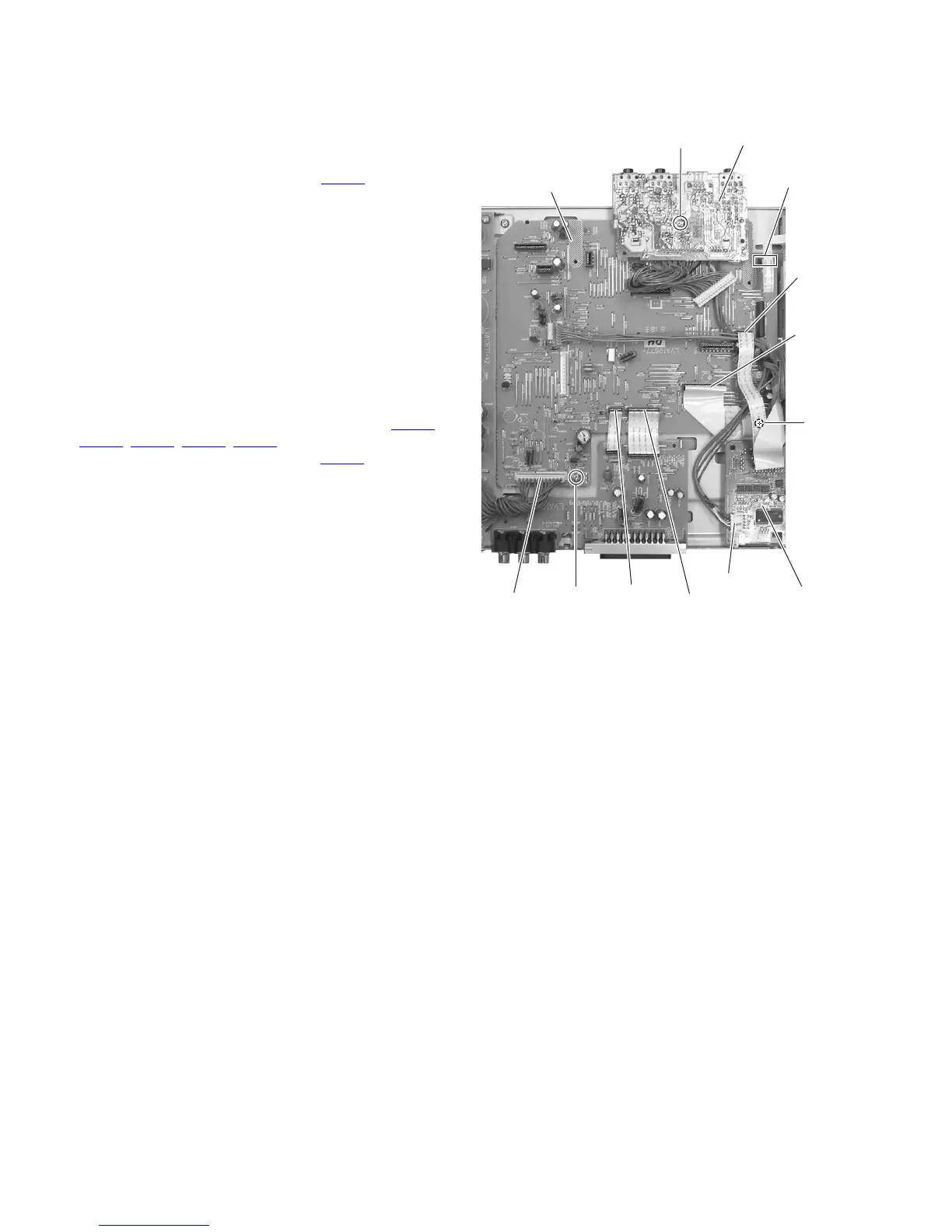
3.1.10 Removing the jack board
(See Fig.21)
• Remove the side panel L, side panel R, top cover, front base,
audio board and LAN board assembly.
(1) From the top side of the main body, remove the screw U at-
taching the jack board.
(2) Disconnect the wire from the connector CN704
on the DVD
board.
(3) Take out the jack board from the main body.
3.1.11 Removing the main board
(See Fig.21)
• Remove the side panel L, side panel R, top cover, front base,
audio board, tuner, rear panel, LAN board assembly and jack
board.
(1) From the top side of the main body, remove the screw V
and screw V' attaching the main board.
Reference:
When attaching the screw V', attach the earth wire with
it. (See Fig. 21)
(2) Disconnect the card wires from the connectors (CN461
,
CN463, CN471, CN472, CN473) on the main board.
(3) Disconnect the wire from the connector CN901
on the main
board.
(4) Take out the main board from the main body.
Fig.21
CN461
V'
V
U
CN901
CN463
CN704
CN471
CN473
CN472
Main board
Jack board
DVD board



 To Next Page