EasyManua.ls Logo

JVC DR-E31BK - Page 18

JVC DR-E31BK
54 pages
Print Icon
To Next Page IconTo Next Page
To Previous Page IconTo Previous Page
Loading...
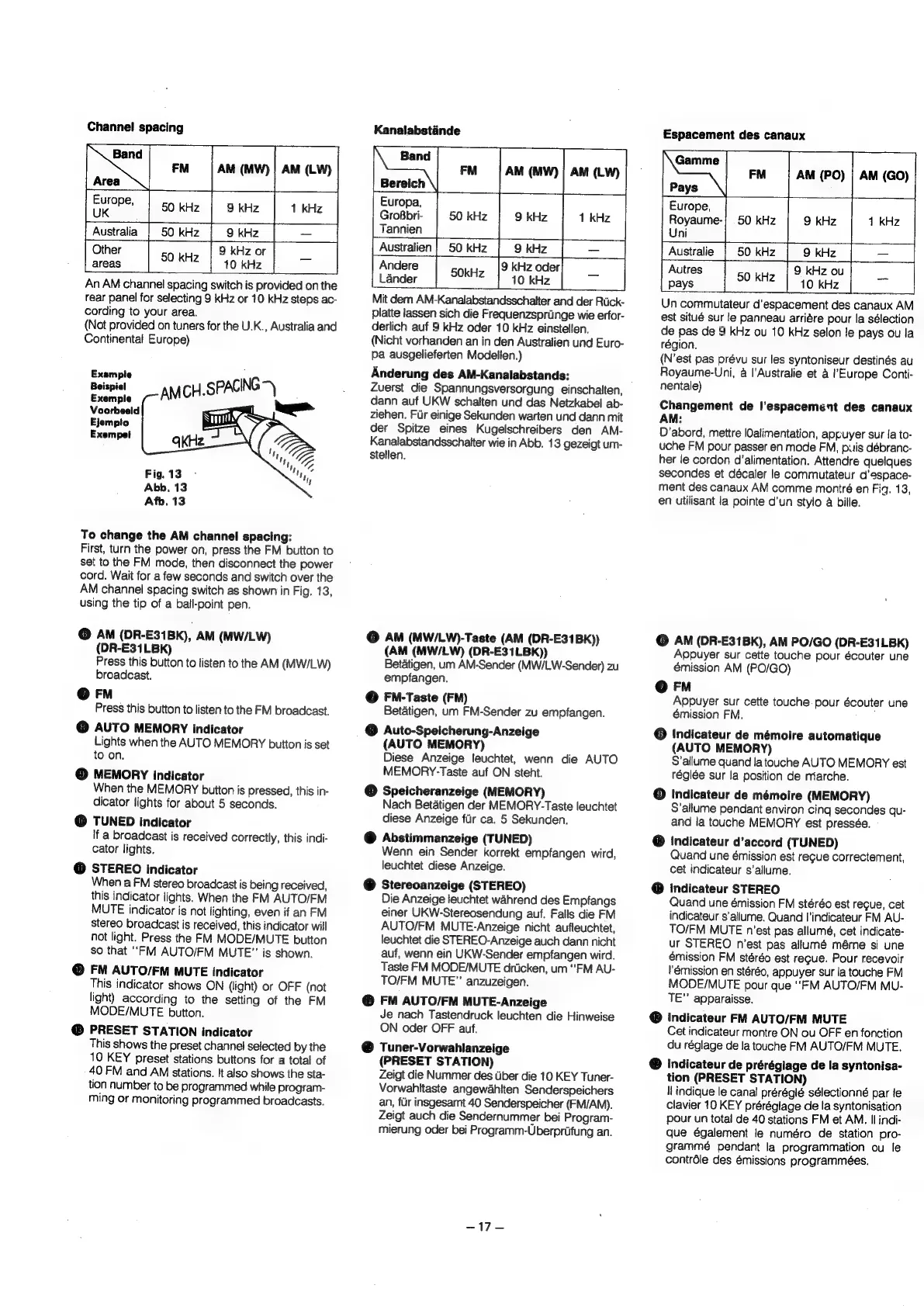
Channel
spacing
Fm
|
AM
(MW)
|
AM
(LW)
50
kHz
9
kHz
50
kHz
9
kHz
9
kHz
or
50
KHZ
|
“10
kHz
An
AM
channel
spacing
switch
is
provided
on
the
rear
panel
for
selecting
9
kHz
or
10
kHz
steps
ac-
cording
to
your
area.
(Not
provided
on
tuners
for
the
U.K.,
Australia
and
Continental
Europe)
Australia
Example
Beispiel
Exemple
Fig.
13
Abb.
13
Afb.
13
To
change
the
AM
channel
spacing:
First,
turn
the
power
on,
press
the
FM
button
to
set
to
the
FM
mode,
then
disconnect
the
power
cord.
Wait
for
a
few
seconds
and
switch
over
the
AM
channel
spacing
switch
as
shown
in
Fig.
13,
using
the
tip
of
a
ball-point
pen.
©
AM
(DR-E31Bk),
AM
(MW/LW)
(DR-E31LBK)
Press
this
button
to
listen
to
the
AM
(MW/LW)
broadcast.
@
FM
Press
this
button
to
listen
to
the
FM
broadcast.
@
AUTO
MEMORY
indicator
Lights
when
the
AUTO
MEMORY
button
is
set
to
on.
©
MEMORY
indicator
When
the
MEMORY
button
is
pressed,
this
in-
dicator
lights
for
about
5
seconds.
@
TUNED
indicator
if
a
broadcast
is
received
correctly,
this
indi-
cator
lights.
@
STEREO
indicator
When
a
FM
stereo
broadcast
is
being
received,
this
indicator
lights.
When
the
FM
AUTO/EM
MUTE
indicator
is
not
lighting,
even
if
an
FM
stereo
broadcast
is
received,
this
indicator
will
not
light.
Press
the
FM
MODE/MUTE
button
so
that
‘FM
AUTO/FM
MUTE”
is
shown.
@
FM
AUTO/FM
MUTE
indicator
This
indicator
shows
ON
(light)
or
OFF
(not
light)
according
to
the
setting
of
the
FM
MODE/MUTE
button.
@
PRESET
STATION
indicator
This
shows
the
preset
channel
selected
by
the
10
KEY
preset
stations
buttons
for
a
total
of
40
FM
and
AM
stations.
It
also
shows
the
sta-
tion
number
to
be
programmed
while
program-
ming
or
monitoring
programmed
broadcasts.
Kanalabstande
AM
(MW)
|;
AM
(LW)
Europa,
GroBbri-
Tannien
Espacement
des
canaux
AM
(PO)
|
AM
(GO)
Europe,
Royaume-
Uni
Australien
Australie
Lander
Mit
dem
AM-Kanalabstandsschalter
and
der
Ruck-
platte
lassen
sich
die
Frequenzspriinge
wie
erfor-
derlich
auf
9
kHz
oder
10
kHz
einstellen.
(Nicht
vorhanden
an
in
den
Australien
und
Euro-
Pa
ausgelieferten
Modelien.)
Anderung
des
AM-Kanalabstands:
Zuerst
die
Spannungsversorgung
einschalten,
dann
auf
UKW
schalten
und
das
Netzkabel
ab-
ziehen.
Fur
einige
Sekunden
warten
und
dann
mit
der
Spitze
eines
Kugelschreibers
den
AM-
Kanalabstandsschaiter
wie
in
Abb.
13
gezeigt
um-
Stellen.
©
AM
(MWI/LW)-Taste
(AM
(DR-E31BK))
(AM
(MW/LW)
(DR-E31LBK))
Betatigen,
um
AM-Sender
(MW/LW-Sender)
zu
empfangen.
@
FN-Taste
(FM)
Betatigen,
um
FM-Sender
zu
empfangen.
©
Auto-Speicherung-Anzeige
(AUTO
MEMORY)
Diese
Anzeige
leuchtet,
wenn
die
AUTO
MEMORY-Taste
auf
ON
steht.
©
Speicheranzeige
(MEMORY)
Nach
Betatigen
der
MEMORY-Taste
leuchtet
diese
Anzeige
flr
ca.
5
Sekunden.
@
Abstimmanzeige
(TUNED)
Wenn
ein
Sender
korrekt
empfangen
wird,
leuchtet
diese
Anzeige.
@
Stereoanzeige
(STEREO)
Die
Anzeige
leuchtet
wahrend
des
Empfangs
einer
UKW-Stereosendung
auf.
Falls
die
FM
AUTO/FM
MUTE-Anzeige
nicht
aufleuchtet,
leuchtet
die
STEREO-Anzeige
auch
dann
nicht
auf,
wenn
ein
UKW-Sender
empfangen
wird.
Taste
FM
MODE/MUTE
drticken,
um
‘FM
AU-
TO/FM
MUTE”
anzuzeigen.
@
FM
AUTO/FM
MUTE-Anzeige
Je
nach
Tastendruck
leuchten
die
Hinweise
ON
oder
OFF
auf.
@
Tuner-Vorwahlanzeige
(PRESET
STATION)
Zeigt
die
Nummer
des
Uber
die
10
KEY
Tuner-
Vorwahitaste
angewahlten
Senderspeichers
an,
fur
insgesamt
40
Senderspeicher
(FM/AM).
Zeigt
auch
die
Sendernummer
bei
Program-
mierung
oder
bei
Programm-Uberpriifung
an.
APS
Autres
pays
Un
commutateur
d'espacement
des
canaux
AM
est
situé
sur
le
panneau
arriére
pour
la
sélection
de
pas
de
9
kHz
ou
10
kHz
selon
le
pays
ou
la
région.
(N’est
pas
prévu
sur
les
syntoniseur
destinés
au
Royaume-Uni,
a
|'Australie
et
a
l'Europe
Conti-
nentale)
Changement
de
l’espacement
des
canaux
AM:
D’abord,
mettre
lOalimentation,
appuyer
sur
Ja
to-
uche
FM
pour
passer
en
mode
FM,
puis
débranc-
her
le
cordon
d’alimentation.
Attendre
quelques
secondes
et
décaler
le
commutateur
d'espace-
ment
des
canaux
AM
comme
montré
en
Fig.
13,
en
utilisant
la
pointe
d'un
stylo
a
bille.
©
AM
(DR-E31BK),
AM
PO/GO
(DR-E31LBK)
Appuyer
sur
cette
touche
pour
écouter
une
émission
AM
(PO/GO)
@
FM
Appuyer
sur
cette
touche
pour
écouter
une
émission
FM.
:
©
Indicateur
de
mémoire
automatique
(AUTO
MEMORY)
S’allume
quand
la
touche
AUTO
MEMORY
est
réglée
sur
la
position
de
miarche.
@
Indicateur
de
mémoire
(MEMORY)
S’allume
pendant
environ
cing
secondes
qu-
and
la
touche
MEMORY
est
pressée.
@
Indicateur
d’accord
(TUNED)
Quand
une
émission
est
regue
correctement,
cet
indicateur
s’allume.
@
Indicateur
STEREO
Quand
une
émission
FM
stéréo
est
recue,
cet
indicateur
s’allume.
Quand
I'indicateur
FM
AU-
TO/FM
MUTE
n'est
pas
allumé,
cet
indicate-
ur
STEREO
n’est
pas
allumé
méme
si
une
émission
FM
stéréo
est
regue.
Pour
recevoir
lémission
en
stéréo,
appuyer
sur
la
touche
FM
MODE/MUTE
pour
que
‘FM
AUTO/FM
MU-
TE”
apparaisse.
@
indicateur
FM
AUTO/FM
MUTE
Cet
indicateur
montre
ON
ou
OFF
en
fonction
du
réglage
de
la
touche
FM
AUTO/FM
MUTE,
@
Indicateur
de
préréglage
de
la
syntonisa-
tion
(PRESET
STATION)
ll
indique
le
canal
préréglé
sélectionné
par
le
clavier
10
KEY
prérégiage
de
la
syntonisation
pour
un
total
de
40
stations
FM
et
AM.
Il
indi-
que
également
le
numéro
de
station
pro-
grammé
pendant
la
programmation
ou
le
contréle
des
émissions
programmeées.

Related product manuals