EasyManua.ls Logo

JVC DR-E31BK - Page 36

JVC DR-E31BK
54 pages
Print Icon
To Next Page IconTo Next Page
To Previous Page IconTo Previous Page
Loading...
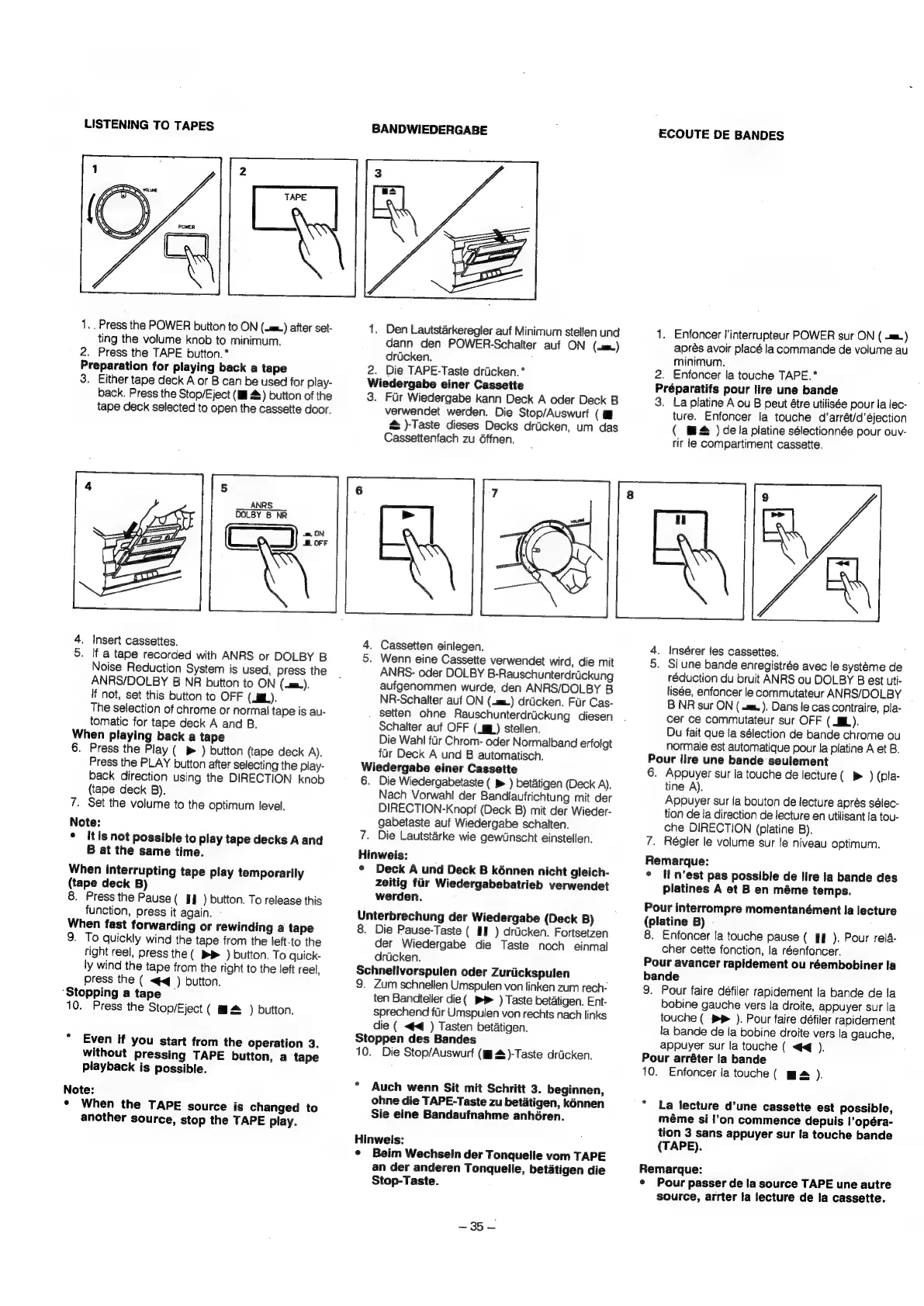
LISTENING
TO
TAPES
1.
Press
the
POWER
button
to
ON
(.m.)
after
set-
ting
the
volume
knob
to
minimum.
2.
Press
the
TAPE
button.
*
Preparation
for
playing
back
a
tape
3.
Either
tape
deck
A
or
B
can
be
used
for
play-
back.
Press
the
Stop/Eject
(Ill
4s)
button
of
the
tape
deck
selected
to
open
the
cassette
door.
ANRS
DOLBY
B
NR
4.
Insert
cassettes.
5.
If
a
tape
recorded
with
ANRS
or
DOLBY
B
Noise
Reduction
System
is
used,
press
the
ANRS/DOLBY
B
NR
button
to
ON
(-m.).
If
not,
set
this
button
to
OFF
(ML).
The
selection
of
chrome
or
normal
tape
is
au-
tomatic
for
tape
deck
A
and
B.
When
playing
back
a
tape
6.
Press
the
Play
(
®
)
button
(tape
deck
A).
Press
the
PLAY
button
after
selecting
the
play-
back
direction
using
the
DIRECTION
knob
(tape
deck
B).
7.
Set
the
volume
to
the
optimum
level.
Note:
¢
Itis
not
possible
to
play
tape
decks
A
and
B
at
the
same
time.
When
interrupting
tape
play
temporarily
(tape
deck
B)
8.
Press
the
Pause
(
I
)
button.
To
release
this
function,
press
it
again.
-
When
fast
forwarding
or
rewinding
a
tape
9.
To
quickly
wind
the
tape
from
the
left-to
the
right
reel,
press
the
(
&
)
button.
To
quick-
ly
wind
the
tape
from
the
right
to
the
left
reel,
press
the
(
<4
)
button.
‘Stopping
a
tape
~
10.
Press
the
Stop/Eject
(
ma
)
button.
Even
if
you
start
from
the
Operation
3.
without
pressing
TAPE
button,
a
tape
playback
is
possible.
Note:
*
When
the
TAPE
source
is
changed
to
another
source,
stop
the
TAPE
play.
BANDWIEDERGABE
2
3
|
TAPE
|
1.
Den
Lautstarkeregler
auf
Minimum
stellen
und
dann
den
POWER-Schalter
auf
ON
(.)
drucken.
2.
Die
TAPE-Taste
drticken.*
Wiedergabe
einer
Cassette
3.
Fur
Wiedergabe
kann
Deck
A
oder
Deck
B
verwendet
werden.
Die
Stop/Auswurf
(
i
@
)-Taste
dieses
Decks
driicken,
um
das
Cassettenfach
zu
6ffnen.
4.
Cassetten
einlegen.
5.
Wenn
eine
Cassette
verwendet
wird,
die
mit
ANRS-
oder
DOLBY
B-Rauschunterdrdickung
aufgenommen
wurde,
den
ANRS/DOLBY
B
NR-Schalter
auf
ON
(4m)
drticken.
Fur
Cas-
setten
ohne
Rauschunterdrickung
diesen
Schalter
auf
OFF
(gp)
stellen.
Die
Wahl
fir
Chrom-
oder
Normalband
erfolgt
fur
Deck
A
und
B
automatisch.
Wiedergabe
einer
Cassette
6.
Die
Wiedergabetaste
(
p>
)
betatigen
(Deck
A).
Nach
Vorwahi
der
Bandlaufrichtung
mit
der
DIRECTION-Knopf
(Deck
B)
mit
der
Wieder-
gabetaste
auf
Wiedergabe
schalten.
7.
Die
Lautstaérke
wie
gewUinscht
einstellen.
Hinweis:
¢
Deck
A
und
Deck
B
kénnen
nicht
gleich-
zeitig
fur
Wiedergabebatrieb
verwendet
werden.
Unterbrechung
der
Wiedergabe
(Deck
B)
8.
Die
Pause-Taste
(
HE
)
drticken.
Fortsetzen
der
Wiedergabe
die
Taste
noch
einmal
drucken.
Schnellvorspulen
oder
Zuriickspulen
9.
Zum
schnellen
Umspulen
von
linken
zum
rech-
ten
Bandteller
die(
PP
)
Taste
betatigen.
Ent-
sprechend
flr
Umspulen
von
rechts
nach
links
die
(
<4)
Tasten
betatigen.
Stoppen
des
Bandes
10.
Die
Stop/Auswurf
(Ml
4)-Taste
drucken.
*
Auch
wenn
Sit
mit
Schritt
3.
beginnen,
ohne
die
TAPE-Taste
zu
betatigen,
kénnen
Sie
eine
Bandaufnahme
anhéren.
Hinweis:
¢
Beim
Wechsein
der
Tonquelle
vom
TAPE
an
der
anderen
Tonquelle,
betatigen
die
Stop-Taste.
~35—
ECOUTE
DE
BANDES
1.
Enfoncer
!’interrupteur
POWER
sur
ON
(
=)
aprés
avoir
placé
la
commande
de
volume
au
minimum.
2.
Enfoncer
la
touche
TAPE.*
Préparatifs
pour
lire
une
bande
3.
La
platine
A
ou
B
peut
étre
utilisée
pour
la
lec-
ture.
Enfoncer
la
touche
d’arrét/d’éjection
(
™&
)
dela
platine
sélectionnée
pour
ouv-
rir
le
compartiment
cassette.
8
9
ul
4.
Insérer
les
cassettes.
5.
Si
une
bande
enregistrée
avec
le
systeme
de
réduction
du
bruit
ANRS
ou
DOLBY
B
est
uti-
lisée,
enfoncer
le
commutateur
ANRS/DOLBY
B
NR
sur
ON
(
«mm.
).
Dans
le
cas
contraire,
pla-
cer
ce
commutateur
sur
OFF
(
BL).
Du
fait
que
la
sélection
de
bande
chrome
ou
normale
est
automatique
pour
la
platine
A
et
B.
Pour
lire
une
bande
seulement
6.
Appuyer
sur
la
touche
de
lecture
(
>
)
(pla-
tine
A).
Appuyer
sur
la
bouton
de
lecture
aprés
sélec-
tion
de
la
direction
de
lecture
en
utilisant
la
tou-
che
DIRECTION
(platine
B).
7.
Régler
le
volume
sur
le
niveau
optimum.
Remarque:
°
H
Mest
pas
possible
de
lire
la
bande
des
platines
A
et
B
en
méme
temps.
Pour
interrompre
momentanément
la
lecture
(platine
B)
-
8.
Enfoncer
la
touche
pause
(
If
).
Pour
rela-
cher
cette
fonction,
la
réenfoncer.
Pour
avancer
rapidement
ou
réembobiner
la
bande
9.
Pour
faire
défiler
rapidement
la
bande
de
la
bobine
gauche
vers
la
droite,
appuyer
sur
la
touche
(
PP
).
Pour
faire
défiler
rapidement
la
bande
de
la
bobine
droite
vers
la
gauche,
appuyer
sur
la
touche
(
<<
).
Pour
arréter
la
bande
10.
Enfoncer
la
touche
(
m&
).
*
La
lecture
d'une
cassette
est
possible,
méme
si
l'on
commence
depuis
!’opéra-
tion
3
sans
appuyer
sur
la
touche
bande
(TAPE).
Remarque:
*
Pour
passer
de
la
source
TAPE
une
autre
source,
arrter
la
lecture
de
la
cassette.

Related product manuals