EasyManua.ls Logo

JVC HR-D540EE - Page 10

JVC HR-D540EE
90 pages
Print Icon
To Next Page IconTo Next Page
To Previous Page IconTo Previous Page
Loading...
|
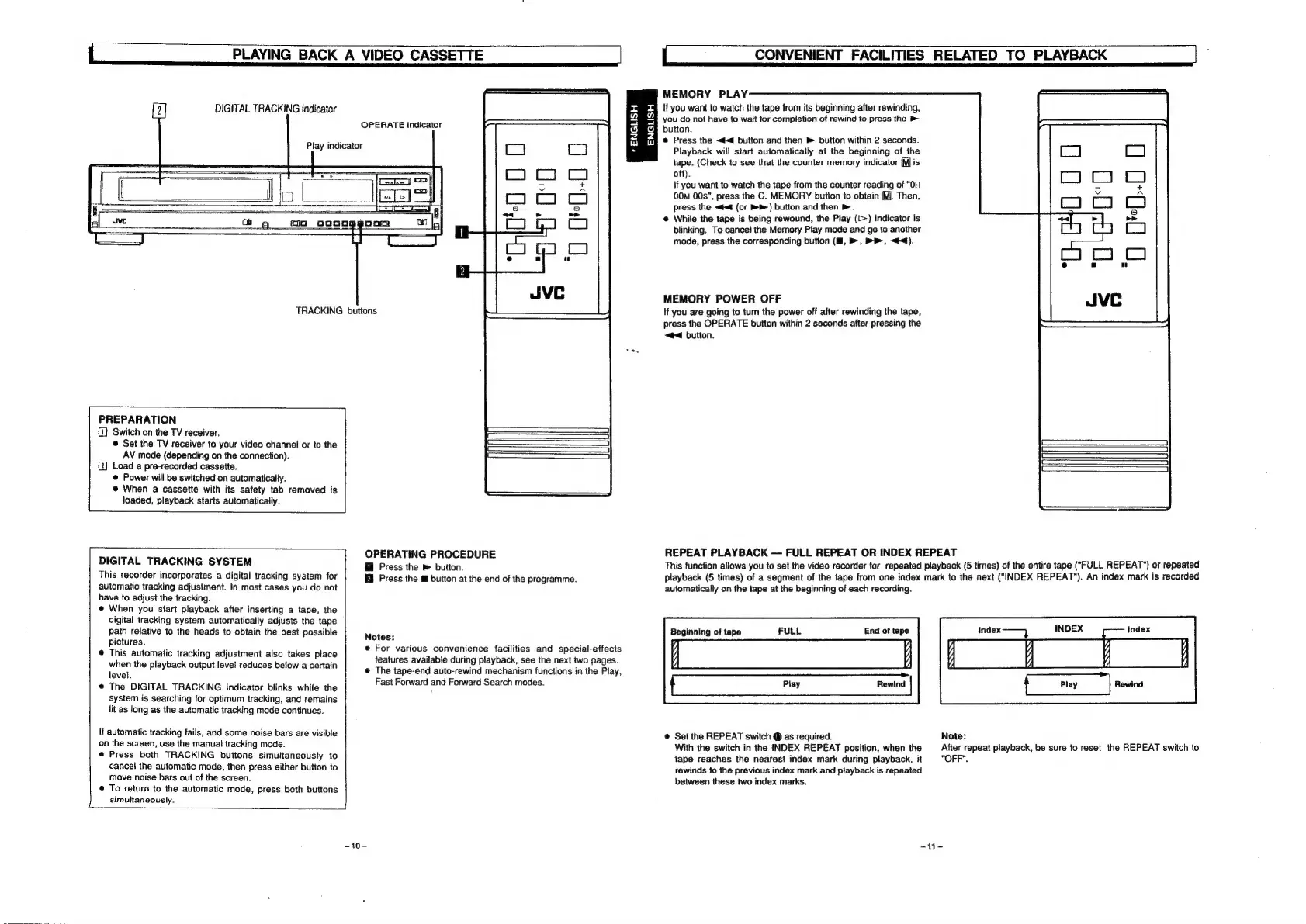
PLAYING
BACK
A
VIDEO
CASSETTE
DIGITAL
TRACKING
indicator
Play
indicator
OPERATE
indicator
TRACKING
buttons
PREPARATION
(1)
Switch
on
the
TV
receiver.
©
Set
the
TV
receiver
to
your
video
channel
or
to
the
AV
mode
(depending
on
the
connection).
{2]
Load
a
pre-recorded
cassette.
©
Power
will
be
switched
on
automatically.
@
When
a
cassette
with
its
safety
tab
removed
is
loaded,
playback
starts
automatically.
DIGITAL
TRACKING
SYSTEM
This
recorder
incorporates
a
digital
tracking
system
for
automatic
tracking
adjustment.
In
most
cases
you
do
not
have
to
adjust
the
tracking.
@
When
you
start
playback
after
inserting
a
tape,
the
digital
tracking
system
automatically
adjusts
the
tape
path
relative
to
the
heads
to
obtain
the
best
possible
pictures.
®
This
automatic
tracking
adjustment
also
takes
place
when
the
playback
output
level
reduces
betow
a
certain
level.
@
The
DIGITAL
TRACKING
indicator
blinks
while
the
system
is
searching
for
optimum
tracking,
and
remains
lit
as
long
as
the
automatic
tracking
mode
continues.
If
automatic
tracking
fails,
and
some
noise
bars
are
visible
on
the
screen,
use
the
manual
tracking
mode.
e@
Press
both
TRACKING
buttons
simultaneously
to
cancel
the
automatic
mode,
then
press
either
button
to
move
noise
bars
out
of
the
screen.
®
To
return
to
the
automatic
mode,
press
both
buttons
L
simultaneously.
OPERATING
PROCEDURE
fil
Press
the
»
button.
Press
the
button
at
the
end
of
the
programme.
Notes:
e
For
various
convenience
facilities
and
special-effects
features
available
during
playback,
see
the
next
two
pages.
@
The
tape-end
auto-rewind
mechanism
functions
in
the
Play,
Fast
Forward
and
Forward
Search
modes.
-10-
=x
w
=
So
Zz
Ww
ENGLISH
|
;
CONVENIENT
FACILITIES
RELATED
TO
PLAYBACK
MEMORY
PLAY
if
you
want
to
watch
the
tape
from
its
beginning
after
rewinding,
you
do
not
have
to
wait
for
completion
of
rewind
to
press
the
»
button.
@
Press
the
<4
button
and
then
m
button
within
2
seconds.
Playback
will
start
automatically
at
the
beginning
of
the
tape.
(Check
to
see
that
the
counter
memory
indicator
[Mis
off).
if
you
want
to
watch
the
tape
from
the
counter
reading
of
“OH
00M
00s”,
press
the
C.
MEMORY
button
to
obtain
MJ.
Then,
press
the
<4
(or
B®)
button
and
then
>.
@
While
the
tape
is
being
rewound,
the
Play
(C>)
indicator
is
blinking.
To
cancel
the
Memory
Play
mode
and
go
to
another
mode,
press
the
corresponding
button
(1,
>,
»,
<4).
MEMORY
POWER
OFF
If
you
are
going
to
turn
the
power
off
after
rewinding
the
tape,
press
the
OPERATE
button
within
2
seconds
after
pressing
the
~@4
button.
REPEAT
PLAYBACK
FULL
REPEAT
OR
INDEX
REPEAT
This
function
allows
you
to
set
the
video
recorder
for
repeated
playback
(5
times)
of
the
entire
tape
("FULL
REPEAT")
or
repeated
playback
(5
times)
of
a
segment
of
the
tape
from
one
index
mark
to
the
next
("INDEX
REPEAT").
An
index
mark
is
recorded
automatically
on
the
tape
at
the
beginning
of
each
recording.
Index
End
of
tape
Beginning
of
tape
>,
{
Play
|
Rewind
@
Set
the
REPEAT
switch
®
as
required.
Note:
With
the
switch
in
the
INDEX
REPEAT
position,
when
the
After
repeat
playback,
be
sure
to
reset
the
REPEAT
switch
to
tape
reaches
the
nearest
index
mark
during
playback,
it
"OFF".
rewinds
to
the
previous
index
mark
and
playback
is
repeated
between
these
two
index
marks.
“te

Related product manuals