EasyManua.ls Logo

JVC HR-D540EE - In Case of Difficulty

JVC HR-D540EE
90 pages
Print Icon
To Next Page IconTo Next Page
To Previous Page IconTo Previous Page
Loading...
I
IN
CASE
OF
DIFFICULTY
What
may
initially
appear
to
be
trouble
is
not
always
a
real
problem.
Make
sure
first
...
ae
Symptoms
Check
points
b=
ae
istli
ing
i
i
from
TV
or
reduce
TV
sound
volume.
POWER
AND
TAPE
TRANSPORT
PROBLEMS
caged
|
Wieiro
at
howtiie
hexe
tom
1
DE
Perens
CIE
Sear
Foal
Wand
Gada
aw
;
Some
channels
are
skipped
over
when
@
Those
channels
are
preset
to
be
skipped
over.
If
you
nee
,
i
wu
Ww
Symptoms
Check
points
selecting
a
channel.
No
power
is
applied
to
the
recorder.
@
ts
the
power
cord
disconnected?
Channel
cannot
be
switched.
Is
recording
in
progress?
Connect
it.
Press
PAUSE/STILL/SLOW,
select
a
desired
channel
and
press
PLAY
.
Clock
is
functioning
properly,
but
the
Is
the
TIMER
indicator
lit
on
the
FDP?
The
recorder
cannot
be
operated
with
the
Batteries
are
discharged.
recorder
cannot
be
powered.
Press
TIMER
to
disengage
the
Timer
Recording
Standby
mode.
remote
control.
Replace
with
new
one.
Tape
does
not
run
during
recording.
Is
the
PAUSE/STILL/SLOW
button
engaged?
Press
the
PLAY
button.
:
Sanit
:
2
ae
This
recorder
contains
microcomputers.
Externai
electronic
noise
or
interference
could
cause
malfunctioning.
!n
such
cases,
Tape
stops
in
the
Rewind
or
Fast-Forward
Is
the
COUNTER
MEMORY
switch
set
so
that
"M"
appears
on
the
FDP?
switch
the
power
off
and
unplug
the
power
cord.
Then
plug
it
in
again
and
switch
on.
Take
out
the
cassette.
After
checking
the
mode.
Press
to
make
"M"
disappear.
cassette,
operate
the
unit
as
usual.
Tape
will
not
rewind
or
fast
forward.
Is
the
tape
already
fully
rewound
or
fast
forwarded?
oe
Check
the
cassette.
RECORDING
PROBLEMS
Check
points
Recording
cannot
be
started.
ls
a
cassette
loaded?
Is
the
safety
tab
on
the
cassette
removed?
Reseal
the
slot
with
cellophane
tape.
+
Camera
recording
is
not
possible.
Are
the
camera
and
the
camera
adapter
correctly
connected?
HEAD
CLEANING
Is
the
power
switch
of
the
camera
adapter
set
to
ON?
Does
the
channel
display
indicate
"AU"?
Press
TV
PROG.
until
"AU"
appears
in
the
channel
display.
@
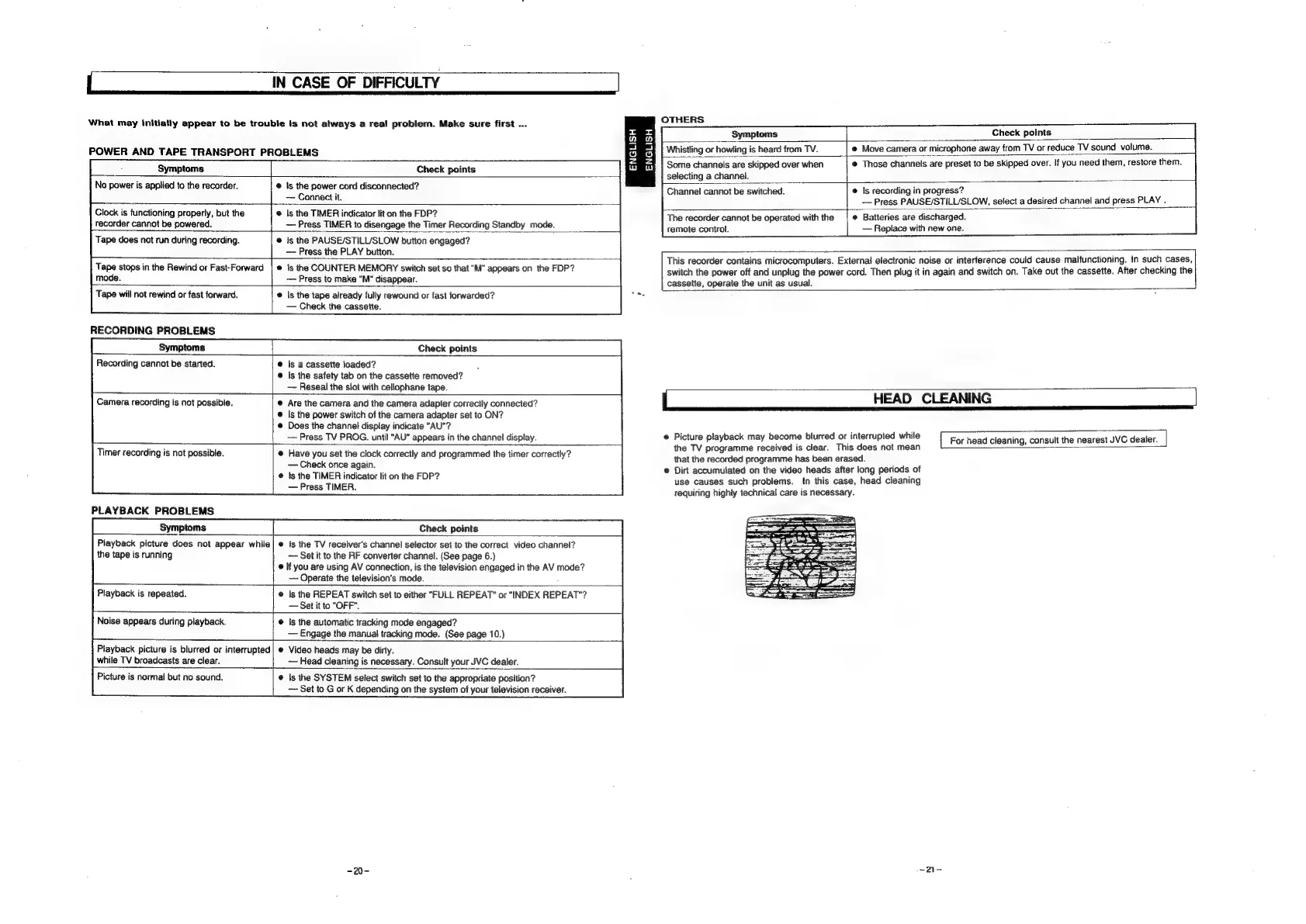
Picture
playback
may
become
blurred
or
interrupted
while
For
head
cleaning,
consult
the
nearest
JVC
dealer.
ine
i ;
the
TV
programme
received
is
clear.
This
does
not
mean
Timer
recording
is
not
possible.
Have
you
set
the
clock
correctly
and
programmed
the
timer
correctly?
that
the
recorded
programme
has
been
erased.
Check
once
again.
indi
F
e
Dirt
accumulated
on
the
video
heads
after
long
periods
of
:
phe
hie
ee
mene!
use
causes
such
problems.
tn
this
case,
head
cleaning
EE
tequiring
highly
technical
care
is
necessary.
PLAYBACK
PROBLEMS
Symptoms
Check
points
Playback
picture
does
not
appear
while|
@
ts
the
TV
receiver's
channel
selector
set
to
the
correct
video
channel?
the
tape
is
running
~~
Set
it
to
the
RF
converter
channel.
(See
page
6.)
©
If
you
are
using
AV
connection,
is
the
television
engaged
in
the
AV
mode?
Operate
the
television's
mode.
Playback
is
repeated.
|s
the
REPEAT
switch
set
to
either
"FULL
REPEAT”
or
“INDEX
REPEAT"?
Set
it
to
“OFF”.
Noise
appears
during
playback.
Is
the
automatic
tracking
mode
engaged?
Engage
the
manual
tracking
mode.
(See
page
10.)
Playback
picture
is
blurred
or
interrupted
Video
heads
may
be
dirty.
while
TV
broadcasts
are
clear.
~—
Head
cleaning
is
necessary.
Consult
your
JVC
dealer.
Picture
is
normal
but
no
sound.
Is
the
SYSTEM
select
switch
set
to
the
appropriate
position?
Set
to
G
or
K
depending
on
the
system
of
your
television
receiver.

Related product manuals