EasyManua.ls Logo

JVC HR-D540EE - Audio Circuit; Tuner;If Circuit

JVC HR-D540EE
90 pages
Print Icon
To Next Page IconTo Next Page
To Previous Page IconTo Previous Page
Loading...
2.6
AUDIO
CIRCUIT
Note:
Unless
otherwise
specified,
all
test
points
and
adjustments
are
located
on
the
MAIN
board.
Audio
Bias
TP31
(+)
R11
e
SOURCE
SEL
1)
Connect
a
millivoltmeter
between
TP31
and
TP32.
Level
TP32
(—)
(Bias
adj)
:
AUX
2)
Set
for
REC
mode
without
incoming
signal.
e
SP
mode
3)
Adjust
R11
for
1.9
mVrms.
@
REC
mode
e
No
signal
2.7.
TUNER/IF
CIRCUIT
Note:
Unless
otherwise
specified,
all
test
points
and
adjustments
are
located
on
the
IF
board.
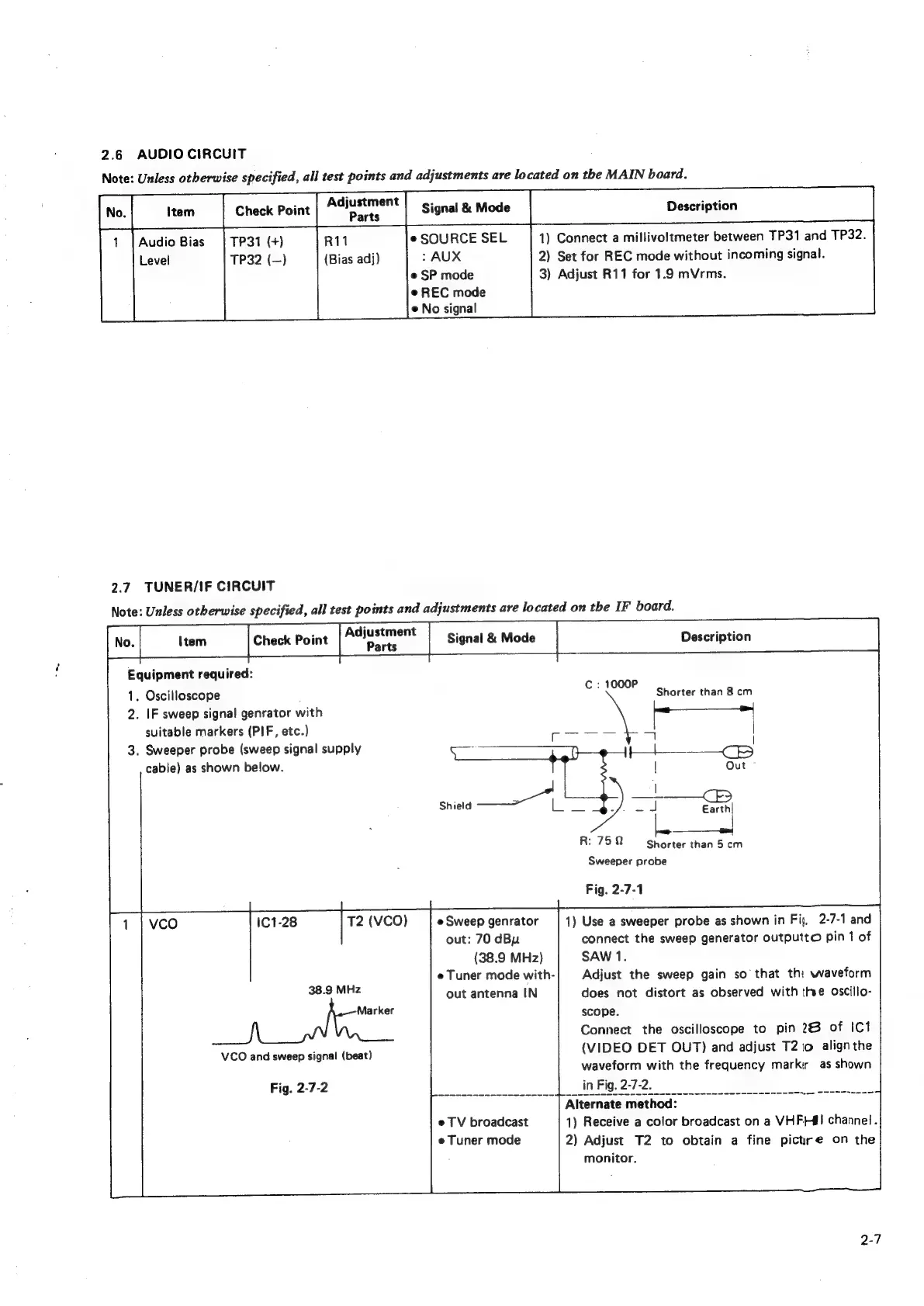
Equipment
required:
1.
Oscilloscope
Gade
Shorter
than
8
cm
2.
IF
sweep
signa!
genrator
with
suitable
markers
(PIF,
etc.)
3.
Sweeper
probe
(sweep
signal
supply
cable)
as
shown
below.
ee
R:
750
Shorter
than
5
cm
Sweeper
probe
Fig.
2-7-1
T2
(VCO)
e
Sweep
genrator
1)
Use
a
sweeper
probe
as
shown
in
Fiy,
2-7-1
and
out:
70
dBu
connect
the
sweep
generator
outputto
pin
1
of
(38.9
MHz)
SAW
1.
e
Tuner
mode
with-
Adjust
the
sweep
gain
so
that
the
waveform
38.9
MHz
out
antenna
IN
does
not
distort
as
observed
with
the
oscillo-
Marker
scope.
Connect
the
oscilloscope
to
pin
26
of
IC1
(VIDEO
DET
OUT)
and
adjust
T2
to
align
the
waveform
with
the
frequency
markir
as
shown
Fig.2-7-20
|
in
Fig.
2-7-2.
cos
Alternatemethod:
—SSsss=CST
e
TV
broadcast
1)
Receive
a
color
broadcast
on
a
VHF}#!
channel.
e
Tuner
mode
2)
Adjust
T2
to
obtain
a
fine
pictrre
on
the
monitor.
VCO
and
sweep
signal
(beat)

Related product manuals