EasyManua.ls Logo

JVC HR-D540EE - Page 38

JVC HR-D540EE
90 pages
Print Icon
To Next Page IconTo Next Page
To Previous Page IconTo Previous Page
Loading...
[tom
[ena
|
RRs
@
Before
the
following
adjustments:
1.
Connect
a
cable
to
ANT
IN
and
terminate
TV
OUT
at
75
Q.
2.
Set
a
TV
channel
signal
generator
as
follows.
Video
:
65
dBu/75
Q,
color
bar
87.5%
modulation
Audio
:
55
dBu/75
Q,
1
kHz
+
50
kHz
deviation
2
|RFAGC
iF
terminal
|
R21
of
Front
end
|(RF
AGC)
MONITOR
R21
CN1-4
(VIDEO
OUT}
(Color
level)
(TUNER
CTL
board)
Color
Level
waitin
|
2
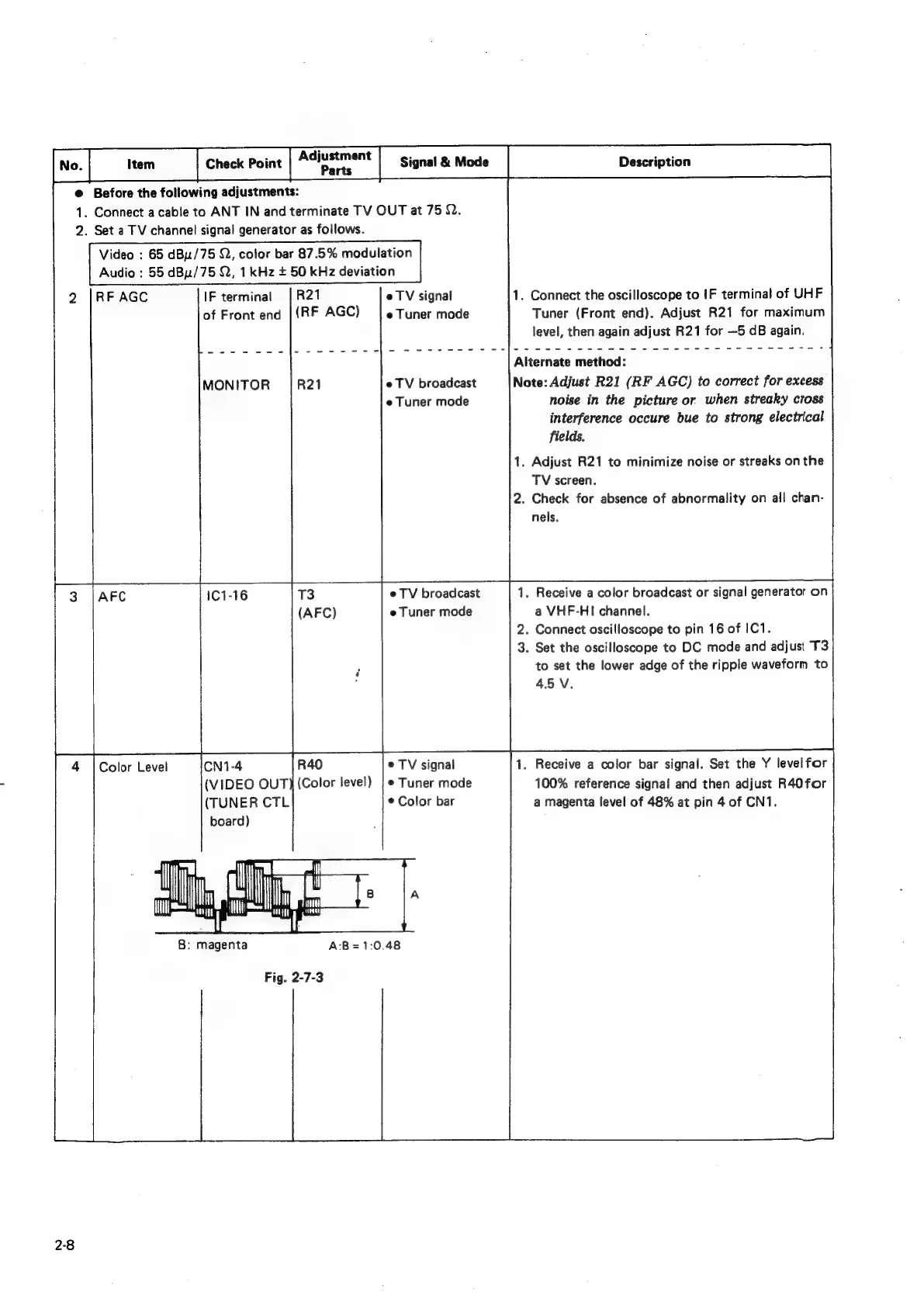
B:
magenta
Fig.
2-7-3
2-8
e
TV
signal
e
Tuner
mode
e
TV
broadcast
e
Tuner
mode
e@
TV
broadcast
e
Tuner
mode
e
TV
signal
©
Tuner
mode
©
Color
bar
A:B=1:0.48
1.
Connect
the
oscilloscope
to
IF
terminal
of
UHF
Tuner
(Front
end).
Adjust
R21
for
maximum
level,
then
again
adjust
R21
for
—5
dB
again.
Alternate
method:
Note:
Adjust
R21
(RF
AGC)
to
correct
for
excess
noise
in
the
picture
or
when
streaky
cross
interference
occure
bue
to
strong
electrical
fields.
1.
Adjust
R21
to
minimize
noise
or
streaks
on
the
TV
screen.
2.
Check
for
absence
of
abnormality
on
all
chan-
nels.
.
Receive
a
color
broadcast
or
signal
generator
on
a
VHF-HI
channel.
2.
Connect
oscilloscope
to
pin
16
of
IC1.
3.
Set
the
oscilloscope
to
DC
mode
and
adjust
T3
to
set
the
lower
adge
of
the
ripple
waveform
to
45
V.
1.
Receive
a
color
bar
signal.
Set
the
Y
levelfor
100%
reference
signal
and
then
adjust
R40
for
a
magenta
level
of
48%
at
pin
4
of
CN1.

Related product manuals