EasyManua.ls Logo

JVC HR-D540EE - Audio out

JVC HR-D540EE
90 pages
Print Icon
To Next Page IconTo Next Page
To Previous Page IconTo Previous Page
Loading...
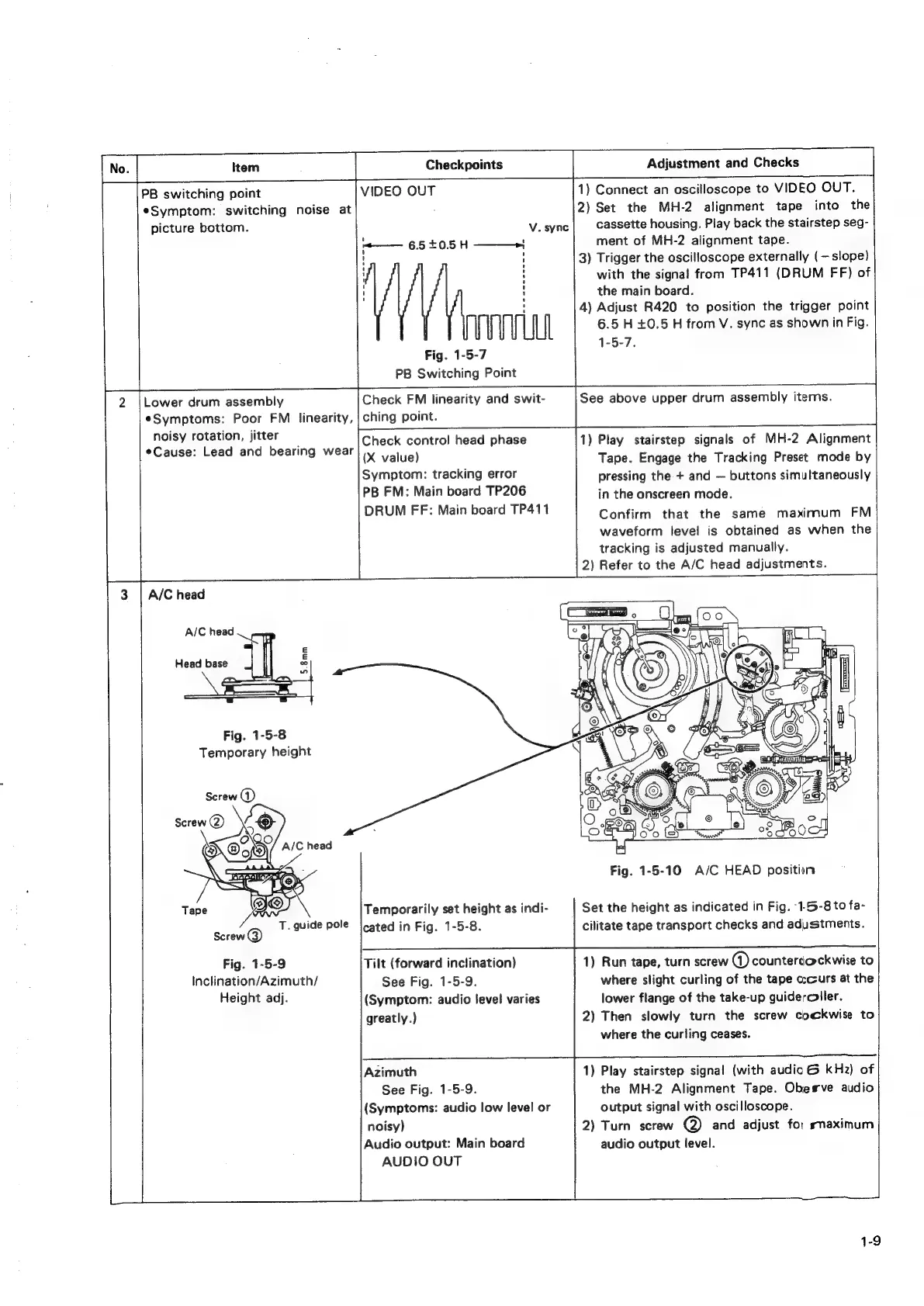
PB
switching
point
eSymptom:
switching
noise
at
picture
bottom.
Lower
drum
assembly
«Symptoms:
Poor
FM
linearity,
Adjustment
and
Checks
Checkpoints
VIDEO
OUT
1)
Connect
an
oscilloscope
to
VIDEO
OUT.
2)
Set
the
MH-2
alignment
tape
into
the
cassette
housing.
Play
back
the
stairstep
seg-
ment
of
MH-2
alignment
tape.
3)
Trigger
the
oscilloscope
externally
(—
slope)
with
the
signal
from
TP411
(DRUM
FF)
of
the
main
board.
4)
Adjust
R420
to
position
the
trigger
point
6.5
H
£0.5
H
from
V.
sync
as
shown
in
Fig.
1-5-7.
V.
sync
Fig.
1-5-7
PB
Switching
Point
noisy
rotation,
jitter
*Cause:
Lead
and
bearing
wear
Check
FM
linearity
and
swit-
See
above
upper
drum
assembly
items.
ching
point.
Check
control
head
phase
1)
Play
stairstep
signals
of
MH-2
Alignment
Tape.
Engage
the
Tracking
Preset
mode
by
pressing
the
+
and
buttons
simultaneously
in
the
onscreen
mode.
(X
value)
Symptom:
tracking
error
PB
FM:
Main
board
TP206
DRUM
FF:
Main
board
TP411
Confirm
that
the
same
maximum
FM
waveform
level
is
obtained
as
when
the
tracking
is
adjusted
manually.
2)
Refer
to
the
A/C
head
adjustments.
A/C
head
A/C
head
5.8mm
Head
base
Fig.
1-5-8
Temporary
height
ee
ey
:
T.
guide
pole
Tape
Screw
@
Fig.
1-5-9
Inclination/Azimuth/
Height
adj.
Fig.
1-5-10
A/C
HEAD
position
Set
the
height
as
indicated
in
Fig.
1-5-8
to
fa-
cilitate
tape
transport
checks
and
adustments.
Temporarily
set
height
as
indi-
cated
in
Fig.
1-5-8.
1)
Run
tape,
turn
screw
@
counterdackwise
to
where
slight
curling
of
the
tape
acurs
at
the
lower
flange
of
the
take-up
guideroller.
2)
Then
slowly
turn
the
screw
coeckwise
to
where
the
curling
ceases.
Tilt
(forward
inclination)
See
Fig.
1-5-9.
(Symptom:
audio
Sevel
varies
greatly.)
Azimuth
1)
Play
stairstep
signal
(with
audic
G
kHz)
of
See
Fig.
1-5-9.
the
MH-2
Alignment
Tape.
Obes
ve
audio
(Symptoms:
audio
low
level
or
output
signal
with
oscilloscope.
noisy)
2)
Turn
screw
@
and
adjust
for
snaximum
Audio
output:
Main
board
AUDIO
OUT
audio
output
level.
1-9

Related product manuals