EasyManua.ls Logo

JVC HR-D540EE - Page 26

JVC HR-D540EE
90 pages
Print Icon
To Next Page IconTo Next Page
To Previous Page IconTo Previous Page
Loading...
Cn
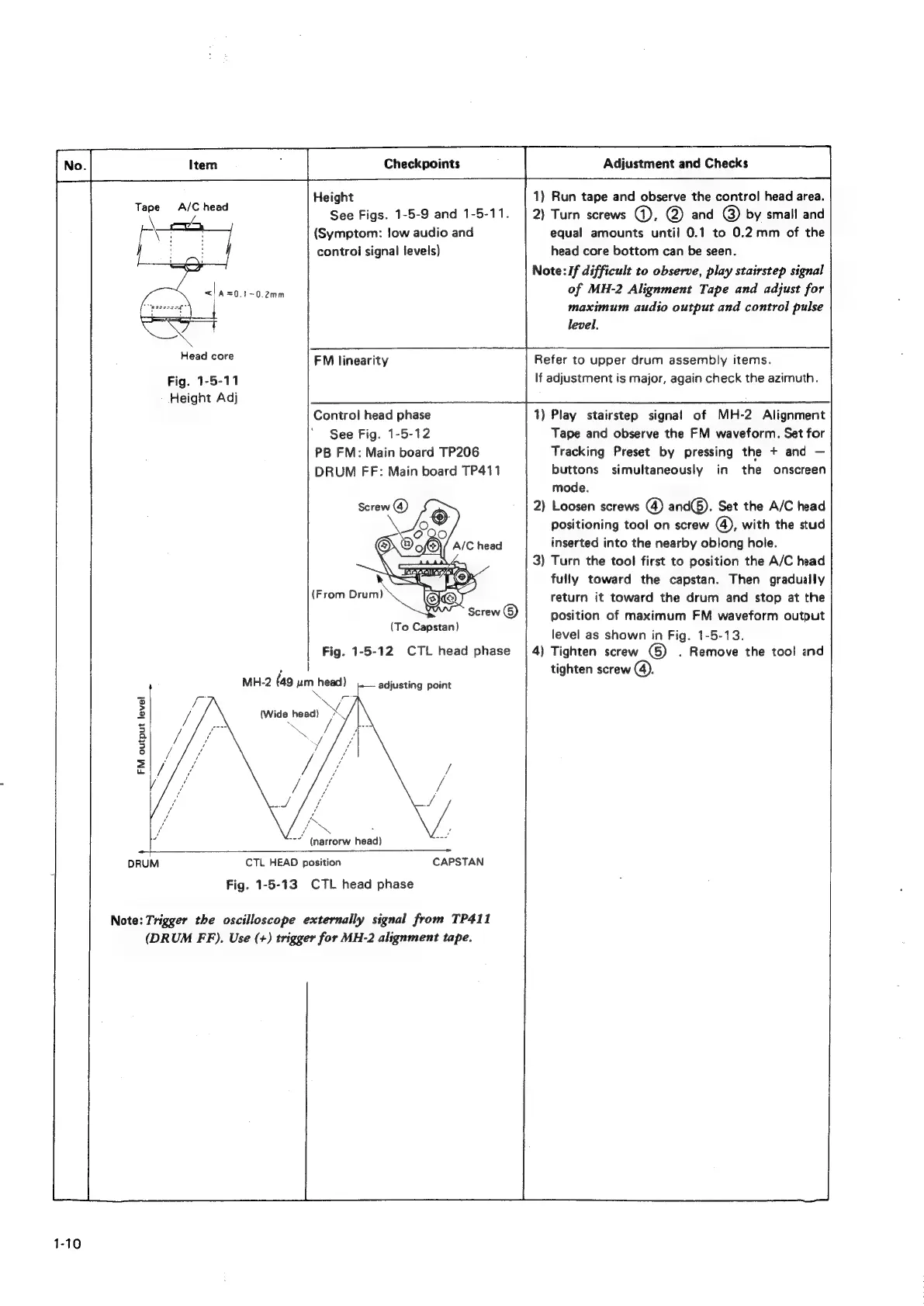
Height
1)
Run
tape
and
observe
the
control
head
area.
See
Figs.
1-5-9
and
1-5-11.
|
2)
Turn
screws
@),
@
and
@)
by
small
and
(Symptom:
!ow
audio
and
equal
amounts
until
0.1
to
0.2
mm
of
the
control
signal
levels)
head
core
bottom
can
be
seen.
Note:
If
difficult
to
observe,
play
stairstep
signal
<<!
A=0.1-0.2mm
of
MH-2
Alignment
Tape
and
adjust
for
maximum
audio
output
and
control
pulse
level,
Tape
A/C
head
Head
core
FM
linearity
Refer
to
upper
drum
assembly
items.
Fig.
1-5-11
If
adjustment
is
major,
again
check
the
azimuth.
Height
Adj
Control
head
phase
1)
Play
stairstep
signal
of
MH-2
Alignment
See
Fig.
1-5-12
Tape
and
observe
the
FM
waveform.
Set
for
PB
FM:
Main
board
TP206
Tracking
Preset
by
pressing
the
+
and
DRUM
FF:
Main
board
TP411
buttons
simultaneously
in
the
onscreen
mode.
Screw
@)
2)
Loosen
screws
(4)
and(@).
Set
the
A/C
head
positioning
tool
on
screw
®,
with
the
stud
AIC
head
inserted
into
the
nearby
oblong
hole.
3)
Turn
the
tool
first
to
position
the
A/C
head
fully
toward
the
capstan.
Then
gradually
(From
Drum)
return
it
toward
the
drum
and
stop
at
the
Screw
©)
position
of
maximum
FM
waveform
output
level
as
shown
in
Fig.
1-5-13.
Fig.
1-5-12
CTL
head
phase
|
4)
Tighten
screw
(©)
.
Remove
the
tool
and
,
it
tighten
screw
@.
F
MH-2
(49
um
head)
-—
adjusting
point
(To
Capstan)
(Wide
head)
Bre
FM
output
level
oe
~
(narrorw
head)
CAPSTAN
CTL
HEAD
position
Fig.
1-5-13
CTL
head
phase
Note:
Trigger
the
oscilloscope
externally
signal
from
TP411
(DRUM
FF).
Use
(+)
trigger
for
MH-2
alignment
tape.
1-10

Related product manuals