EasyManua.ls Logo

JVC HR-D540EE - Instant Timer Recording; Real Time Tape Counter

JVC HR-D540EE
90 pages
Print Icon
To Next Page IconTo Next Page
To Previous Page IconTo Previous Page
Loading...
|
CONVENIENT
FACILINES
RELATED
TO
RECORDING
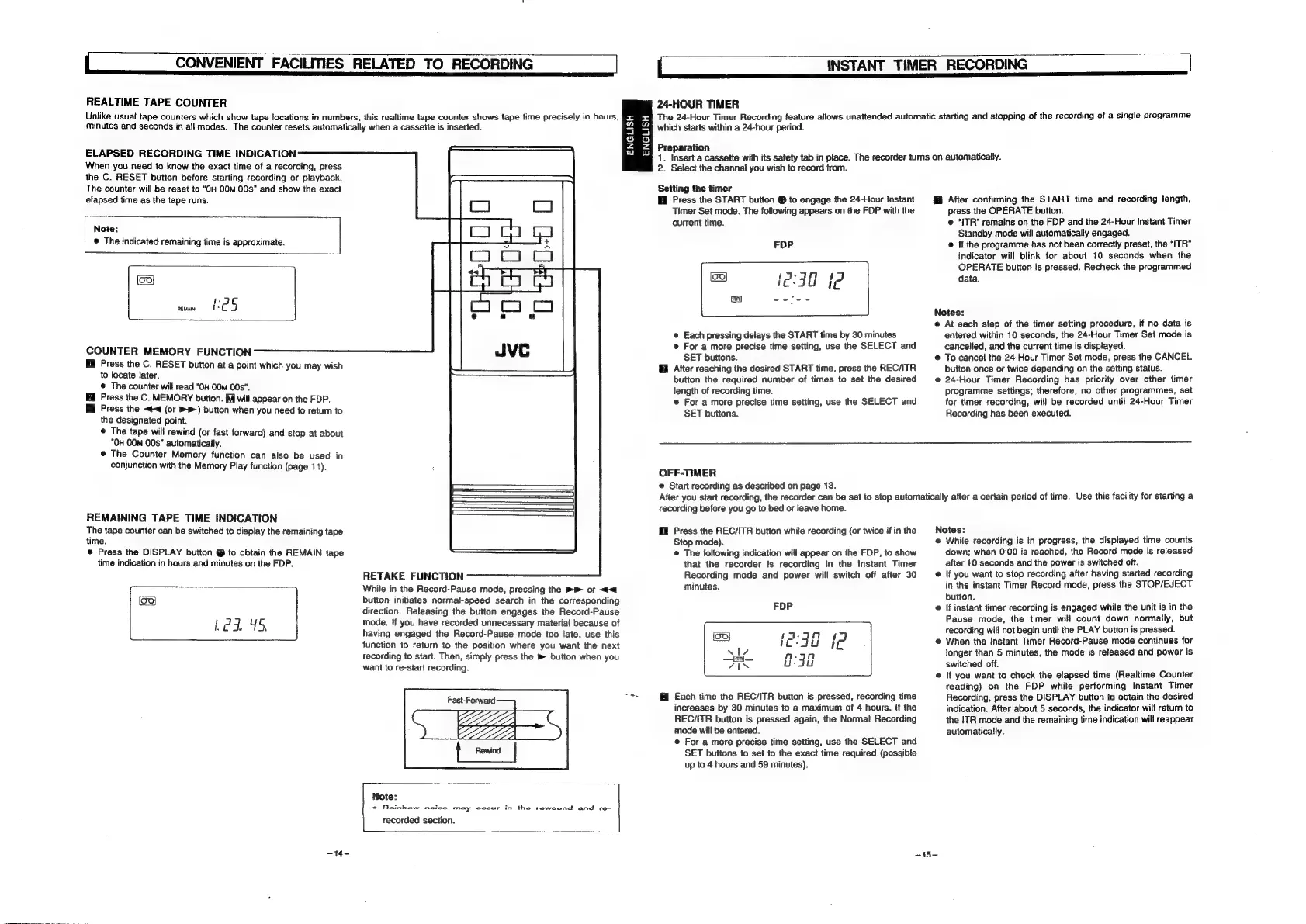
REALTIME
TAPE
COUNTER
Unlike
usual
tape
counters
which
show
tape
locations
in
numbers,
this
realtime
tape
counter
shows
tape
time
precisely
in
hours,
minutes
and
seconds
in
all
modes.
The
counter
resets
automatically
when
a
cassette
is
inserted.
ENGLISH
ENGLISH
ELAPSED
RECORDING
TIME
INDICATION
When
you
need
to
know
the
exact
time
of
a
recording,
press
the
C.
RESET
button
before
starting
recording
or
playback.
The
counter
will
be
reset
to
“OH
00M
00s"
and
show
the
exact
elapsed
time
as
the
tape
runs.
Note:
®
The
indicated
remaining
time
is
approximate.
eis)
mins
CES
COUNTER
MEMORY
FUNCTION
Press
the
C.
RESET
button
at
a
point
which
you
may
wish
to
locate
later.
©
The
counter
will
read
“OH
0Om
00s”.
Press
the
C.
MEMORY
button.
(M]
will
appear
on
the
FDP.
Hi
Press
the
~t<4
(or
®P-)
button
when
you
need
to
return
to
the
designated
point.
©
The
tape
will
rewind
(or
fast
forward)
and
stop
at
about
“OH
00m
00s”
automatically.
©
The
Counter
Memory
function
can
also
be
used
in
conjunction
with
the
Memory
Play
function
(page
11).
REMAINING
TAPE
TIME
INDICATION
The
tape
counter
can
be
switched
to
display
the
remaining
tape
time.
©
Press
the
DISPLAY
button
@
to
obtain
the
REMAIN
tape
time
indication
in
hours
and
minutes
on
the
FDP.
RETAKE
FUNCTION
While
in
the
Record-Pause
mode,
pressing
the
»®
or
<<
button
initiates
normal-speed
search
in
the
corresponding
direction.
Releasing
the
button
engages
the
Record-Pause
mode.
tf
you
have
recorded
unnecessary
material
because
of
having
engaged
the
Record-Pause
mode
too
late,
use
this
function
to
return
to
the
position
where
you
want
the
next
recording
to
start.
Then,
simply
press
the
m
button
when
you
want
to
re-start
recording.
(99)
ace
Be
be
se
Fast-Forward
=
Note:
*
Rainbow
noice
may
cocur
in
the
rewound
and
re-
recorded
section.
-14-
|
INSTANT
TIMER
RECORDING
24-HOUR
TIMER
The
24-Hour
Timer
Recording
feature
allows
unattended
automatic
starting
and
stopping
of
the
recording
of
a
single
programme
which
starts
within
a
24-hour
periad.
Preparation
1.
Insert
a
cassette
with
its
safety
tab
in
place.
The
recorder
turns
on
automatically.
2.
Select
the
channel
you
wish
to
record
from.
Setting
the
timer
@
Press
the
START
button
®
to
engage
the
24-Hour
Instant
Timer
Set
mode.
The
following
appears
on
the
FDP
with
the
current
time.
FOP
ol
ei
eients
@
Each
pressing
delays
the
START
time
by
30
minutes
e
For
a
more
precise
time
setting,
use
the
SELECT
and
SET
buttons.
After
reaching
the
desired
START
time,
press
the
REC/TR
button
the
required
number
of
times
to
set
the
desired
length
of
recording
time.
©
For
a
more
precise
time
setting,
use
the
SELECT
and
SET
buttons.
After
confirming
the
START
time
and
recording
length,
press
the
OPERATE
button.
@
“{TR”
remains
on
the
FDP
and
the
24-Hour
Instant
Timer
Standby
mode
will
automatically
engaged.
®
If
the
programme
has
not
been
correctly
preset,
the
“ITR"
indicator
will
blink
for
about
10
seconds
when
the
OPERATE
button
is
pressed.
Recheck
the
programmed
data.
Notes:
©
At
each
step
of
the
timer
setting
procedure,
if
no
data
is
entered
within
10
seconds,
the
24-Hour
Timer
Set
mode
is
cancelled,
and
the
current
time
is
displayed.
®
To
cancel
the
24-Hour
Timer
Set
mode,
press
the
CANCEL
button
once
or
twice
depending
on
the
setting
status.
@
24-Hour
Timer
Recording
has
priority
aver
other
timer
programme
settings;
therefore,
no
other
programmes,
set
for
timer
recording,
will
be
recorded
until
24-Hour
Timer
Recording
has
been
executed.
OFF-TIMER
©
Start
recording
as
described
on
page
13.
After
you
start
recording,
the
recorder
can
be
set
to
stop
automatically
after
a
certain
period
of
time.
Use
this
facility
for
starting
a
recording
before
you
go
to
bed
or
leave
home.
I
Press
the
REC/ITR
button
white
recording
(or
twice
if
in
the
Stop
mode).
@
The
foltowing
indication
will
appear
on
the
FDP,
to
show
that
the
recorder
is
recording
in
the
Instant
Timer
Recording
mode
and
power
will
switch
off
after
30
minutes.
FDP
ileis)}
17-23n1
lead
N17
raj}
nm-an
Pais
oie
@
Each
time
the
REC/ITR
button
is
pressed,
recording
time
increases
by
30
minutes
to
a
maximum
of
4
hours.
If
the
REC/ITR
button
is
pressed
again,
the
Normal
Recording
mode
will
be
entered.
e
For
a
more
precise
time
setting,
use
the
SELECT
and
SET
buttons
to
set
to
the
exact
time
required
(possible
up
to
4
hours
and
59
minutes).
Notes:
@
While
recording
is
in
progress,
the
displayed
time
counts
down;
when
0:00
is
reached,
the
Record
mode
is
released
after
10
seconds
and
the
power
is
switched
off.
@
If
you
want
to
stop
recording
after
having
started
recording
in
the
Instant
Timer
Record
mode,
press
the
STOP/EJECT
button.
@
If
instant
timer
recording
is
engaged
while
the
unit
is
in
the
Pause
mode,
the
timer
will
count
down
normally,
but
recording
will
not
begin
until
the
PLAY
button
is
pressed.
©
When
the
Instant
Timer
Record-Pause
mode
continues
for
fonger
than
5
minutes,
the
mode
is
released
and
power
is
switched
off.
e
If
you
want
to
check
the
elapsed
time
(Realtime
Counter
reading)
on
the
FDP
while
performing
Instant
Timer
Recording,
press
the
DISPLAY
button
to
obtain
the
desired
indication.
After
about
5
seconds,
the
indicator
will
return
to
the
ITR
mode
and
the
remaining
time
indication
will
reappear
automatically.
~15-

Related product manuals