EasyManua.ls Logo

JVC HR-D540EE - Page 24

JVC HR-D540EE
90 pages
Print Icon
To Next Page IconTo Next Page
To Previous Page IconTo Previous Page
Loading...
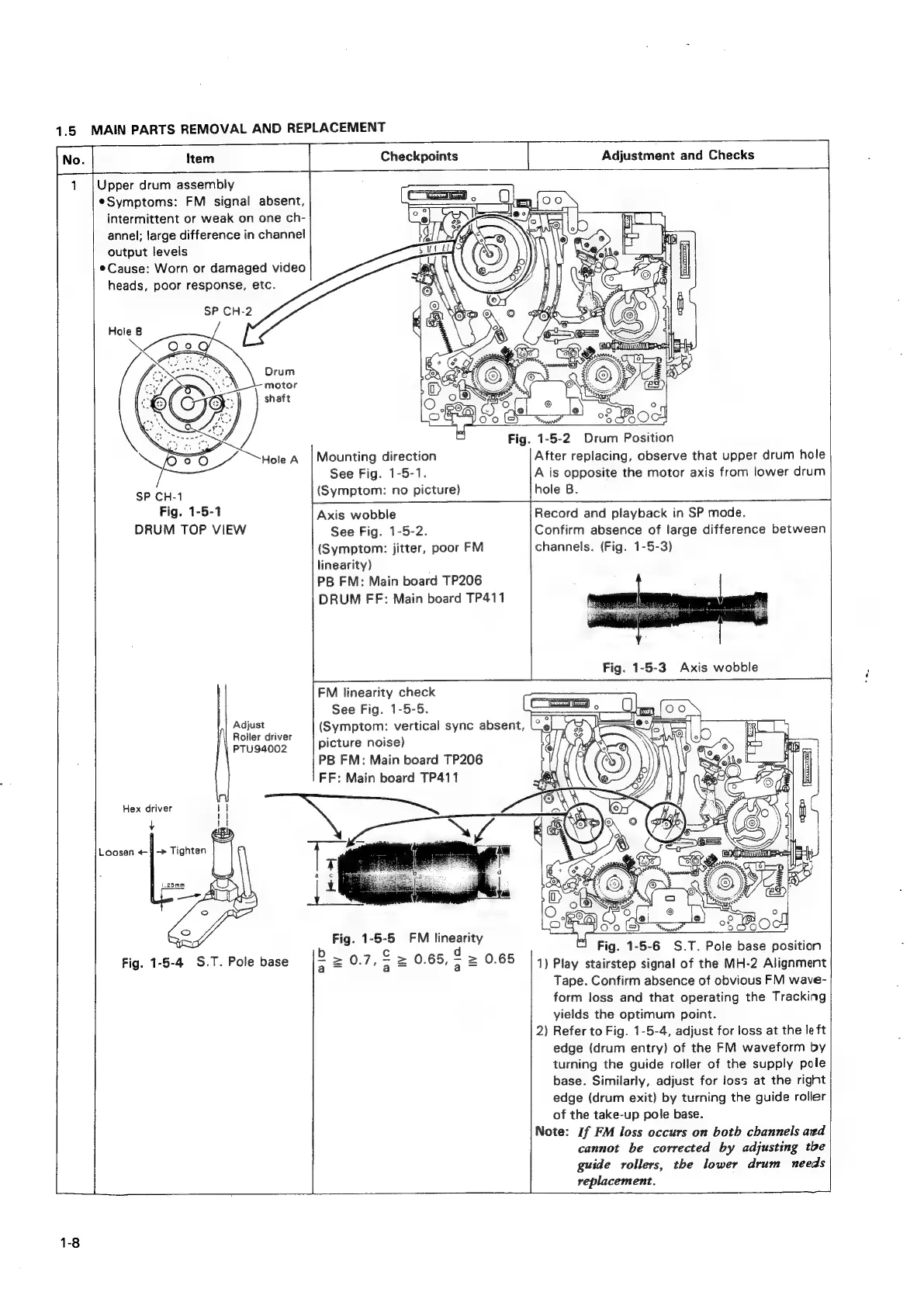
1.5
MAIN
PARTS
REMOVAL
AND
REPLACEMENT
Item
7
Checkpoints
Upper
drum
assembly
¢Symptoms:
FM
signal
absent,
intermittent
or
weak
on
one
ch-
annel;
large
difference
in
channel
output
levels
Cause:
Worn
or
damaged
video
heads,
poor
response,
etc.
SP
CH-1
Fig.
1-5-1
DRUM
TOP
VIEW
Adjust
Roller
driver
PTU94002
Hex
driver
+
Fig.
1-5-4
S.T.
Pole
base
——
|
Adjustment
and
Checks
Mounting
direction
See
Fig.
1-5-1.
(Symptom:
no
picture)
Fig.
1-5-2
Drum
Position
After
replacing,
observe
that
upper
drum
hole
A
is
opposite
the
motor
axis
from
lower
drum
hole
B.
Axis
wobble
See
Fig.
1-5-2.
(Symptom:
jitter,
poor
FM
linearity)
PB
FM:
Main
board
TP206
DRUM
FF:
Main
board
TP411
FM
linearity
check
See
Fig.
1-5-5.
picture
noise)
PB
FM:
Main
board
TP206
FF:
Main
board
TP411
Fig.
1-5-5
FM
linearity
b.0.7,22065,22
0.65
a
a a
(Symptom:
vertical
sync
absent,
U
Record
and
playback
in
SP
mode.
Confirm
absence
of
large
difference
between
channels.
(Fig.
1-5-3)
“]
Fig.
1-5-6
$.T.
Pole
base
position
1)
Play
stairstep
signal
of
the
MH-2
Alignment
Tape.
Confirm
absence
of
obvious
FM
wave-
form
loss
and
that
operating
the
Tracking
yields
the
optimum
point.
2)
Refer
to
Fig.
1-5-4,
adjust
for
loss
at
the
le
ft
edge
(drum
entry)
of
the
FM
waveform
by
turning
the
guide
roller
of
the
supply
pole
base.
Similarly,
adjust
for
loss
at
the
right
edge
(drum
exit)
by
turning
the
guide
roller
of
the
take-up
pole
base.
Note:
If
FM
loss
occurs
on
both
channels
ard
cannot
be
corrected
by
adjusting
tbe
guide
rollers,
the
lower
drum
needs
replacement.

Related product manuals