EasyManua.ls Logo

JVC HR-D540EE - Page 29

JVC HR-D540EE
90 pages
Print Icon
To Next Page IconTo Next Page
To Previous Page IconTo Previous Page
Loading...
fo]
tem
|
Checkpoints
Adjustment
and
Checks
Take-up
loading
arm
assembly
Supply
loading
arm
assembly
Plate
assembly
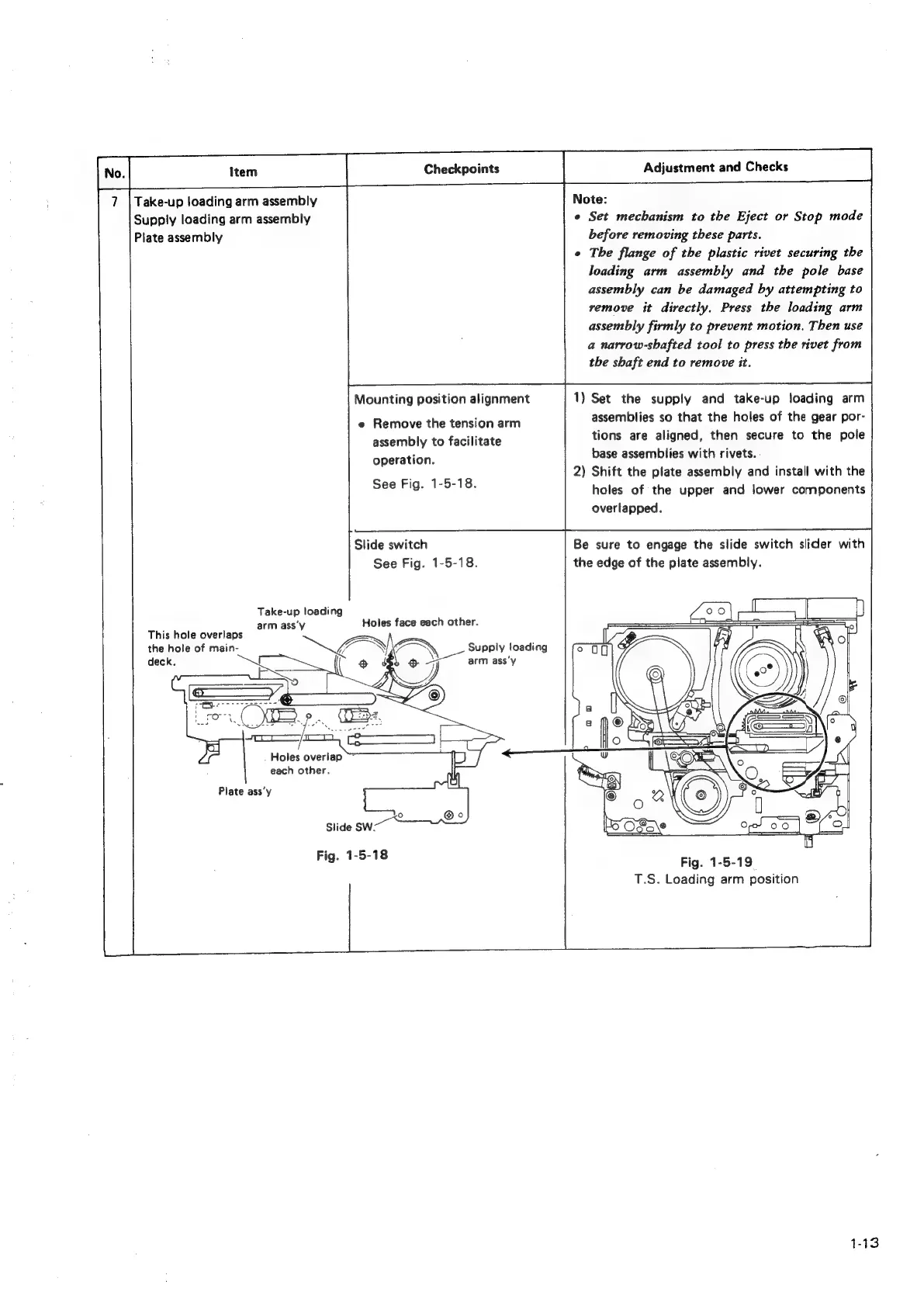
Mounting
position
alignment
e
Remove
the
tension
arm
assembly
to
facilitate
operation.
See
Fig.
1-5-18.
Ste
switch
See
Fig.
1-5-18.
Take-up
loading
arm
ass‘y
Holes
face
each
other.
This
hole
overlaps
the
hole
of
main-
deck.
Holes
overiap
~
each
other.
Plate
ass’y
AN
f
Ne
Supply
loading
ee
arm
ass’y
Note:
©
Set
mechanism
to
the
Eject
or
Stop
mode
before
removing
these
parts.
e
The
flange
of
the
plastic
rivet
securing
the
loading
arm
assembly
and
the
pole
base
assembly
can
be
damaged
by
attempting
to
remove
it
directly.
Press
the
loading
arm
assembly
firmly
to
prevent
motion.
Then
use
a
narrow-shafted
tool
to
press
the
rivet
from
the
shaft
end
to
remove
it.
1)
Set
the
supply
and
take-up
loading
arm
assemblies
so
that
the
holes
of
the
gear
por-
tions
are
aligned,
then
secure
to
the
pole
base
assemblies
with
rivets.
2)
Shift
the
plate
assembly
and
install
with
the
holes
of
the
upper
and
lower
components
overlapped.
Be
sure
to
engage
the
slide
switch
slider
with
the
edge
of
the
plate
assembly.
Fig.
1-5-19
T.S.
Loading
arm
position

Related product manuals