iPod/iPhone iPod/iPhone
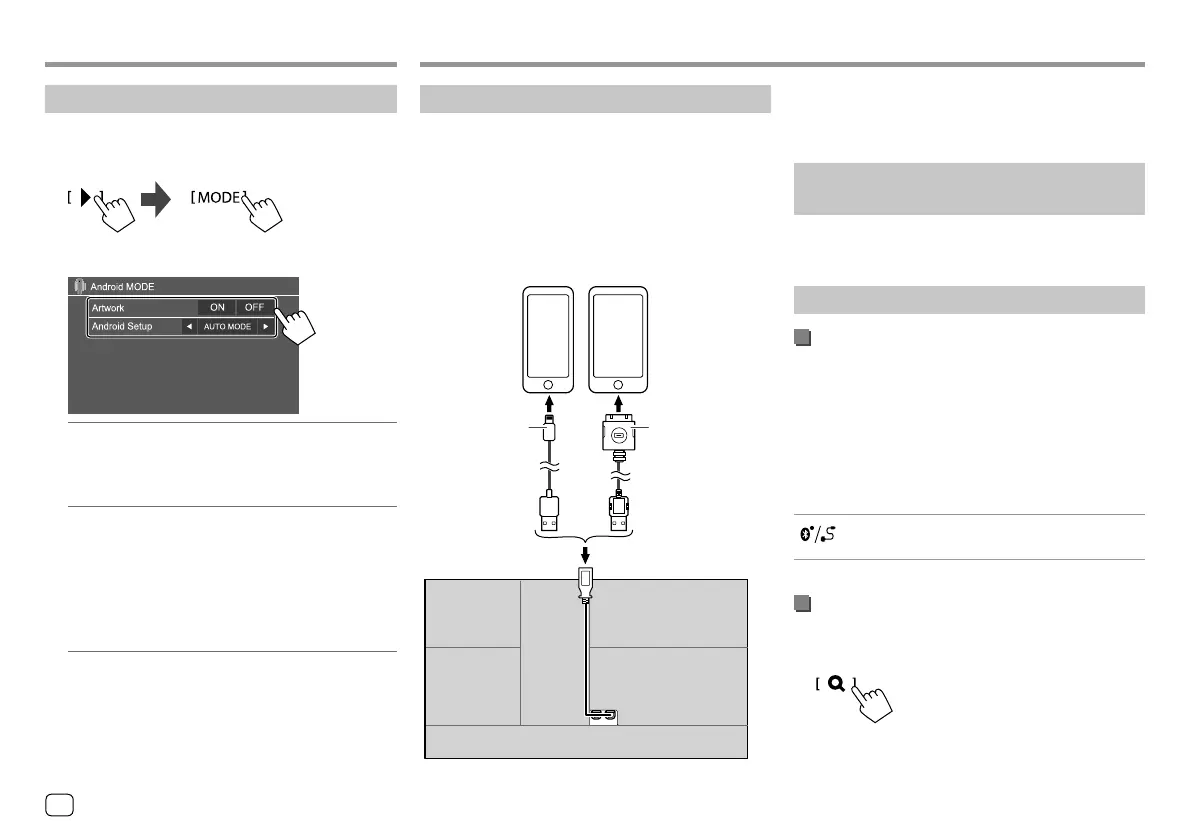
Connecting an iPod/iPhone
• For playable iPod/iPhone types and other
information, see page 49.
• You cannot watch video.
Wired connection
iPod/iPhone
Lightning model
(commercially available)
iPod/iPhone 30-pin
connector model
(commercially available)
On the rear panel
USB Audio cable
for iPod/iPhone:
KS-U62 (optional
accessory)
30-pin to USB cable
(accessory of iPod/
iPhone)
Bluetooth connection
Pair the iPod/iPhone with this unit via Bluetooth.
(Page26)
Selecting the playback device via the
connection method
See <Smartphone Setup> on page 38 for more
information.
Playback operations
Playback information and key operation
• For playback information, see “Source control screen”
on page7.
• For key operations on the touch panel, see “Common
operation keys on source control screen” on
page8.
Additional keys operations. Touching the operation
keys performs the following actions:
[ ]
Switches the device on <Smartphone
Setup> screen. (Page38)
Selecting an audio file from the menu
1 Display the audio menu.
On the source control screen, touch as follows:
Settings for Android playback
1 Display the <Android MODE> screen.
On the source control screen, touch as follows:
2 Make the settings.
<Artwork>
• ON (Initial): Shows the artworks of the playing
files.
• OFF: Hides the artworks of the playing files.
<Android Setup>
• AUTO MODE (Initial): Controls from the unit
(using the JVC Music Play application).
• AUDIO MODE: Controls other media player
applications from the Android device (without
using the JVC Music Play application).
– You can play/pause or skip files from the unit.
AndroidAndroid
16
ENGLISH
00_KW-V2018ST_M_ENG.indb 1600_KW-V2018ST_M_ENG.indb 16 17/6/2017 7:35:47 AM17/6/2017 7:35:47 AM



 To Next Page