Various Screens and OperationsVarious Screens and Operations
Source control screen
You can perform the playback operation from the
source control screen during playback.
• The operation keys and information displayed vary
depending on the selected source/disc type/file type
being played.
• If the operation keys are not displayed on the screen,
touch the screen to show them.
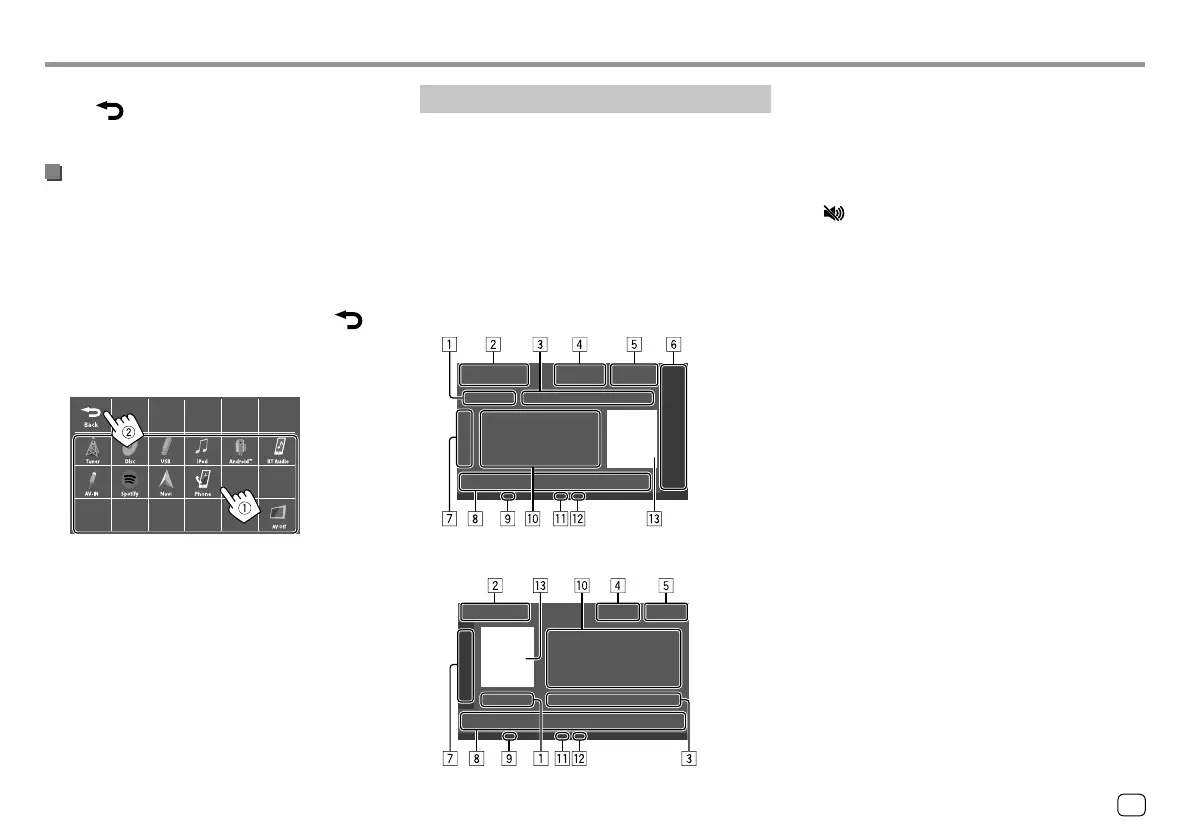
E.g. Common audio playback source screen:
KW-V340BT/KW-V340BTM
KW-V440BT/KW-V440BTM
1 Playing time/playback status
2 Playback source or media type
3 Current playback item information
(folder no./file no./track no./total track no./playback
file type)
4 [M]: Ejects the disc.
[ ]: Attenuates/restores the sound.
5 Clock display
6 Only for KW-V340BT/KW-V340BTM: Playback
source items shown on the Home screen.
• Touching the playback source item changes the
playback source.
7 Displays/hides other available operation keys*
8 Operation keys*
9 IN indicator (lights up while a disc is inserted)
p Track/file/song/video information
• Touching [H] scrolls the text if not all of the text
is shown.
q Playback mode indicator (Repeat/Random)
w File type indicator
e Picture/artwork (shown if the file contains the
information)
* See “Common operation keys on source control screen” on
page8.
To return to the Home screen
Touch [ ] or [Home] on the source/option
selection screen.
Customizing the Home screen
1 Select an item to replace.
On the Home screen, touch and hold the icon you
want to replace.
The item selection screen is displayed.
2 Select an item (1) you want to display in
the selected position, then touch [
]
(
2).
Repeat the procedure to customize your Home
screen.
E.g. Home item selection screen for KW-V440BT
• Only selectable sources are shown.
• You cannot locate [Camera] on the Home
screen.
7
ENGLISH
03_KW_V340BT_M_Body01.indd 703_KW_V340BT_M_Body01.indd 7 18/7/2017 9:55:35 AM18/7/2017 9:55:35 AM



 To Next Page