Bluetooth®Bluetooth®
KW-V440BT/KW-V440BTM
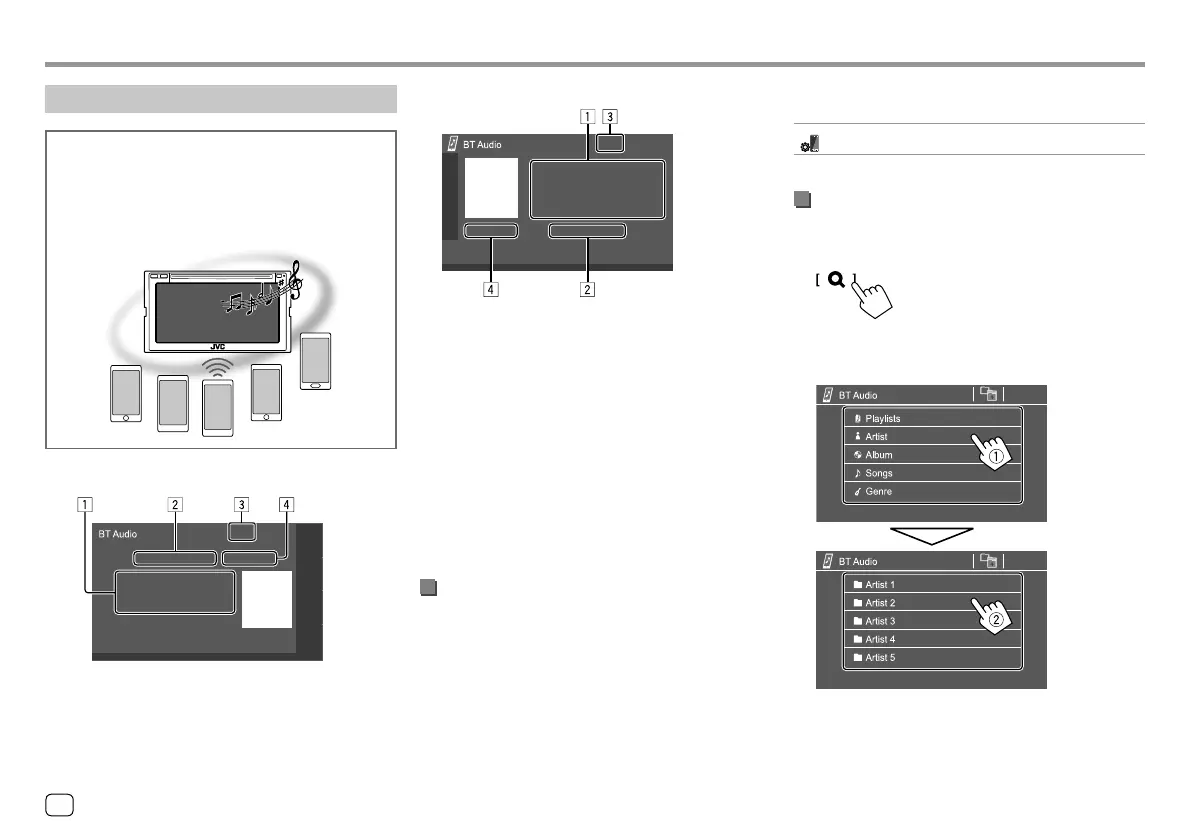
1 Tag data* (current track title/artist name/album
title)
• Pressing [H] scrolls the text if not all of the text is
shown.
2 Connected device name
• Touching the device name switches to another
connected Bluetooth audio device.
3 Signal strength and battery level
(Appear only when the information is acquired
from the device.)
4 Playing time*/playback status*
* Available only for devices compatible with AVRCP 1.3.
Playback information and key operation
• For playback information, see “Source control screen”
on page7.
• For key operations on the touch panel, see “Common
operation keys on source control screen” on
page8.
Bluetooth audio player
JVC Streaming DJ
When “BT Audio” is selected as the source, you can
connect up to five Bluetooth audio devices at the
same time. You can easily switch between these five
devices by playing music from the device.
KW-V340BT/KW-V340BTM
Additional keys operations. Touching the operation
keys performs the following actions:
[ ]
Displays <Bluetooth Setup> screen.
Selecting an audio file from the menu
1 Display the audio menu.
On the source control screen, touch as follows:
2 Select a category (1), then select a
desired item (
2).
Select an item in each layer until you reach and
select the desired file.
30
ENGLISH
03_KW_V340BT_M_Body01.indd 3003_KW_V340BT_M_Body01.indd 30 18/7/2017 10:04:53 AM18/7/2017 10:04:53 AM



 To Next Page