References References
Maintenance
Cleaning the unit
• Do not use any solvent (for example, thinner,
benzine, etc.), detergent, or insecticide. This may
damage the monitor or the unit.
• Gently wipe the panel with a soft, dry cloth.
Handling discs
• Do not touch the recording surface of the disc.
• Do not stick tape etc. on the disc, or use a disc with
tape stuck on it.
• Do not use any accessories for the disc.
• Clean from the center of the disc and move outward.
• Clean the disc with a dry silicone or soft cloth. Do not
use any solvents.
• When removing discs from this unit, pull them out
horizontally.
• Remove burrs from the center hole and disc edge
before inserting a disc.
More information
About playable files
Audio files
• This unit can play back the following files with
following codec and extension code:
– For disc: MP3(.mp3), WMA(.wma), WAV(.wav),
AAC(.m4a)
– For USB mass storage class device: MP3(.mp3),
WMA(.wma), WAV(.wav), AAC(.aac, .m4a),
FLAC(.flac)
Installation and ConnectionInstallation and Connection
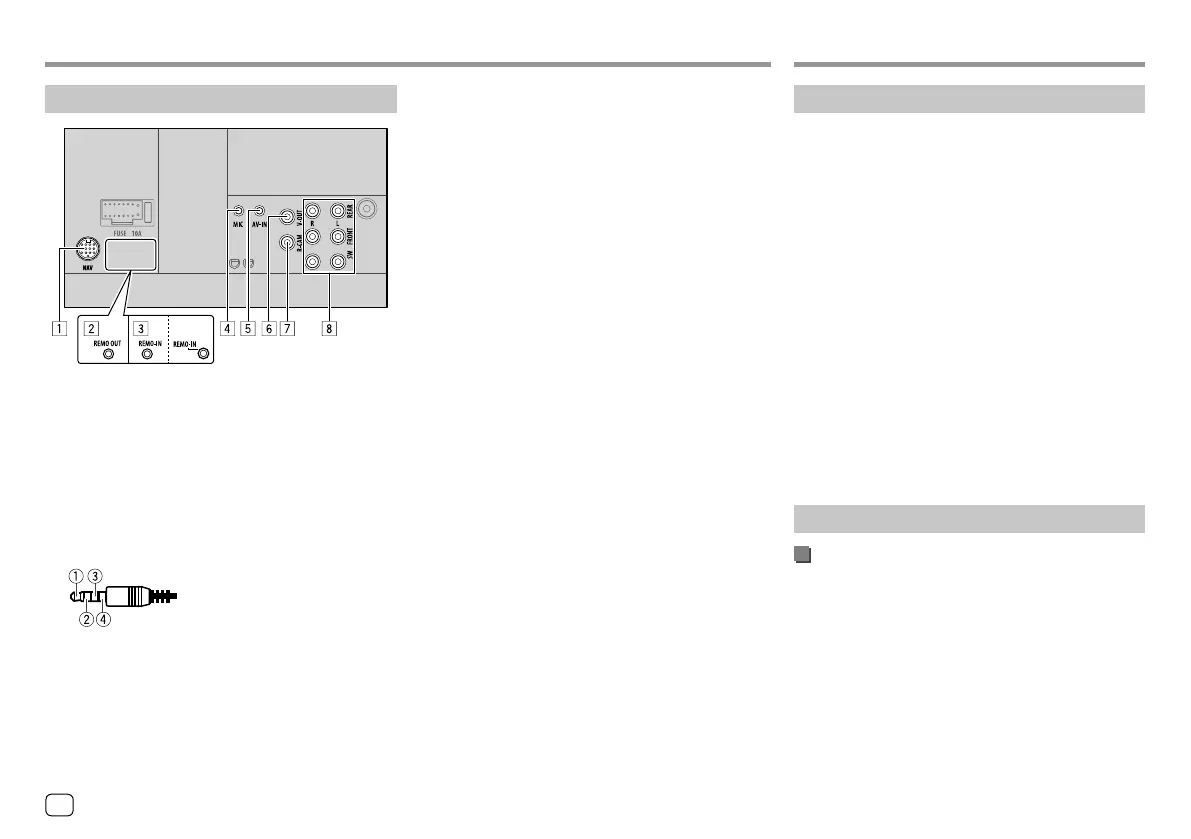
Connecting external components
1 Navigation input (NAV)*1
2 3rd party TV output (REMO OUT)*2
3 Steering wheel remote controller input (REMO-IN)
• Connect to the vehicle’s steering remote harness
using the Steering Remote cable (]). Contact
your JVC dealer for details.
4 Microphone input (MIC) (Page 45)
5 Audio video input (AV-IN)
Connect the following type of 4-pole mini plug:
1
Left audio
2
Right audio
3
Ground
4
Composite video
6 Video output (V-OUT)
7 Rear view camera input (R-CAM)
8 Output terminals*3
• Left output (White)
• Right output (Red)
REAR: Rear speaker preouts
FRONT: Front speaker preouts
SW: Subwoofer preouts
For 3-way crossover:
REAR: Tweeter preouts
FRONT: Mid range speaker preouts
SW: Woofer preouts
*1 Only for KW-V340BT Region 3, KW-V340BTM Region 2,
KW-V440BT Region 3 (except for Indonesian models),
KW-V440BTM Region 2.
*2 Only for KW-V440BT Region 3 (except for Indonesian models),
KW-V440BTM Region 2.
*3 When connecting an external amplifier, connect its ground wire
to the chassis of the car; otherwise the unit may be damaged.
46
ENGLISH
00_KW-V2018ST_M_ENG.indb 4600_KW-V2018ST_M_ENG.indb 46 17/6/2017 7:35:54 AM17/6/2017 7:35:54 AM



 To Next Page