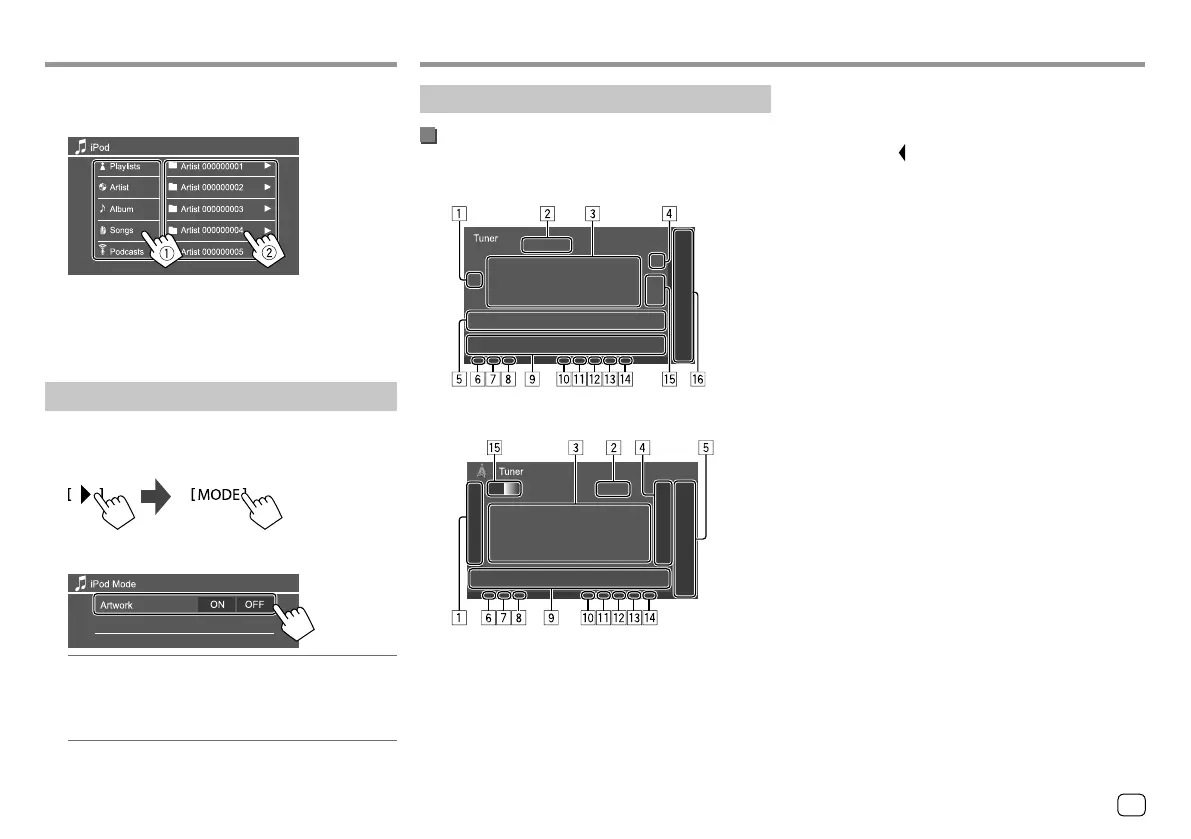
iPod/iPhoneiPod/iPhone
2
Select a category (1), then select a
desired item (
2).
Select an item in each layer until you reach and
select the desired file.
• Available categories differ depending on the type
of iPod/iPhone.
Settings for iPod/iPhone playback
1 Display the <iPod Mode> screen.
On the source control screen, touch as follows:
2 Make the settings.
<Artwork>
• ON (Initial): Shows the artworks of the playing
files.
• OFF: Hides the artworks of the playing files.
Listening to the radio
Playback information on the source control
screen
KW-V340BT/KW-V340BTM
KW-V440BT/KW-V440BTM
Tuner Tuner
1 Displays/hides other available operation keys*
2 Current station frequency
3 Text information
• Touching [ ] scrolls the text if not all of the text
is shown.
• Touching [Radio Text] switches the information
between Radio Text, Radio Text Plus and PTY
code.
4 Displays the preset stations window (Page19)
5 [P1] – [P5]
• (Touch) Selects a preset station.
• (Hold) Presets the current station.
6 NEWS indicator
7 AF indicator
8 TI indicator
9 Operation keys*
p ST/MONO indicator
The ST indicator lights up when receiving an FM
stereo broadcast with sufficient signal strength.
q Seek mode indicator
w LO.S indicator
e RDS indicator
r EON indicator
The EON indicator lights up when a Radio Data
System station is sending EON signals.
t Selects the band (AM/FM1/FM2/FM3)
y Only for KW-V340BT/KW-V340BTM: Playback
source items shown on the Home screen.
• Touching the playback source item changes the
playback source.
* See “Operation keys on source control screen” on page18.
17ENGLISH
00_KW-V2018ST_M_ENG.indb 1700_KW-V2018ST_M_ENG.indb 17 17/6/2017 7:35:47 AM17/6/2017 7:35:47 AM



 To Next Page