Installation and ConnectionInstallation and Connection
Installing the trim plate
(Only for KW-V340BT Region 3, KW-V340BT Region 2,
KW-V340BTM Region 4)
Parts list for installation
Note: This parts list does not include all the package
contents.
¥ Wiring harness (× 1)
ø Extension wire, 2 m (× 1)
π Microphone, 3 m (× 1)
[ Flat head screw (× 6)
“ Round head screw (× 6)
] Steering remote cable (× 1)
‘ Trimplate (× 1)
(Only for KW-V340BT Region 3, KW-V340BT
Region 2, KW-V340BTM Region 4)
Installation procedure
1 Remove the key from the ignition and
disconnect the
· battery.
2 Make the proper input and output wire
connections for each unit.
3 Connect the speaker wires of the wiring
harness.
4 Connect the wires of the wiring harness
in the following order: ground, battery,
ignition.
5 Connect the wiring harness to the unit.
6 Install the unit in your car.
Make sure that the unit is installed securely in place.
If the unit is unstable, it may malfunction (e.g., the
sound may skip).
7 Reconnect the · battery.
8 Press the reset button on the monitor
panel. (Page3)
9 Configure <Initial Settings>. (Page4)
Installing the unit
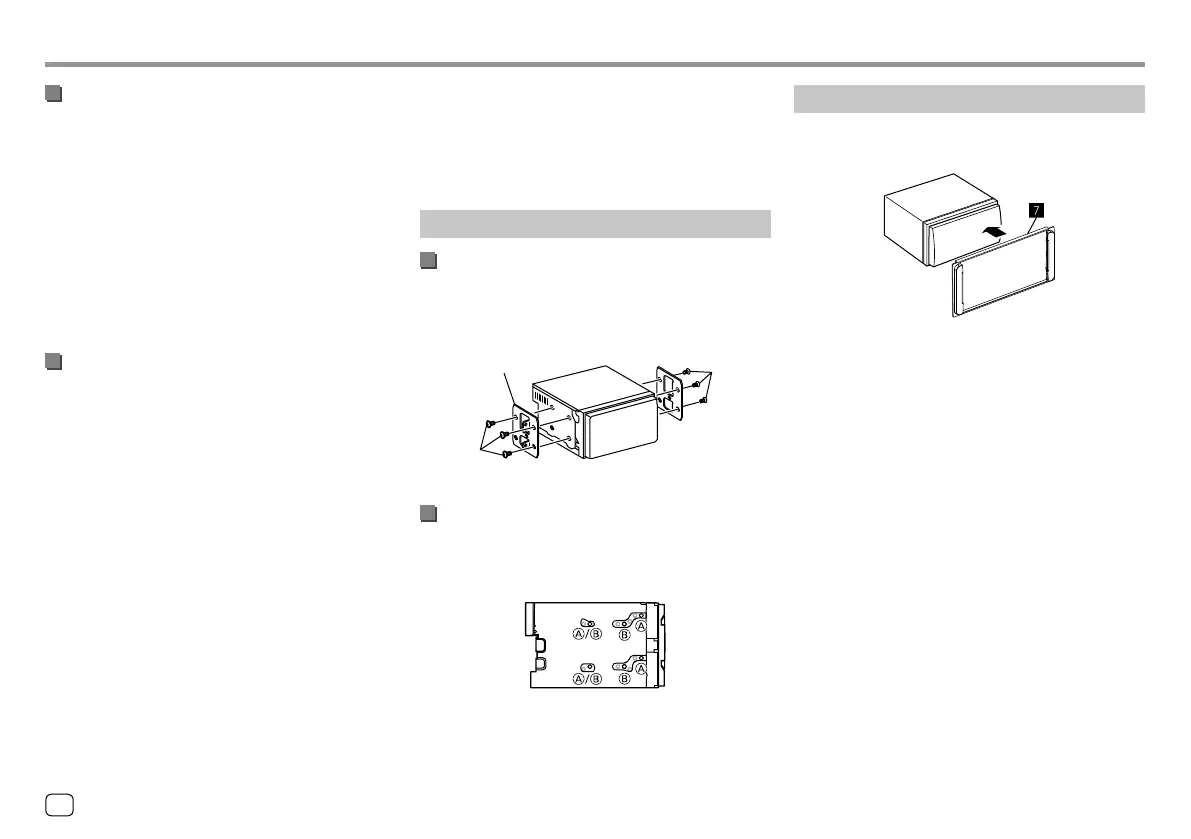
Installing using the mounting brackets
removed from the car
Select the appropriate type of screw for the mounting
brackets: flat head ([) or round head (“).
Installing in Toyota cars
Install onto the car bracket using the supplied screws
(“). Use the mounting holes (A or B) that fit the car
bracket.
Car bracket
[
or
“
[
or
“
Side view
44
ENGLISH
00_KW-V2018ST_M_ENG.indb 4400_KW-V2018ST_M_ENG.indb 44 17/6/2017 7:35:54 AM17/6/2017 7:35:54 AM



 To Next Page