19
Operation
Fine-tuning the image size and clarity
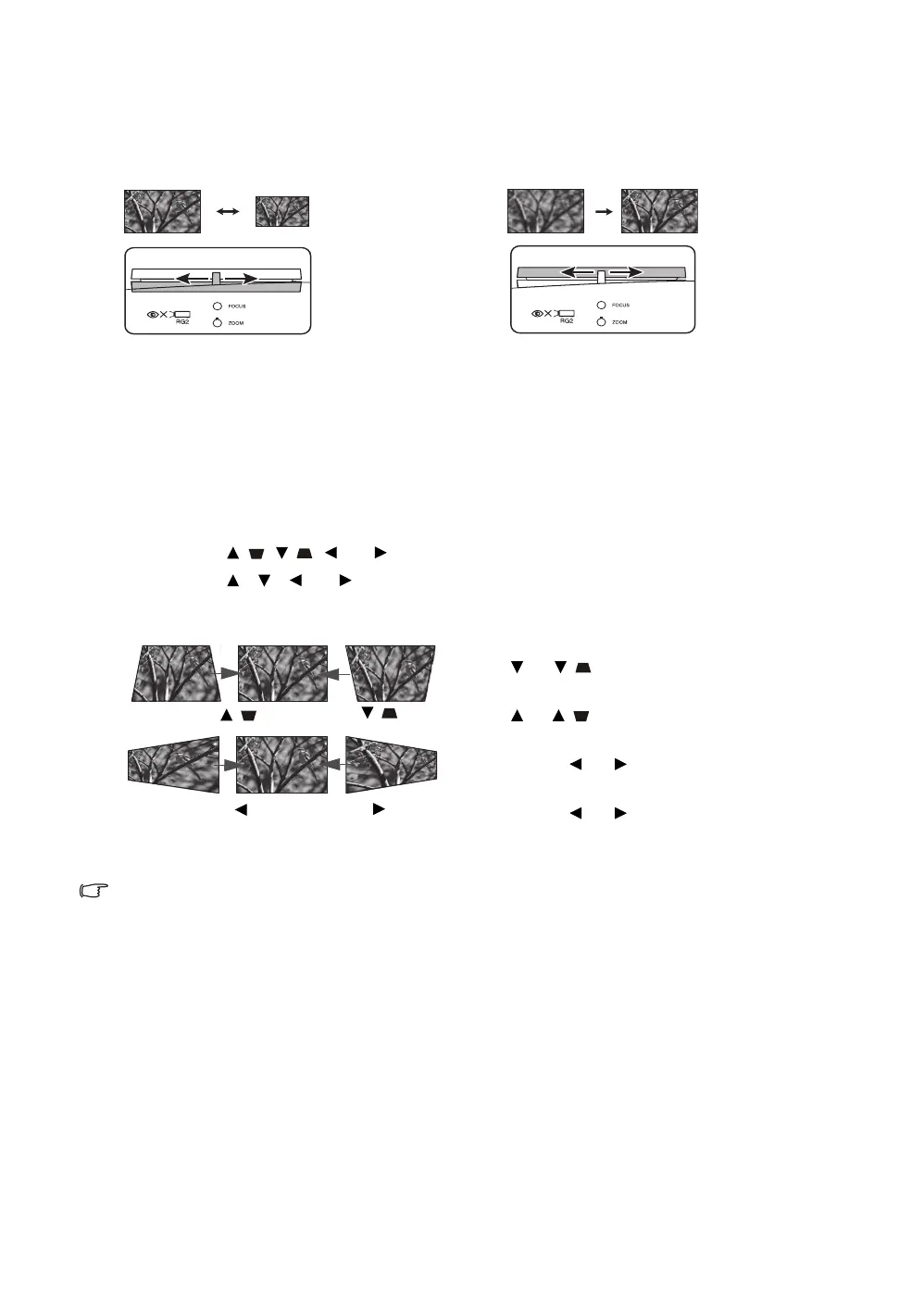
Correcting keystone
Keystoning refers to the situation where the projected image becomes a trapezoid due to angled
projection. It occurs when the projector is not perpendicular to the screen.
Besides adjusting the height of the projector, you may correct this manually by following the
instructions below:
1. Do one of the following steps to display the Keystone window:
• Press / , / , , or on the projector.
• Press /, /, , or on the remote control.
2. The illustrations below show how to correct keystone distortion:
Depending on your installation conditions, keystone correction may not be possible. In such a case, if
possible, reset the installation conditions and project straight to the screen.
To adjust the projected picture size, turn the
zoom ring on the projector.
To sharpen the picture, rotate the focus ring
on the projector.
• To correct keystoning at the bottom of the image,
use or / .
• To correct keystoning at the top of the image,
use or / .
• To correct keystoning at the right side of the
image, use or .
• To correct keystoning at the left side of the
image, use or .
When done, press BACK to save your changes and
exit.
Press / .
Press / .
Press .
Press .



 To Next Page
 Loading...