FEATURES menu
37
ENGLISH
PD-42/35B50BU/BJ / LCT1617-001A-U / English (EK)
REFRESH
When burn-in is minimal, burn-in and
residual images may be softened with the
REFRESH function.
1 Choose REFRESH
2 Press the a button
Snow appears on the screen. Leave the
TV in this condition for a few hours.
3 After a few hours, press the TV,
number buttons, or # button
Press the A button for the TV.
The REFRESH function has no effect if used
only for a short time.
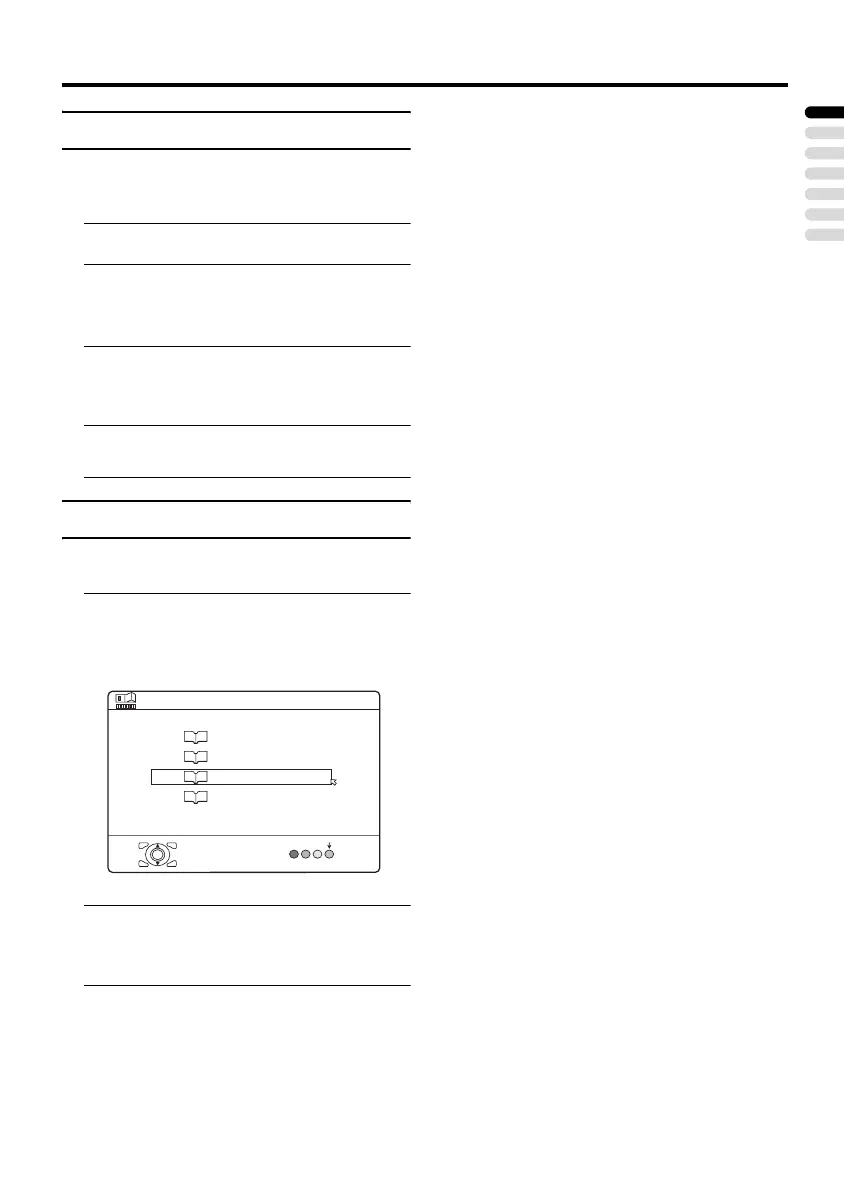
FAVOURITE SETTING
Chose when deleting the favourite channels
registered in the buttons 1 to 4.
1 Choose FAVOURITE SETTING,
then press the a or 3 button
The FAVOURITE SETTING menu
appears.
2 Press the 6 buttons and chose
the favourite channel that you want
to delete
3 Press the blue button
The chosen favourite channel and set
contents are deleted.
D0112-EN
FAVOURITE SETTING
OK
RESET
1
PR
07
2
PR
01
3
PR 01
4
PR
01
PD-42&35B50BUBJ(EK)_Eng.book Page 37 Monday, March 29, 2004 11:32 AM


 To Next Page