42
SET UP menu
PD-42/35B50BU/BJ / LCT1617-001A-U / English (EK)
4 Press the green or red button to
search for a TV channel
Scanning stops when the TV finds a TV
channel. Then the TV channel is
displayed.
5 Press the green or red button
repeatedly until the TV channel you
want appears
If the TV channel reception is poor:
Press the blue or yellow button to fine-
tune the TV channel.
6 Press the a button and register
the TV channel to a Programme
number (PR)
The normal EDIT menu is resumed.
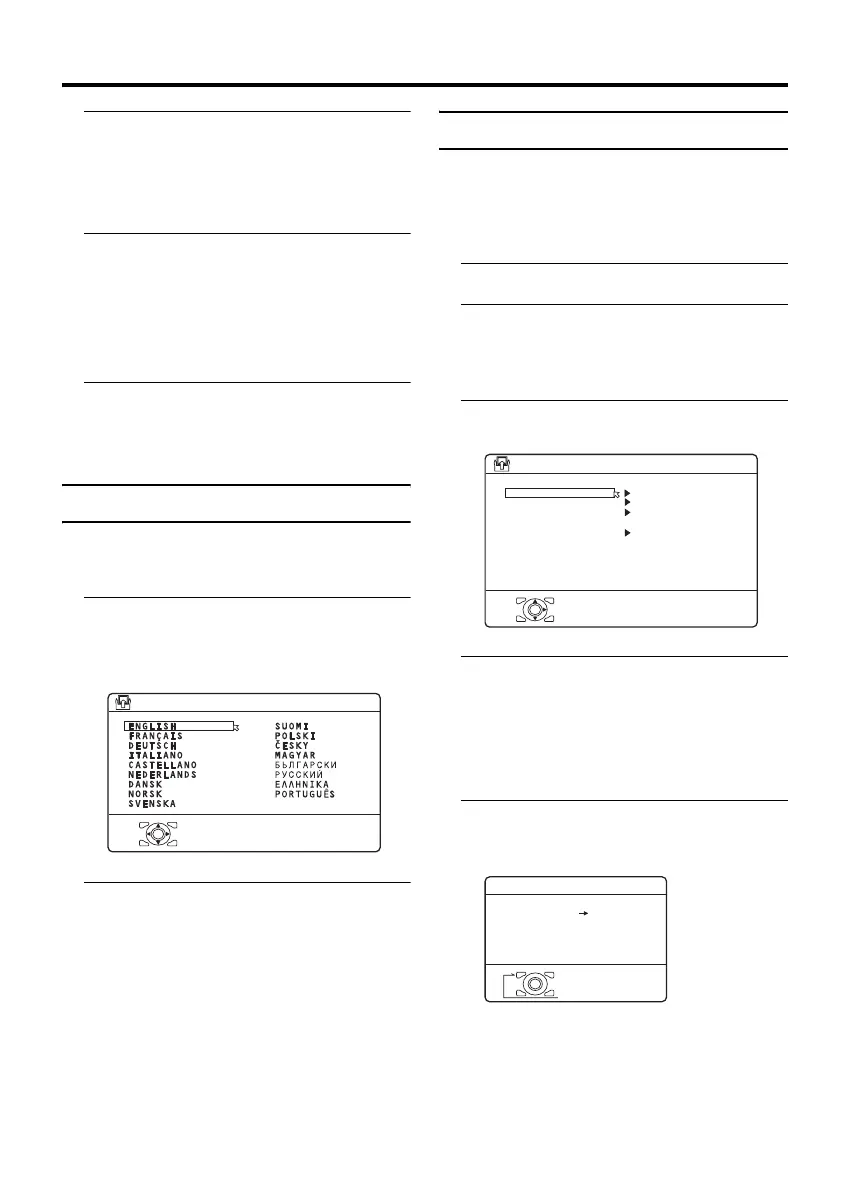
LANGUAGE
The LANGUAGE setting which was
performed in the “Initial settings” (page 9)
can be changed.
1 Choose LANGUAGE, then press
the a or 3 button
A sub-menu of the LANGUAGE function
appears.
2 Press the 5 and 6 buttons to
choose a language. Then press the
a button
DECODER (EXT-2)
If you have a decoder connected to a T-V
LINK compatible VCR, which in turn is
connected to the EXT-2 terminal, use the
DECODER (EXT-2) function to unscramble
the scrambled TV channels.
1 Turn on the decoder power
2 Display the scrambled TV channel
on the TV
Even if the decoder is working, a
scrambled picture appears.
3 Display the SET UP menu and
choose DECODER (EXT-2)
4 Press the 5 buttons to choose
ON
An unscrambled picture appears.
To cancel the DECODER (EXT-2)
function:
Press the 5 buttons to choose OFF.
5 Press the a button to complete
the setting
The T-V LINK menu appears.
You can send the programme numbers
data to a VCR with the T-V LINK
function.
D0002-EN
> LANGUAGE
OK
D0029-EN
SET UP
AUTO PROGRAM
EDIT/MANUAL
LANGUAGE
DECODER(EXT-2)
EXT SETTING
PICTURE SHIFT
OK
ON
OFF
D0005-EN
DOWNLOAD TV VCR
T-V LINK
OK
EXIT
PD-42&35B50BUBJ(EK)_Eng.book Page 42 Monday, March 29, 2004 11:32 AM



 To Next Page